

How to Create Digital Raffle Tickets in Minutes (Free Tool)
 Written byAshish ChandraLast updatedAugust 19, 2026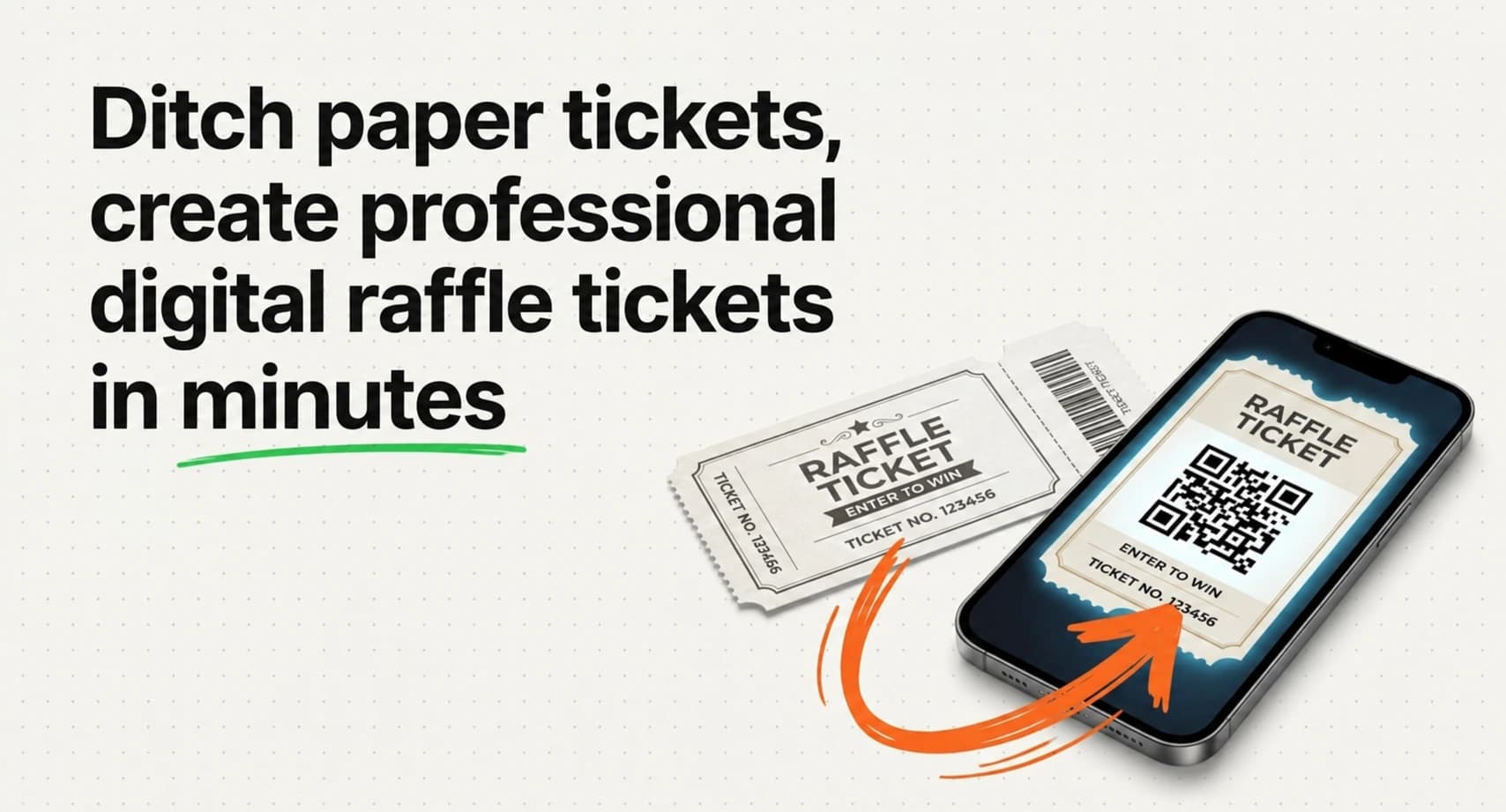
Key Takeaways: Digital raffle tickets are numbered tickets shared as PDFs, images, or QR-code passes instead of paper rolls. They save money, look more professional, and remove the hassle of manual ticket design. Every raffle ticket should include a ticket portion, a matching stub, a unique ID, and complete event details. For in-person draws, use Ticket Generator's free raffle ticket maker . For paid online raffles, the full platform manages registration, payments, and QR-code validation in one place.
Setting up a raffle used to mean ordering pre-numbered paper rolls from an office supply store. Or worse, hand-cutting tickets from a printed page. Today, most organizers skip both. They go digital.
Digital raffle tickets are simply numbered raffle tickets created in digital form. They live as PDFs you print, or as QR-code passes you send straight to a phone. Either way, you skip the trip to the store and the design-software learning curve.
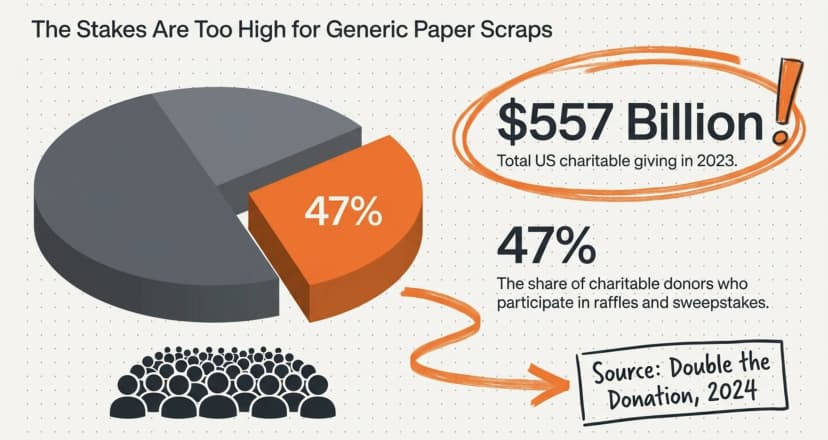
Did You Know? 47% of charitable donors participate in raffles and sweepstakes, contributing to the $557 billion Americans gave to charity in 2023. Source: Double the Donation , 2024 report.
That's a lot of raffle tickets changing hands every year and a strong reason to make yours look professional without blowing the fundraiser's budget on a designer.
In this guide, I’ll cover what counts as one, what to include, how to create digital raffle tickets in minutes with a free tool, and when to move up to a full ticketing platform with QR validation and online payments.
A. What are digital raffle tickets?
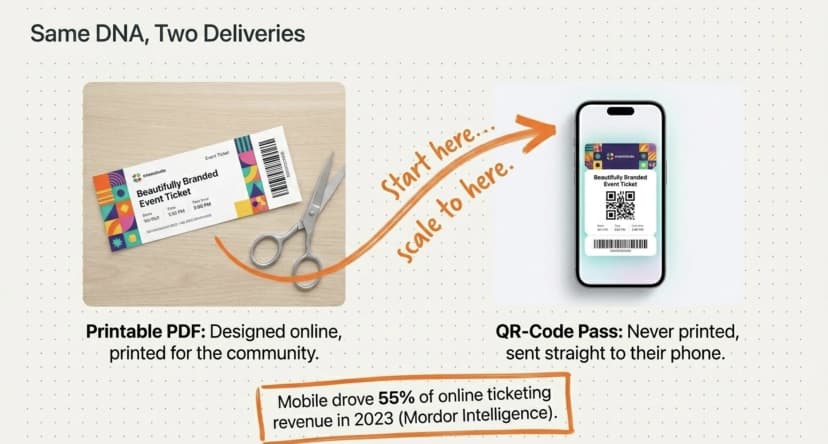
Digital raffle tickets are numbered raffle tickets created, stored, or delivered in digital form. Unlike pre-printed paper rolls, they exist as PDFs, images, or QR-code passes, so you can customize, duplicate, and distribute them without a print shop in between.
There are two common types:
- Printable digital tickets. PDF files you design online, download, and print on cardstock. Each one has a stub and a unique number. Perfect for in-person draws like school fairs, church fundraisers, and community bazaars.
- Fully digital QR-code tickets. These never need to be printed. They're sent via email, SMS, or WhatsApp as a QR Code, then scanned at the door or used to enter the draw online.
Most small fundraisers use the printable kind. Larger paid raffles or hybrid events lean toward QR-based tickets for entry tracking and fraud prevention. Either format counts as "digital"; the difference is whether the buyer ends up holding paper or a phone.
B. Why are organizers switching to digital raffle tickets?
The short answer: going digital is faster, cheaper, and easier to track. Paper rolls cost money, can't be branded, and leave no record of who has what number.
Here's what changes when you make the switch:
- Zero printing waste. Print only what you need, when you need it.
- Full branding control. Add your logo, event name, and prize details in seconds, exactly the kind of polish custom raffle tickets are built for.
- Easy numbering. Each ticket gets a unique ID that matches its stub.
- Faster setup. A 200-ticket batch takes minutes, not days.
- Better records. A master file means you can reprint, audit, or share with volunteers.
Did You Know? The mobile segment held 55% of the revenue share in online event ticketing in 2023. Source: Mordor Intelligence , Online Event Ticketing Market Report.
Buyers are already used to getting tickets on their phones. These tickets fit that same pattern, especially when your raffle is part of a larger event.
C. What should a good raffle ticket include?
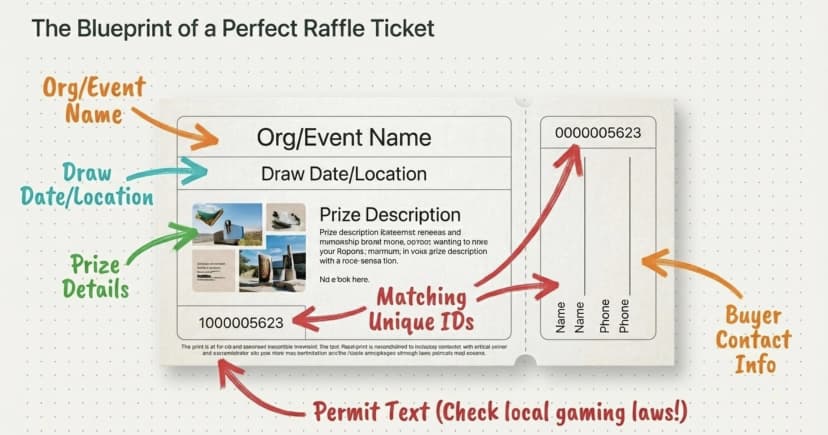
A clear raffle ticket has the same essential fields whether it's printed on cardstock or delivered as a QR Code. Miss one, and you'll get phone calls on draw day.
Every ticket should include:
- Organization or event name — so buyers know who's running the draw
- Draw date, time, and location — when and where winners get picked
- Prize details — what's actually on offer
- A unique ticket number — appearing on both the ticket and the stub
- Buyer details on the stub — name and phone or email, at a minimum
- Permit or legal text — if your region requires it (more on that below)
Keep the design simple. The ticket number and draw date are the most important elements on the page. They should be the easiest things to read at a glance. Anything else is decoration. For a deeper walkthrough of layout, hierarchy, and fonts, see our guide on how to design a raffle ticket.
Pro Tip: Ticket Generator's free raffle ticket maker includes a built-in "Ticket ID" field that automatically prints on both the ticket and the matching stub. No more writing numbers by hand or dealing with mismatched pairs during the draw.
D. How do you create these tickets in minutes?
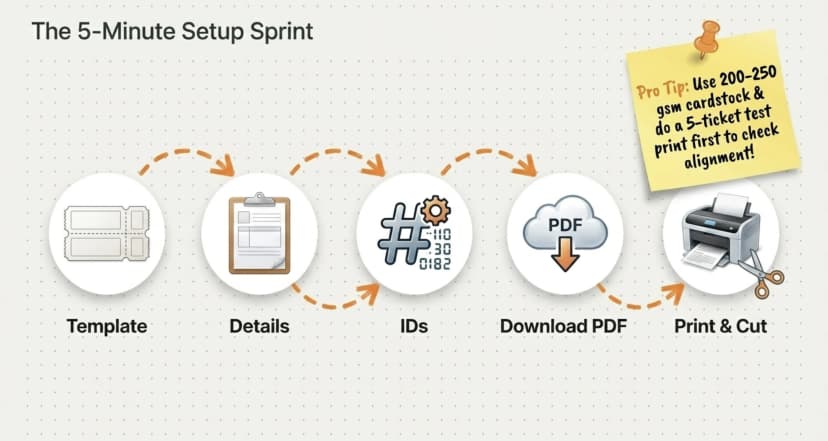
You can create your own tickets in under 10 minutes using the free raffle ticket generator. For a deeper walkthrough, our complete guide to the free raffle ticket generator covers numbering, printing, and legal checks in detail. Here's the short version:
- Go to the tool. Visit the free raffle ticket generator.
- Choose a raffle ticket template. Browse the ready-to-use designs with a ticket and matching stub layout. Pick one that fits your event's theme or purpose.
- Add your event details. Enter your organization name, draw date, venue, and prize details. You can also include a disclaimer or permit information if needed.
- Add a ticket number or ID. Each ticket should have a unique number that appears on both the ticket and the stub. Use the "Ticket ID" field to add it.
- Preview and download. Once you're happy with the design, download your print-ready PDF. You can then print, cut, and distribute the tickets.
- Print and prepare. Use thicker paper (200–250 gsm) for better durability. Lightly score the separator line for easy tear-off between ticket and stub.
Pro Tip: Do a quick test print with 5–10 tickets before printing the full batch. It helps catch alignment or formatting issues early and is far cheaper than reprinting 500 tickets later.
Want a more detailed look at the end-to-end process, including paper choice, perforation tips, and sales tracking? Our standalone guide on how to make raffle tickets walks through every step a first-time organizer would need.
Skip the design hassle. Use Ticket Generator's free raffle ticket maker to design, number, and download print-ready tickets in minutes, no signup required.
E. Digital vs paper raffle tickets: which one wins?
For most fundraisers, digital is the better default, but pre-printed paper rolls still have a place in a few cases. Here's a side-by-side look:
|
Feature |
Digital Raffle Tickets |
Pre-printed Paper Rolls |
|---|---|---|
|
Cost |
Free design; you only pay for paper if printing |
$10–$30 per roll + shipping |
|
Setup time |
5–10 minutes |
2–5 days (order + delivery) |
|
Branding |
Full control (logo, colors, event details) |
None, generic stock design |
|
Numbering |
Unique IDs auto-printed on ticket and stub |
Pre-numbered, can't customize |
|
Customization |
Add prize, permit text, contact info |
Not possible |
|
Best for |
School, community, and nonprofit fundraisers |
Quick, small draws where branding doesn't matter |
For most organizers, digital wins on flexibility alone. You can update the prize, change the draw date, or fix a typo without ordering a fresh batch, and your tickets actually look like your event, not a generic stock template.
F. When should you use QR-code tickets instead?
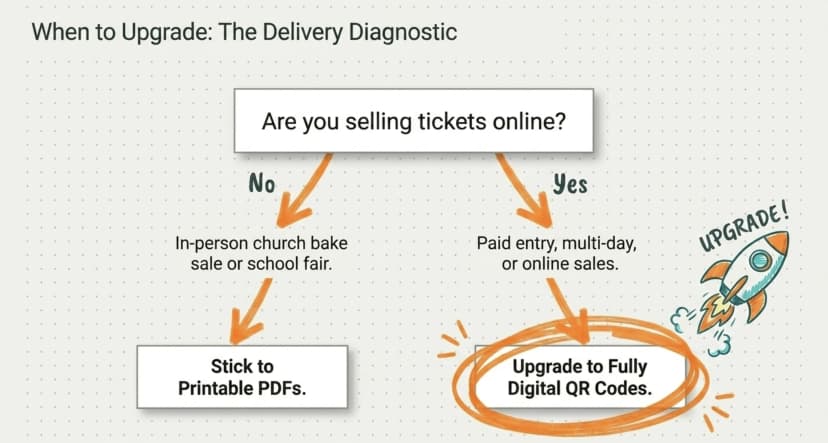
Switch to QR-code tickets when your raffle is part of a bigger event with paid online entries. QR tickets make sense when:
- You're selling tickets online and need to deliver them by email, SMS, or WhatsApp
- Your raffle is tied to an event with paid entry (concert, gala, conference, fair)
- You need to verify winners at the venue or block duplicate entries
- You're running a multi-day or recurring raffle with hundreds of participants
Printable tickets are perfect for the church bake sale. They're not great for a city-wide fundraiser with 5,000 participants and online sales. That's where a full digital ticketing setup pays off.
If you're still weighing your options for the broader event, our guide on raffle vs giveaway breaks down which format fits which goal.
G. How does Ticket Generator help with digital raffles?
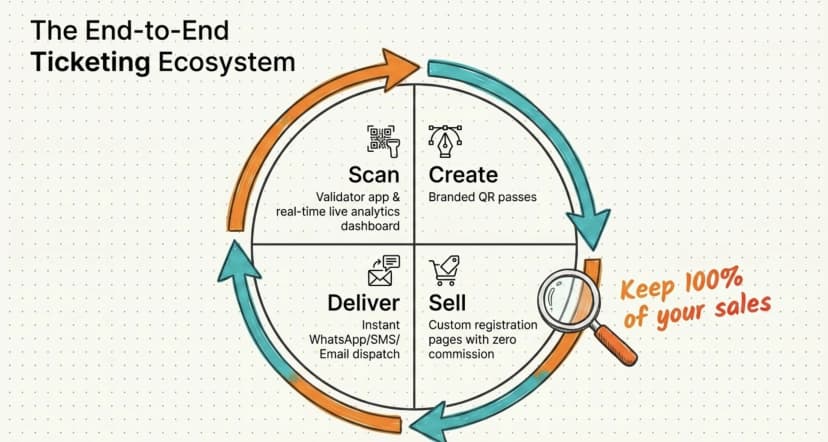
Ticket Generator is built for organizers who want one tool for everything, from making the ticket to scanning it at the door.
The free raffle ticket maker is the entry point. The full platform takes over when your event grows beyond a paper stub draw.
Here's what you get beyond the free tool:
1. Branded tickets with unique QR Codes
Every ticket carries a unique QR Code and a unique Ticket ID. Duplicate scans get flagged instantly, no more wondering if someone slipped in on a screenshot. Designs stay fully on-brand, with no platform watermarks on the ticket itself.
2. Online sales with zero commission
Connect your own Stripe, PayPal, or Razorpay account and collect payments directly. Ticket Generator takes no cut on ticket sales. Instead, you use predictable, credit-based pricing (one credit per ticket generated). No subscriptions, no per-event fees.
3. Email, SMS, and WhatsApp delivery
Send up to 1,000 tickets per batch. Buyers get their ticket and QR Code within seconds of paying. Lost ticket? Resend it from the dashboard in two clicks.
4. Branded event and registration pages
Build a full registration page in minutes, no web design needed. Custom fields, payment collection, approval workflows, registration limits, and waitlists all live in one place.
5. Real-time validation with the Ticket Validator app
Scan tickets at the venue using any smartphone, iOS or Android. Multiple gates? Multiple devices scan at once, all synced. Results show as Valid, Invalid, Duplicate, or Expired in real time.
6. Live dashboard and analytics
See ticket sales, attendance rates, and unauthorized entry attempts as they happen. Export everything as Excel or PDF when the raffle wraps.
Real Example: Heartland Emmys, a U.S. television nonprofit, has run 10+ events through Ticket Generator across 4 consecutive years, issuing 3,433+ branded tickets with QR-based check-in. Elida Martinez, who manages event ticketing at Antioch University, another long-time Ticket Generator user, explains why teams continue using the platform: “The ability to check in using a QR Code, and the platform to scan tickets on the phone.” That kind of recurring, branded workflow is nearly impossible with traditional paper rolls.
Conclusion
Digital raffle tickets save time, money, and effort without sacrificing how a proper fundraiser ticket looks and feels. For an in-person draw, a printable PDF with numbered stubs is all you need, and you can make one in under 10 minutes with a free tool.
For bigger raffles with online entries, paid participation, or venue check-ins, you'll want true digital tickets with QR Codes, online payments, and a validator app. Both options live under the same roof at Ticket Generator, so you can start small and scale up the moment your event outgrows paper.
The point isn't paper vs pixel. It's running a smooth, transparent draw that your participants actually trust, and digital tools make that easier on both sides of the table.
Create your raffle tickets in minutes with Ticket Generator's free raffle ticket maker and scale up to the full platform when your event needs online sales, QR validation, and real-time tracking.
FAQs: Digital Raffle Tickets
1. Are digital raffle tickets legal?
Yes, they are legal in most regions, but raffles themselves are often regulated. Many U.S. states, the U.K., Canada, and Australia require a permit or license for paid raffles, especially fundraising ones. The format (digital vs paper) doesn't change the rules; always check your local gaming or charitable fundraising laws before you launch.
2. Can I sell digital raffle tickets online?
Yes. Ticket Generator's full platform lets you build a registration page, connect your own payment gateway, and sell tickets with zero commission. Buyers receive their ticket and QR Code by email, SMS, or WhatsApp within seconds of paying.
3. How do I number raffle tickets?
Most ticket generators include a "Ticket ID" field that prints on both the ticket and the stub. For small batches, edit the ID before each download. For larger batches, prepare a numbered list in a spreadsheet and update each page before printing. Our guide on how to make raffle tickets with numbers covers spreadsheet-based numbering in detail. With Ticket Generator's full platform, unique IDs are generated automatically.
4. Do raffle tickets need QR Codes?
Not always. Printable tickets for in-person draws don't need QR Codes. You collect paper stubs in a box and draw winners by hand. QR Codes matter when you're selling tickets online or validating entries at a venue.
5. Are Ticket Generator's free raffle tickets really free?
Yes. The free raffle ticket maker is 100% free to use. Tickets carry a small Ticket Generator watermark, which is how the tool stays free. You get a print-ready PDF with stubs, numbering, and event details at no cost. For watermark-free tickets and online sales, you'll need the full Ticket Generator platform with credit-based pricing.
6. What paper should I use for printing?
Use 200–250 gsm cardstock for the best result. It feels premium and is durable enough to handle being torn into a ticket and stub. Standard printer paper works in a pinch, but it tears easily and looks cheap.
About the author
Content Marketer at Ticket Generator
Ashish Chandra has spent 5+ years writing about event technology, covering topics such as ticket design, QR check-ins, attendee management, and event marketing strategy. As the Content Lead at Ticket Generator, Ashish has analyzed hundreds of real-world event workflows and ticketing setups, helping organizers across industries use QR-based tickets, event landing pages, and smarter ticketing systems to run smoother, better-attended events. His writing is shaped by real user needs and the questions organizers ask most often: How do I sell more tickets? How do I avoid chaos at the door? How do I make my next event better than my last? When he steps away from the screen, you'll likely find him hiking a quiet trail or tending his plants- his preferred way to reset.
Latest posts
Check out our latest articles on the blog
 12 min read
Email Marketing for Events and Webinars: What to Send, When to Send It, and How to Automate It
A step-by-step playbook for email marketing for events and webinars. Learn what to send, when to send it, and how to automate every email for in person and virtual events.
Ashish Chandra
18 Oct 2026
 10 min read
Halloween Masquerade Ball: How to Host a Night of Masks and Mystery
From Venetian-inspired masks to QR-coded entry, here is your complete guide to planning a Halloween masquerade ball your guests will talk about for years.
Ashish Chandra
18 Oct 2026
 9 min read
Ticketmaster Reserved Seating: How It Works and a Better Fit for Smaller Events
Ticketmaster reserved seating works well for arenas. If you run a theatre, gala, or mid-size show, see how it works, what it costs, and how to switch.
Ashish Chandra
16 Oct 2026