

How to make raffle tickets: Quick Professional designs | Ticket Generator
 Written byJayanshu BadlaniLast updatedJuly 1, 2026
.webp&w=3840&q=75)
Key Takeaways: Want to make raffle tickets that look great? It's easier than you think. First, plan what information needs to appear on each ticket. Use Excel to generate sequential numbers so every ticket has its own unique ID. You can also use online tools like Ticket Generator's free raffle ticket maker with ready-made templates to speed things up. Print on thicker paper so tickets feel sturdy and professional. Keep track of sold ticket numbers carefully, and consider bundle pricing like 3 tickets for $10 to increase sales. Avoid common mistakes such as missing numbers, duplicate IDs, or hard-to-read text. With a few simple steps, you can create professional-looking raffle tickets without spending much money.
Have you ever been put in charge of a fundraiser or community event and thought, "How am I going to make all these raffle tickets?" You're not alone. Most organizers panic at the thought of designing, numbering, and printing professional-looking tickets without paying a designer.
Here's the good news: for an in-person raffle, you don't need an account, an event page, or a paid platform. You need a free tool that gives you a print-ready PDF with numbered tickets and matching stubs. That's where the free raffle ticket maker comes in. It's free, requires no signup, and the download is print-ready in minutes.
Did You Know? The global market for charity-fundraising platforms was valued at approximately USD 1.09 billion in 2024 and is projected to reach nearly USD 2.51 billion by 2033. Source: Business Research Insights .
This guide walks through everything you need to know about how to make raffle tickets from start to finish. Whether you're planning a school fundraiser, church event, or community gathering, you'll learn how to design, number, print, and distribute tickets that will impress everyone.
By the time you finish reading, you'll have all the skills to create raffle tickets that not only look professional but also help your event run smoothly. Let's get started!
How to plan your raffle ticket strategy?
Before you jump into designing your raffle tickets, take a few minutes to plan. This small step can save you from big headaches later when you create raffle tickets for your event.
First, think about your event. Is it a school fundraiser? A charity dinner? A community festival? Your event type will guide many decisions as you make raffle tickets that appeal to your audience.
Next, get clear on your goals. How much money do you hope to raise? How many raffle tickets do you think you'll sell? Setting a target helps you decide how many tickets to make and how to price them.
Don't forget about your audience. Are they parents, business professionals, or community members? Their preferences should shape your ticket design and pricing when you create printable raffle tickets for your event.
Now, make a list of what needs to go on your tickets. Every good raffle ticket should include:
- Event name and date
- Your organization's name
- Ticket category
- Drawing date and location
- A unique ticket number
Having this information ready before you start designing will make the whole process much easier. Learning how to make raffle tickets with proper planning ensures nothing important gets left out.
Pro Tip: Research similar events in your area to benchmark your pricing. Being slightly below market rate often increases overall sales volume.
How to design your raffle tickets?
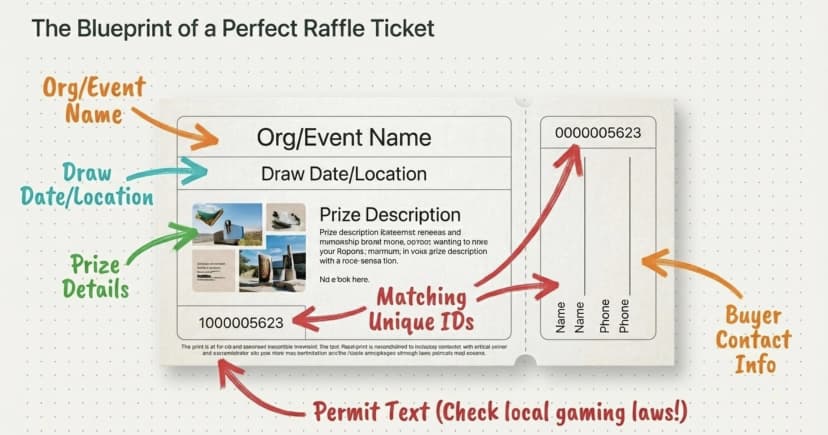
Good design makes your raffle tickets both attractive and functional. When you create raffle tickets that look professional, you don't need to be a graphic designer to get results people will love.
Learning how to create raffle tickets starts with keeping your layout simple and clean. Avoid the temptation to cram too much text onto the ticket. White space (empty areas) helps make your information easier to read when you make raffle tickets for your event.
Choose colors that match your organization or event theme. Using 2-3 colors is usually enough when you create raffle tickets. Too many colors can make your tickets look busy and unprofessional.
When it comes to fonts, less is more. Pick one font for headings and another for body text. Make sure both are easy to read, especially in smaller sizes. Stay away from fancy script fonts that might look pretty but are hard to read quickly when designing raffle tickets.
Make your ticket number stand out. This is probably the most important part of any raffle ticket. Try putting it in a larger size or a different color so it's easy to spot during the drawing. This is crucial when you make homemade raffle tickets with sequential numbering.
If your ticket has a tear-off stub, make sure the line between them is clear. Both parts should have the ticket number and enough information to make sense on their own. This is an important consideration when learning how to make raffle tickets with stubs.
Remember, the best raffle ticket design balances being eye-catching with being practical. A beautiful ticket that's missing key information won't serve you well on event day.
Tip: Add a subtle background pattern that doesn’t photocopy well. This simple trick provides basic protection against unauthorized duplication.
What tools do you need to create your raffle tickets?
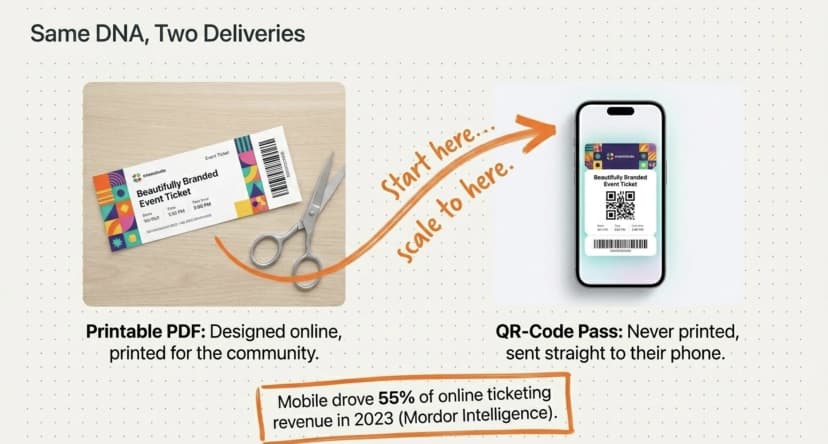
You have several options when it comes to tools for making raffle tickets. The right choice depends on whether you're running an in-person draw (which is in most cases) or a paid online raffle where buyers receive their tickets digitally.
For most fundraisers, an online ticket maker is the easiest path. Ticket Generator's free raffle ticket maker gives you ready-made raffle ticket templates with a ticket portion and a matching stub, plus an editable Ticket ID field, no signup, no payment, no learning curve. You design in the browser and download a print-ready PDF.
If you prefer more control, you can use common software you might already have to create raffle tickets:
- Google Docs is free and works well for basic ticket designs
- Canva offers more design options with professional-looking templates
- Many online platforms have pre-designed templates ready to customize
For numbering your tickets, spreadsheet programs like Microsoft Excel are excellent tools. They can quickly create number sequences that you can add to your raffle tickets. Many platforms handle the numbering automatically, but if you need to create your own sequence, most spreadsheet programs have a fill feature that makes this simple.
Did you know? Ticket Generator once generated 20,000 tickets for a single event, demonstrating its ability to handle large-scale ticket production when demand peaks.
Quality paper is essential for professional-looking tickets. Card stock between 65–110 lb weight works best for raffle tickets. If you're making tickets with tear-off stubs, perforated paper makes separation much easier and gives a clean, professional look.
Pro Tip: Save your ticket design as a template for future events. This saves time when you need to create similar tickets later.
How to create custom raffle tickets? Step-by-step
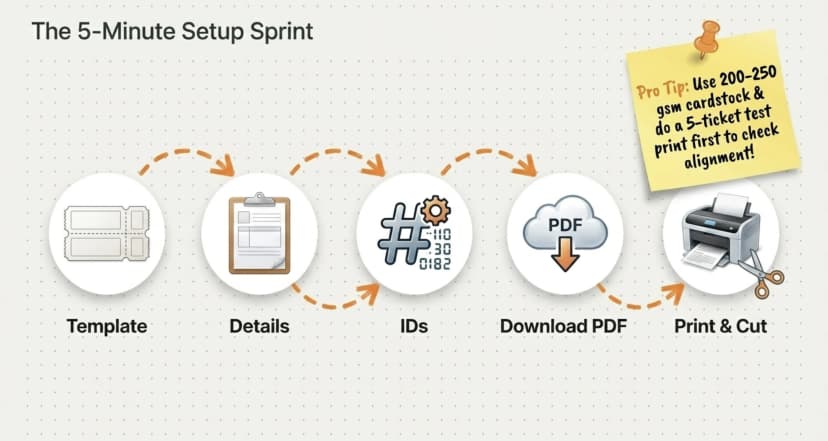
Now, let me walk you through the end-to-end process of creating raffle tickets. For this guide, I’ll be using a reliable free raffle ticket maker to create print-ready raffle tickets in under 10 minutes (no signup, no payment, no event setup).
If you need a full-fledged ticketing system for paid online sales or QR validation, jump to Section E.
Step 1: Go to the free raffle ticket maker
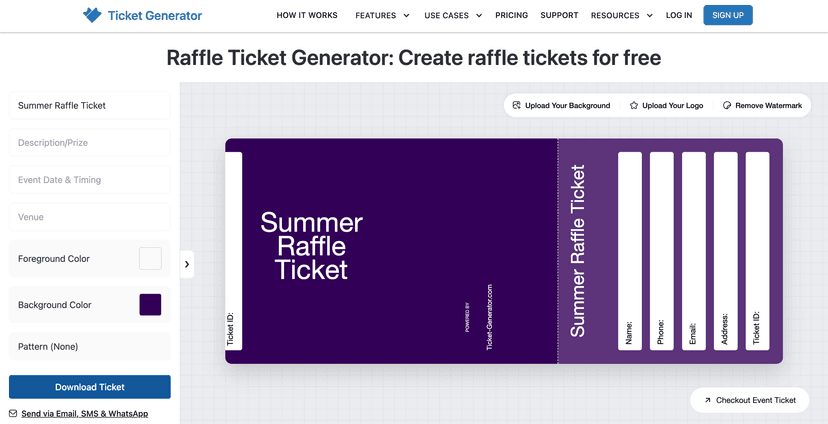
Go to ticket-generator.com/ticket-templates/raffle-tickets. The tool opens directly in your browser (no account or login required). You'll see a gallery of raffle ticket templates with a ticket portion and a matching stub layout.
Step 2: Choose a template that fits your event
Browse the ready-made templates. Pick one that fits your event's theme, bright and playful for a school fundraiser, elegant for a charity gala, vintage for a community festival. You can change colors, fonts, and the background image without starting from scratch.
Step 3: Add your event details
Enter your organization name, the draw date, the venue, and the prize info directly into the editor. If your region requires a permit number or legal disclaimer on the ticket, add that too, there's a dedicated text block for fine print.
Getting started with a ticket maker website is straightforward:
- Visit the online platform of your choice
- Create an account using your email or social media login
- Look for the dashboard where you'll manage your raffle tickets
- Many sites offer free trials or basic plans, perfect for smaller raffles
Take a few minutes to explore the platform before diving in.
Step 4: Add a unique ticket number (or ID range)
Every raffle ticket needs a unique number on both the ticket and the stub. Use the "Ticket ID" field. It appears on both halves automatically, so no mismatched pairs at draw time. For a single batch with sequential numbers, edit the ID before each download (e.g., 001, 002, 003…). For 50+ tickets with sequential numbering done in one go, see the next section on 'When to upgrate to a full tool?'.
Step 5: Preview and download
Hit preview to see what the printed sheet will look like. Check the spelling on the prize description, confirm the draw date, and make sure the Ticket ID is large and readable. When you're happy, download the print-ready PDF. The tool watermarks a small Ticket Generator credit on the corner — that's how it stays free. Watermark-free tickets are part of the paid platform.
Step 6: Print, cut, and prepare for sale
Print on 200–250 gsm card stock (65–110 lb in US weight) for a sturdy feel. Score the separator line between ticket and stub with a ruler and the back of a knife before tearing. It gives a clean, professional edge. Test-print 5–10 tickets first to check alignment before running the full batch.
Pro Tip: Save your ticket design as a template for future events. Most platforms allow you to duplicate and modify past designs easily.
When should you upgrade to the full Ticket Generator platform?
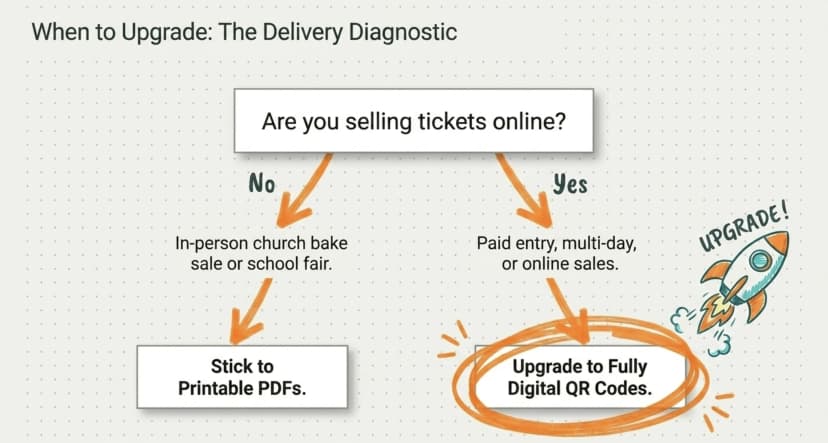
The free raffle ticket maker is the right tool for most fundraisers. But if your raffle is bigger, online, or part of a venue event, the full Ticket Generator platform handles things the free tool can't. Use it when at least one of these applies:
You're selling raffle tickets online and need digital delivery. The full platform lets you build a registration page, connect your own Stripe, PayPal, or Razorpay account, and email/SMS/WhatsApp tickets the moment a buyer pays. Zero commission on sales — you keep 100% of ticket revenue.
You need to bulk-generate 50 or more numbered tickets from a spreadsheet. Upload an Excel file with names, emails, and ticket numbers, and the platform generates a personalized ticket per row in one click.
You're validating tickets at a venue and need to block duplicate scans. The Ticket Validator app (iOS, Android, and web) scans the QR Code on each ticket and shows Valid, Invalid, Duplicate, or Expired in real time. Multiple gates can scan simultaneously, all synced.
You want a live sales dashboard. See ticket sales, attendance rates, and unauthorized entry attempts as they happen. Export everything as Excel or PDF when the raffle wraps.
Pricing is credit-based, one credit per ticket generated. No subscriptions, no per-event fees. You get 10 free credits on signup to try it before paying anything.
If any of those four cases match your raffle: see the full Ticket Generator platform. Otherwise, the free raffle ticket maker is all you need.
How to avoid common raffle ticket mistakes?
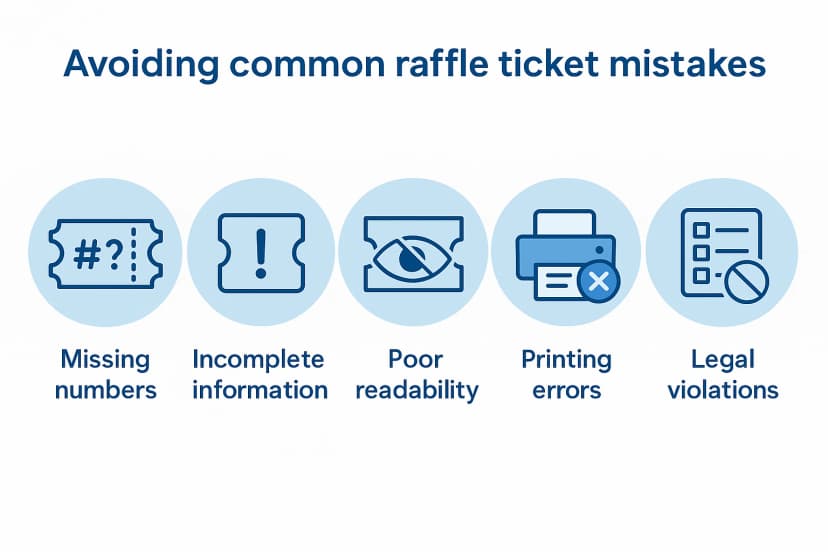
Even experienced event planners make mistakes when making raffle tickets. Here are some common pitfalls to avoid when you create raffle tickets for your next event.
Missing or duplicate numbers are perhaps the biggest problem when creating raffle tickets. Double-check your numbering system before printing.
Keep records of which numbers you've assigned to avoid accidental duplicates. How to make raffle tickets with proper numbering starts with careful planning.
Forgetting essential information happens more often than you'd think when making raffle tickets. Use the checklist we created in the planning section to make sure you include everything people need to know.
Complete information is crucial when creating raffle tickets for any event.
Poor readability ruins otherwise good raffle tickets. Make sure your font sizes are large enough (at least 10pt for most text, larger for important details like the ticket number). Learning how to create raffle tickets that are easy to read means considering your audience's needs.
Printing too many or too few tickets can cause problems. Estimate carefully how many raffle tickets you'll need and print in batches so you don't waste materials if you don't sell them all. Careful planning when making raffle tickets will save you time and money.
Ignoring legal requirements can create serious issues. Some places have laws about raffles, including what information must appear on tickets.
Check your local regulations before finalizing your design. This is an essential consideration when creating raffle tickets.
Poor quality printing makes your organization look unprofessional. Always print a test batch first and make adjustments before committing to your full run of raffle tickets.
Distributing tickets without a tracking system leads to confusion. Create a simple spreadsheet to record which ticket numbers have been distributed to which sellers or buyers. Staying organized is key when you make raffle tickets for fundraisers.
By being aware of these common mistakes, you can avoid them and ensure your raffle tickets contribute to a successful event rather than causing headaches.
Tip: Triple-check your tickets for accuracy before printing the full batch. Small errors can cause big problems on event day.
Before we end: Here's some real life examples
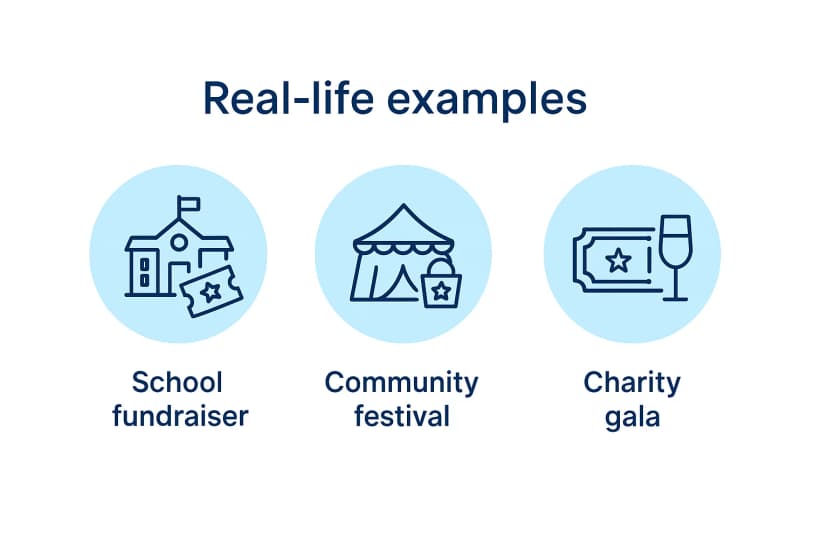
Sometimes the best way to learn how to create raffle tickets is to see real-world success stories. Here are three examples of organizations that created effective tickets for different types of events.
1. School fundraiser success
A local elementary school needed to raise money for new playground equipment. They created bright, colorful raffle tickets with the school mascot and used simple numbering (1-1000). Understanding how to make raffle tickets for their audience was key to their success.
What worked well:
- Affordable pricing ($2 each or 6 for $10)
- Kid-friendly design that appealed to parents
- Tracking sales by classroom to create friendly competition
Their raffle prizes included playground equipment pieces, gift cards to local toy stores, and a grand prize of a family adventure park package.
Their approach to creating raffle tickets raised over $4,000 with minimal costs, providing most of the needed playground funding.
2. Community festival approach
A neighborhood association created raffle tickets for their annual summer festival. They designed tickets with tear-off stubs and printed them on bright yellow card stock. This is a great example of how to create raffle tickets that stand out.
What worked well:
- Using colored paper that was easy to spot
- Including map locations for prize pickup
- Selling tickets in advance and at the event
- Having volunteers check tickets against a master list
One of their most successful raffle ideas was creating themed prize baskets representing different local shops and restaurants. The festival sold all 2,000 raffle tickets and created tremendous community engagement. Their strategy for making raffle tickets paid off with record participation.
3. Charity gala example
A hospital foundation took a more upscale approach for its annual fundraiser. They designed elegant raffle tickets matching their black-tie event theme. This shows how creating raffle tickets with the right look can enhance an event.
What worked well:
- Premium feel with gold foil accents
- Higher pricing ($25 each or 5 for $100)
- Using a prefix system (GALA-0001 to GALA-5000)
- Tracking sales through their donor database
Their luxury raffle prizes included spa packages, weekend getaways, and high-end electronics, perfectly matching their audience's interests. These premium raffle ideas attracted their target demographic of wealthy donors.
Their approach not only raised funds but also created a sense of exclusivity that matched their event. They understood how to make raffle tickets that appealed to their high-end audience.
These examples show how raffle tickets can be adapted to different events while still following the core principles of good design, clear information, and proper numbering.
By matching your raffle prizes to your audience and incorporating creative raffle ideas, you'll maximize participation and fundraising results.
Tip: Create separate digital folders for each event's ticket files to stay organized and make reusing designs easier for future raffles.
Conclusion
Making raffle tickets doesn't have to be complicated. With the right approach, you can create raffle tickets that help your event run smoothly and maximize fundraising.
Remember these key points about how to make raffle tickets:
- Plan carefully and include all essential information
- Use clear numbering and quality paper
- Keep your design clean and readable
- Track sales diligently
For an in-person raffle (school fundraiser, church event, community festival) go to the free raffle ticket maker, design your ticket, add your numbering, and download the print-ready PDF. No signup. No payment.
Only step up to the full Ticket Generator platform when you actually need it: paid online ticket sales with zero commission, bulk generation from a spreadsheet, QR-based venue validation, or a live sales dashboard. Use the right tool for the size of your raffle.
QUICK LINKS: Open the free raffle ticket maker → · See the full platform for paid online raffles →
FAQs: How to make raffle tickets?
Here are answers to the questions people ask most often about making raffle tickets.
1. How many raffle tickets should I print?
For small community events, 500-1000 tickets are often enough. Larger fundraisers might need several thousand. It's better to print slightly more than you think you'll need rather than running out during sales.
2. Do raffle tickets need to be numbered consecutively?
Consecutive numbers make tracking easier and reduce confusion. You could use different ranges for different sellers (1-500, 501-1000, etc.) to track performance. Just ensure each ticket has a unique number.
3. Can I legally run a raffle?
Rules vary by location. Nonprofits can usually hold raffles more easily, but often need permits. Some areas require license applications and have specific rules about prizes and sales. Check your local laws before planning your event.
4. How do I prevent ticket fraud?
Use quality paper that's difficult to photocopy. Add security features like watermarks, QR Codes, or unique patterns. Keep records of which numbers are sold. Validate tickets at the drawing against your sales records.
5. Can I make raffle tickets without special software?
Yes. You can use common programs like Microsoft Word or Google Docs, but those mean a lot of manual layout work. The simpler option is Ticket Generator's free raffle ticket maker (no software install, no signup), ready-made raffle templates with a ticket-and-stub layout and an editable Ticket ID field. You get a print-ready PDF in your browser.
6. How should I price my raffle tickets?
Consider your audience, prize value, and fundraising goals. Common pricing includes $1-2 for small community raffles, $5-10 for medium events, and $20+ for high-value prizes. Bundle pricing (like 5 for $20) often increases total sales.
7. How should I price my raffle tickets?
Consider your audience, prize value, and fundraising goals. Common pricing includes $1-2 for small community raffles, $5-10 for medium events, and $20+ for high-value prizes. Bundle pricing (like 5 for $20) often increases total sales.
About the author
Content Marketer at Ticket Generator
Jayanshu writes for one reason: to help you create better events. He breaks down the complex world of event management—from ticketing and marketing to attendee engagement—into simple, step-by-step guides. Forget the theory; his articles are all about practical advice you can put into action immediately to make your next event a success.
Latest posts
Check out our latest articles on the blog
 12 min read
Email Marketing for Events and Webinars: What to Send, When to Send It, and How to Automate It
A step-by-step playbook for email marketing for events and webinars. Learn what to send, when to send it, and how to automate every email for in person and virtual events.
Ashish Chandra
18 Oct 2026
 10 min read
Halloween Masquerade Ball: How to Host a Night of Masks and Mystery
From Venetian-inspired masks to QR-coded entry, here is your complete guide to planning a Halloween masquerade ball your guests will talk about for years.
Ashish Chandra
18 Oct 2026
 9 min read
Ticketmaster Reserved Seating: How It Works and a Better Fit for Smaller Events
Ticketmaster reserved seating works well for arenas. If you run a theatre, gala, or mid-size show, see how it works, what it costs, and how to switch.
Ashish Chandra
16 Oct 2026