Learning how to use a QR code scanner for event entry is one of the fastest ways to reduce check-in lines, prevent fake tickets, and track attendance in real time.
Each ticket contains a unique QR code that a scanner app can validate in under a second, instantly marking it as valid, invalid, duplicate, or expired.
The same QR-based check-in workflow powers concerts, festivals, sports games, exhibitions, and amusement parks. Only the gate setup changes — the core validation flow stays the same.
Most events only require a smartphone, a validator app, and a stable internet connection. Dedicated scanning hardware is usually unnecessary.
Ticket Generator provides unique QR codes per ticket, a free
Ticket Validator app
for iOS and Android, multi-gate scanning, and re-entry support — already used across 30,000+ events in 100+ countries.
Long entry queues are the single fastest way to turn paying attendees into angry ones. And the problem is not just lines; fake tickets are now a multi-million-dollar industry.
Did You Know? UK fans lost £9.7 million to ticket fraud in 2024, a 47% increase year-over-year, across 9,826 reported cases. Source:
Action Fraud (UK)
(2025).
QR Code scanning solves both problems in one move. Each attendee carries a unique QR code on their phone or printout. You scan it at the gate, and your validator instantly confirms whether the ticket is real, unused, and within the event's date range.
The check-in time per attendee drops from 30–60 seconds (manual list lookup) to roughly 2 seconds.
In this guide, I’ll explain exactly how to use a QR Code scanner for event entry, what you need, the step-by-step setup, how it works at different event types (concerts, festivals, sports games, exhibitions, amusement parks), and what to do when something goes wrong at the gate.
Let’s begin!
Understanding QR Codes
QR Codes, short for Quick Response codes, are two-dimensional barcodes that can be scanned by smartphones and other mobile devices. They are used to store and transmit information, such as website URLs, contact information, and event details. QR codes are popular in event management because they can be used to streamline event entry, ticketing, and check-in processes.
When you scan a QR Code with your smartphone's camera, the code is decoded and the information it contains is displayed on your screen. This can include a website URL, a text message, or an event ticket. QR codes can be generated and printed on event tickets, posters, and other promotional materials.
Types of QR Codes for Events
There are several types of QR codes that can be used for events, including:
Ticket QR codes: These codes are generated for each ticket and contain unique information that identifies the ticket holder and the event they are attending. They can be scanned at the event entry to verify the ticket holder's identity and grant them access to the event.
Check-in QR codes: These codes are generated for each attendee and can be used to streamline the check-in process. Attendees can scan their QR code at the event entry to check themselves in, eliminating the need for manual registration and ticket validation.
Promotional QR codes: These codes can be used to promote the event and provide attendees with additional information, such as event schedules, speaker bios, and sponsor information.
QR codes can be customized to match the event's branding and design. They can also be used to track attendance, collect feedback, and analyze event data.
What is a QR code scanner for event entry, and how does it work?
A QR code scanner for event entry is software (usually a smartphone app or web app) that reads the unique QR code printed or displayed on each ticket and checks it against your event's ticket database in real time. If the code matches a valid, unused ticket, the attendee is let in.
Every secure event ticket carries two things: a unique QR code and a unique ticket ID. These are not random images — they are tied to the attendee record in your ticketing platform. The moment a scanner reads the QR code, the platform returns one of four results:
Valid — first scan, ticket is real, attendee enters
Duplicate — ticket already scanned at this event (someone is trying to reuse it)
Expired — ticket is for a past or future date, not today
This four-state check is what makes QR scanning more than just a faster manual list. It is an active fraud filter at the gate.
Pro Tip: Always issue unique QR codes per ticket.
Ticket Generator
automatically embeds both a unique QR code and a unique ticket ID into every ticket generated, even when you upload your own custom ticket design. That means duplicate detection works immediately without extra setup.
Why use a QR code scanner instead of a paper list or manual check-in?
Manual check-ins fail at three things QR scanning fixes instantly: speed, accuracy, and fraud detection. The bigger your event, the more these failures compound.
Here is the side-by-side:
Check-in method
Time / attendee
Fraud detection
Real-time data
Paper guest list
30–60 sec
Manual eye-check only
None
Email tickets, no scan
20–40 sec
None
None
QR code scanning (app)
~2 sec
Automatic (Valid / Duplicate / Expired)
Yes — live dashboard
Barcode hardware scanner
~2 sec
Automatic
Yes
The data side is where most organizers underestimate the gap. With QR scanning, you see attendance, gate-by-gate, in real time. With a paper list, you find out the next morning, if at all.
Fraud detection alone is worth the switch. A widely cited industry analysis from ClearSale found that 3% to 20% of tickets on the secondary market are fraudulent, and nearly 25% of tickets priced over $200 are fake. QR validation kills photoshopped tickets, screenshot duplicates, and reused tickets in one scan.
What do you need to set up QR code scanning at your event?
You need three things: tickets with unique QR codes, a scanner (app or device), and an internet connection at the gate. That's it.
Here is the practical checklist:
1. Tickets with unique QR codes
Each ticket must have its own QR code tied to your ticketing database.
One shared QR for all attendees defeats the purpose; duplicates cannot be detected.
2. A scanner
A smartphone running a validator app (iOS or Android) is enough for 95% of events.
For very high-throughput gates (10,000+ attendees, stadium events), a dedicated handheld scanner gun can be added.
3. Internet connection
Validation checks against your database, so a stable network is required at the gate.
Plan for backup connectivity: a mobile hotspot or a second SIM. Most event-gate downtime happens because the venue Wi-Fi gets overwhelmed, so bring your own.
4. Trained staff
Each scanning operator needs five minutes of training: how to open the app, what a valid/duplicate/expired looks like, and what to do if a scan fails.
5. A backup plan
Always carry a printed master list as a fallback.
Pre-decide what staff does when an attendee's phone is dead or the screen is cracked.
Pro Tip: With Ticket Generator, your team can scan tickets from any iOS or Android phone using the free
Ticket Validator app
. Multiple devices can scan in parallel without conflicts, allowing a single event to run 10+ gates simultaneously without additional licensing costs.
How do you use a QR code scanner for event entry, step by step?
The full QR check-in workflow is a five-step loop. Follow these steps in order, and any team or any agency, corporate, school, or venue can run it.
Step 1: Create the event and issue tickets
Set up the event in your ticketing platform. (If you still haven’t decided on your ticketing platform yet, see my guide on the best low-fee ticketing sites to make a decision quickly)
Generate tickets with unique QR codes and ticket IDs.
Download the validator app on every staff phone that will scan tickets.
Log in using your event organizer credentials. Confirm the device is linked to the right event.
Step 3: Set up gates
Decide how many entry points you need (a 500-person concert may need 2; a 50,000-person festival may need 20).
Assign a staff member to each gate with a charged phone, a power bank, and internet access.
Step 4: Scan tickets at entry
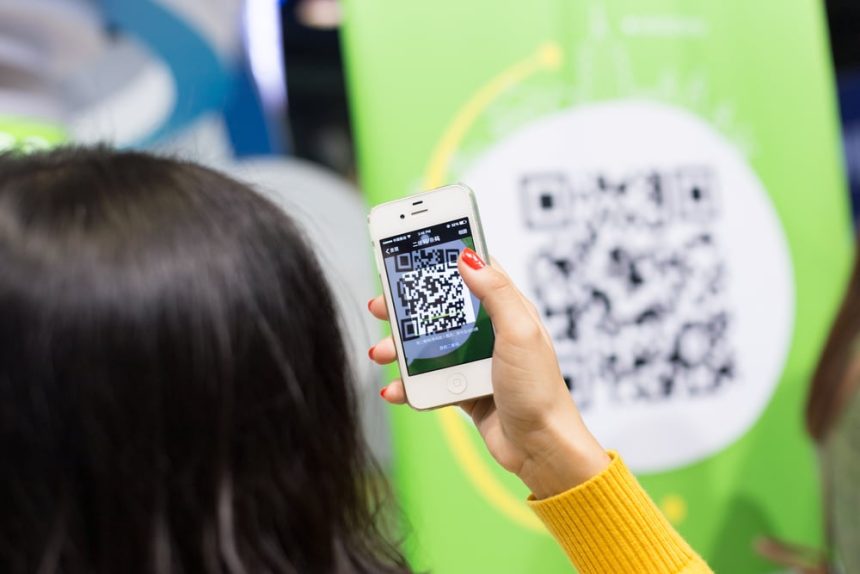
Open the validator app and point the phone's camera at the attendee's QR code (on phone screen or printed ticket).
Wait for the result: Valid, Invalid, Duplicate, or Expired.
Act on the result. Most scans take under 2 seconds.
Step 5: Track attendance and handle exceptions
Watch the live dashboard for entry counts, peak times, and any unauthorized entry attempts.
For lost tickets, resend the ticket from the dashboard to the attendee's email. The new ticket carries the same code; re-issuing does not break validation.
Note: To ensure efficient scanning, it's important to train your staff on how to use the scanning system. This might involve practicing scanning tickets, troubleshooting common issues, and ensuring that staff members are familiar with the scanning software. Also, during the event, it's important to have a system in place for managing entry and troubleshooting issues that may arise. This might involve having staff members stationed at the entrance to assist with scanning, or providing attendees with a support contact in case they have trouble with their ticket.
How does QR code scanning work across different event types?
The core scan flow is the same. What changes is gate count, entry rules, re-entry behavior, and the kind of "wrong" you most need to catch.
Here is how QR scanning maps onto the five most common event types.
1. How do you use a QR code scanner for concert tickets?
For concert tickets, the QR scanner's job is high-speed entry plus fraud filtering. Most concert fraud happens through resold or photoshopped tickets, so the duplicate-detection step matters more than at any other event type.
What changes at concerts:
High volume in a narrow window (most attendees arrive in the 60 minutes before showtime).
Strict re-entry rules; many concerts do not allow re-entry at all.
Tiered tickets (GA, VIP, Pit) need to scan to the right zone.
Set up advice:
Open at least one scanning lane per 500 expected attendees.
Disable re-entry in the validator settings if your event does not allow re-admission.
Issue tiered tickets with distinct QR codes per zone so VIP and GA cannot cross-enter.
A useful proof point: 38% of all UK ticket fraud reports in 2024 involved concert tickets, more than any other category (Source: Action Fraud, 2024). Live QR validation is the single best defense against a photoshopped or copied ticket.
2. How do you use a QR code scanner for festival passes?
For festival passes, QR scanning has to handle multi-day re-entry, multiple stage zones, and offline-friendly fallback. Festivals are the hardest QR environment because attendees leave and re-enter constantly.
What changes at festivals:
Re-entry is the norm; attendees go in and out across 1–4 days.
Multiple zones (camping, main stage, VIP, backstage) often need separate access.
Field conditions: dust, sun, weak cellular coverage.
Set up advice:
Enable re-entry mode in your validator so the same QR can be scanned multiple times per day.
Use ticket categories to gate-control different zones (camping pass ≠ VIP pass).
For multi-day festivals, ticket status should reset at midnight so day-2 entry triggers a fresh check, not a 'duplicate' alert.
Pro Tip: Ticket Generator supports multi-day events natively. Ticket status can automatically reset at midnight, while re-entry permissions remain configurable per gate. You can also run separate scanning teams across different zones, with each team viewing only the data relevant to its assigned gate.
3. How do you use a QR code scanner for sports game tickets?
For sports game tickets, QR scanning has to combine seat assignment, fast throughput, and gate-level zone control. Attendees often arrive in 15-minute bursts before kickoff, so peak throughput is the deciding factor.
What changes at sports games:
Assigned seating — the QR encodes seat number, row, and section.
Peak-rush throughput — 30,000 fans in 45 minutes is normal at mid-size stadiums.
Multiple gates (typically 4–12 entry points around the stadium).
Set up advice:
Run a multi-gate setup with simultaneous scanning at every entry point.
Print seat number on the ticket, but also encode it in the QR so the validator can show the seat at scan.
Allow re-entry for half-time exits if your venue policy permits.
Real example: DART (Dallas Area Rapid Transit) uses Ticket Generator across multi-location access control with real-time attendance tracking; the same multi-gate, simultaneous-scan model used at sports venues. The result is sub-2-second check-ins with no data sync delays between gates.
4. How do you use a QR code scanner for exhibition tickets?
For exhibition tickets, QR scanning often combines paid entry with lead capture. Exhibitions usually have lower per-hour throughput than concerts but longer event hours (3–10 days) and frequent re-entry.
What changes at exhibitions:
Lower instantaneous throughput, but full-day flow.
Re-entry is universally allowed, attendees come and go for sessions.
Often free or invitation-only, but the QR still matters for attendance data and zone access.
Set up advice:
A single primary entry with 1–3 scanning lanes is usually enough.
Pair the QR scan with a lead-capture form to convert attendance into a marketing list.
Use the same QR to gate-control paid workshops or expert sessions inside the exhibition.
5. How do you use a QR code scanner for amusement park tickets?
For amusement park tickets, QR scanning is less about a single gate and more about multi-zone, multi-day, multi-attraction access. Day passes, season passes, and ride-specific tickets all flow through QR scanning.
What changes at amusement parks:
One ticket may grant access to dozens of attractions over a full day or season.
Children's tickets, family passes, and senior tickets all need different category logic.
Park-wide scanning across many zones, often with patchy connectivity.
Set up advice:
Use category-based tickets (Day Pass, Season Pass, Ride-Specific) with different QR codes per category.
Allow re-entry at the main gate, but lock individual high-demand attractions to one-scan-per-day if needed.
For season passes, set the validator to check the date range, not just 'valid/invalid.'
Pro Tip: Ticket Generator lets you create unlimited ticket categories per event, each with its own QR validation rules. A single amusement park can manage Day Pass, Season Pass, and Family of 4 tickets from one dashboard while applying separate access permissions and tracking all entries through shared real-time analytics.
What are the most common QR scanning problems at events and how do you fix them?
Most QR scanning problems come from three sources: bad lighting, no internet, or a damaged ticket. Each has a fix that takes under a minute.
Problem
Cause
Quick fix
Scan won't read
Cracked screen, low brightness, or sun glare
Ask the attendee to raise phone brightness or move under shade
'Duplicate' error
Ticket already scanned (real or accidental)
Check the scan log; if it was staff error, override and re-admit
'Invalid' error
Fake ticket, screenshot reuse, or wrong event ticket
Compare ticket ID against the master attendee list and reject if unmatched
Scanner app frozen
Slow internet connection or app crash
Force-close the app, reopen it, or switch the device to mobile data
Attendee has no ticket
Ticket email never arrived or was lost
Search by attendee name or email in the dashboard and resend the ticket
Power down
Phone battery depleted
Switch to a backup phone and keep power banks available at every gate
The most important operational rule: never let one failed scan stop the line. Staff should pull the attendee aside, run the troubleshooting, and let the rest of the line keep moving.
Pro Tip: Ticket Generator automatically flags unauthorized entry attempts in the dashboard the moment they occur. Even if a fake or duplicate ticket slips past a busy staff member, the activity log records the scan event so your team can investigate it after the event.
How does Ticket Generator support QR code scanning for event entry?
Ticket Generator is built for organizers who want fast, fraud-resistant, branded check-ins without paying per-sale commissions or buying special hardware. Every ticket carries a unique QR code per ticket and a unique ticket ID, validated through a free mobile or web app.
Here's what you get out of the box, mapped to the workflow above:
Unique QR per ticket: auto-embedded, even on your own custom designs. No two tickets share a code.
Ticket Validator app (iOS + Android): free download, scans from any smartphone, no special hardware.
Three-state results: Valid, Invalid, Duplicate. Built-in fraud detection at every gate.
Multi-gate scanning: unlimited devices scan simultaneously, all syncing to one live dashboard.
Re-entry support: toggleable per event, so concerts can disable it and festivals can enable it.
Multi-day events: ticket status auto-resets at midnight, so day-2 attendees scan in cleanly.
Security & compliance: ISO 27001:2022 certified, GDPR-compliant, SOC 2 aligned.
Proof point: Ticket Generator has powered 30,000+ events across 100+ countries, generating 1,000,000+ tickets. Clients include Deloitte, Verizon, VMware, Volvo Group, Google, the Emmy Awards, and UNHCR. Heartland Emmys, for example, has used Ticket Generator for 10+ events over 4 consecutive years, with 3,433+ tickets validated.
At Antioch University in Ohio, sustainability coordinator Elida Martinez moved her events to QR-based ticketing specifically to cut paper and speed up check-in. Her summary: "The ability to check in using a QR Code… and the platform to scan tickets on the phone" was the deciding factor. Across three campus events, the team has validated 1,700+ tickets through Ticket Generator.
What this gives you operationally: predictable, credit-based pricing (no per-sale commission), full branding control on tickets, and a check-in workflow that scales from a 10-person workshop to a 10,000-person festival without changing tools.
Set Up Event Ticketing and Distribution in Minutes!
First 10 tickets free | Free account | No credit card required
If you're looking for a comprehensive solution for your event ticketing needs, the Ticket Generator is a great option. They offer free ticket templates, QR codes with ticket validation, ticket sharing options via social media platforms, and event insights. Plus, they provide 10 free tickets after signup.
Conclusion
QR code scanning is no longer the "advanced" option for event entry, it is the baseline. Manual check-ins are too slow, paper lists cannot catch duplicates, and ticket fraud is rising fast across every major event category.
The setup is genuinely simple. A smartphone, a validator app, an internet connection, and tickets with unique QR codes are enough to run secure, sub-2-second check-ins at concerts, festivals, sports games, exhibitions, and amusement parks. The same workflow scales from 50 attendees to 50,000.
What separates a smooth event from a chaotic one is preparation: enough gates, trained staff, charged phones, and a backup plan. Get those right, and QR scanning gives your team something rare in event ops, calm, real-time control over who is inside your event.
Try Ticket Generator to issue unique QR-coded tickets, validate them in seconds from any phone, and track attendance in real time. Your event. Your data. Your gate.
FAQs: QR Code Scanning for Event Entry
1. Do I need special hardware to scan QR codes at events?
No. A smartphone running a validator app is enough for almost any event. Ticket Generator's Ticket Validator runs on any iOS or Android phone, and the web validator runs on any laptop browser, no scanner guns, no licences, no special equipment.
2. Can the same QR code be scanned twice or shared between people?
No, if your platform issues unique QR codes per ticket. Each scan checks against the database, and a second scan of the same code instantly returns a "duplicate" alert. This is what stops screenshot fraud and ticket-sharing at the gate.
3. Does QR code scanning work without internet?
QR validation requires an internet connection to check against your ticket database. Most modern validator apps (including Ticket Generator's) need network access at the moment of scan. Plan for backup connectivity (mobile hotspot, second SIM) at every gate.
4. How fast is QR code scanning compared to manual check-in?
QR scanning takes roughly 2 seconds per attendee. Manual check-in against a paper list takes 30–60 seconds. For an event with 1,000 attendees, that's the difference between a 30-minute and an 8-hour check-in.
5. Can one event have multiple gates with QR scanning?
Yes. Most QR validator apps (including Ticket Generator) support multi-gate scanning, where multiple devices scan simultaneously and all data syncs to a single live dashboard. A single event can run 10+ gates without conflicts or duplicate counts.
6. What happens if an attendee's phone is dead at the gate?
Look them up by name, email, or ticket ID in the organiser dashboard and resend the ticket or scan a printed backup if they have one. With Ticket Generator, you can resend tickets in one click from the dashboard while the attendee waits.
Ashish Chandra has spent 5+ years writing about event technology, covering topics such as ticket design, QR check-ins, attendee management, and event marketing strategy. As the Content Lead at Ticket Generator, Ashish has analyzed hundreds of real-world event workflows and ticketing setups, helping organizers across industries use QR-based tickets, event landing pages, and smarter ticketing systems to run smoother, better-attended events.
His writing is shaped by real user needs and the questions organizers ask most often: How do I sell more tickets? How do I avoid chaos at the door? How do I make my next event better than my last?
When he steps away from the screen, you'll likely find him hiking a quiet trail or tending his plants- his preferred way to reset.





.png)






.webp)

.svg)
.svg)
