

Best Email Marketing Platform for Event Planners, Compared
 Written byAshish ChandraLast updatedSeptember 23, 2026
Key Takeaways:
- The right email marketing platform for event planners is the one that can act on your ticket and registration data.
- Most email tools cannot see who already holds a ticket, so reminders reach people who already registered.
- Judge every platform against five email moments: promote, register, remind, day of, follow up.
- Ticket Generator keeps subscriber lists and Campaigns inside the ticketing platform itself.
- A dedicated email provider still wins for deep automation and very large lists.
I have watched this go wrong at more events than I can count. Two weeks out, the reminder email hits the whole list, and the forty people who already bought a ticket are told to hurry before it sells out. The email tool did nothing wrong. It had no idea who already held a ticket.
So here is the direct answer. The best email marketing platform for event planners is the one that can act on your registration and ticket data, either natively or through a clean integration. Automation builders and template galleries matter far less, because every serious tool on this list already has them.
In this guide I cover what makes a platform event ready, the five email moments in an event lifecycle, how six leading tools compare, and the data gap no other comparison mentions. I close with a decision rule per kind of planner.
What Makes an Email Platform Event Ready?
An email platform is event ready when it can segment people by what they have actually done, send on a schedule tied to a fixed date, and render cleanly on a phone. The rest is comfort.
Most buying guides score email tools on six fair factors:
- Ease of use. You build emails between venue calls, not in a studio.
- Automation. Sequences that fire on a date or an action, not on someone remembering to hit send.
- Pricing model. Contact based, send volume based, or per seat. Each punishes a different shape of list.
- Deliverability. Sender authentication, list hygiene, reputation management.
- Integrations. Whether the tool talks to the systems holding your attendee records.
- Scalability. What happens when an 800 person list becomes 8,000 before a flagship event.
A seventh factor decides more than those six together: can the platform see who registered and who holds a ticket? Event audiences are not a flat list of subscribers. They are people at different stages, and stage is the only segment that matters once the date is fixed.
That is the gap between general event marketing and event email that works. A retailer runs the same promotion all year. You have one date.
"Email is the only place where people (not algorithms) are in charge."
Ann Handley, Chief Content Officer, MarketingProfs
Handley said that at Content Marketing World 2018 (reported by Campaign Monitor). Your ticket buyer list is the one audience no algorithm change can take from you, so choose the tool that holds it carefully.
Did you know that mobile devices accounted for roughly 58% of online event ticketing transactions in 2025? Source: Mordor Intelligence, 2025
That settles your template before your feature checklist does. If the buy button needs a pinch zoom, the builder behind it is irrelevant.
What Are the Five Email Moments in an Event Lifecycle?
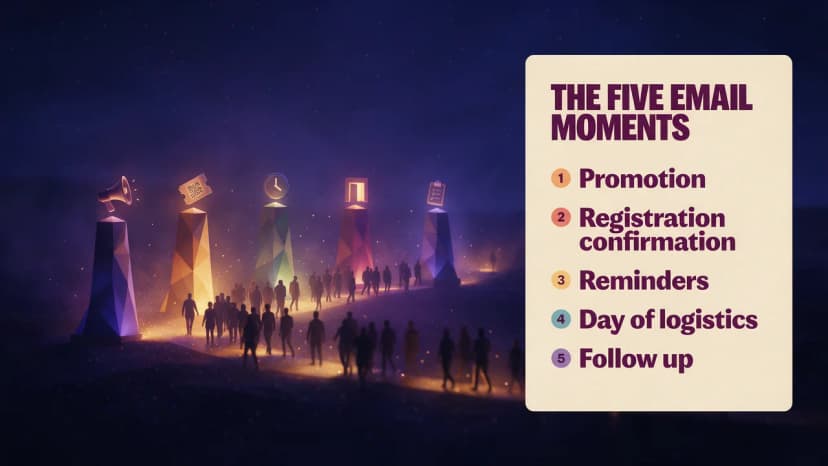
Every event runs on five email moments: promotion, registration confirmation, reminders, day of logistics, and post event follow up. Each asks something different of your platform, and most tools are strong at one or two and weak at the rest.
- Promotion. The announcement and the sequence after it, where a big send list, clean templates and A/B testing earn their keep. My guide to event promotion ideas covers the angles that still work.
- Registration confirmation. Triggered the second someone signs up, carrying the ticket or joining detail. It is transactional, instant, and usually sent by the ticketing system rather than the marketing tool. Getting the event invitation right here sets the tone for everything after.
- Reminders. The countdown at one month, one week, one day. This is where the data gap shows, because a reminder to register and a reminder to attend are two different emails for two different people. If registrations are the real problem, there are better levers than send frequency, so read how to increase registrations for an event.
- Day of logistics. Doors, parking, weather, the last minute room change. These go out fast, reach phones, and should reach confirmed attendees only.
- Follow up. Thank you, survey, photos, the first hint of next year. Send within 48 hours with a short set of post event survey questions rather than a long form nobody finishes.
Three of those five need attendee status, not subscriber status. That is the shape of the problem. Ignore borrowed benchmarks too: event open rates swing so hard on list quality that a generic average misleads. Measure against your own last three events.
Did you know that 40% of shoppers abandon a checkout when extra costs feel too high, making it the single biggest reason carts get dropped? Source: Baymard Institute, 2024
A promotion email can still lose the sale on the page it points to.
Which Is the Best Email Marketing Platform for Event Planners?
The shortlist comes down to six tools. None is built specifically for events, which is the honest starting point. What separates them is pricing shape, automation depth, and how easily they take data from elsewhere.
1. Mailchimp
Best for the shortest path from list to sent campaign. The editor is forgiving, the templates look fine without design help, and scheduling a dated send takes a minute. The limit is pricing shape: Mailchimp prices on contacts, so a list lying dormant for ten months still costs you monthly. It has no concept of a ticket or a check in, so every event segment gets built by hand.
2. Brevo
Best for a large seasonal list on a small budget. Brevo prices on sends rather than stored contacts, which fits the event pattern: keep everyone who attended, pay only in the weeks you campaign. Transactional email and SMS sit in one account, useful when a room change has to reach phones in ten minutes. Automation is capable rather than deep.
3. ActiveCampaign
Best for planners running many events a year who need sequences that branch. The automation builder is the strongest here, with real conditional logic, so someone who opened but did not register takes a different path from someone who registered and went quiet. The cost is complexity plus contact based pricing. Run one event a year and you use a fraction of it.
4. Constant Contact
Best for community groups, nonprofits and schools. It is deliberately simple, and it has long carried event features such as invitations and RSVP tracking, which nothing else here bothers with. Automation is basic next to ActiveCampaign or Brevo. Fine for a 300 person fundraiser, outgrown by a ticketed series with tiers and waves.
5. HubSpot
Best for teams whose events feed a sales pipeline. Email lives inside the CRM, so a registration becomes a contact record a salesperson can work and event to deal attribution stops being guesswork. Pricing climbs quickly past the entry tiers, and most of what you buy is CRM. A planner with no sales team is buying a lot of machinery to send five emails.
6. Klaviyo
Best for planners selling tickets through an ecommerce store. Klaviyo is built around behavioral data, so where it connects natively to the store selling your tickets, it segments on purchase behavior better than anything here. Outside that setup it is overkill, with contact based pricing aimed at retail volumes.
How Do the Platforms Compare Side by Side?
Here is the shortlist on the axes that matter for events, with Ticket Generator added because it comes at the problem from the other side.
|
Platform |
Best for |
Event specific strength |
Pricing shape |
Path to your ticket data |
|---|---|---|---|---|
|
Mailchimp |
Fastest start, one or two events a year |
Templates and scheduled sends, no learning curve |
Contact based, charges for dormant lists |
Integration or manual import |
|
Brevo |
Large seasonal lists on a tight budget |
SMS and transactional email in one account for day of sends |
Send volume based, quiet months cost less |
Integration or API |
|
ActiveCampaign |
Agencies and teams running many events |
Branching automation that splits registrants from prospects |
Contact based, rises with list size |
Integration or API |
|
Constant Contact |
Nonprofits, schools and community groups |
Built in invitation and RSVP features |
Contact based tiers |
Integration or manual import |
|
HubSpot |
Events that feed a sales pipeline |
Registrant becomes a CRM record with attribution |
Tiered platform pricing, climbs quickly |
Integration or API |
|
Klaviyo |
Tickets sold through an ecommerce store |
Behavioral segmentation on purchase data |
Contact based, aimed at retail volumes |
Native only on supported stores |
|
Ticket Generator |
Organizers wanting email and ticketing in one system |
Subscriber lists and Campaigns sit beside ticket records |
Prepaid credits per ticket, no subscription, no commission |
Native, same platform |
Pricing is described by model rather than figure, because these vendors change published prices several times a year. Check each pricing page before committing. Ticket Generator does not sell Campaigns as a separate email subscription, and campaign send limits are not published, so confirm them directly for high volume sending.
Read that last column first. It decides how much manual work you inherit at every event.
Tired of exporting a registrant list just to send a reminder? Try Ticket Generator and keep your subscriber lists next to your ticket records.
Why Does Your Email Tool Not Know Who Has a Ticket?
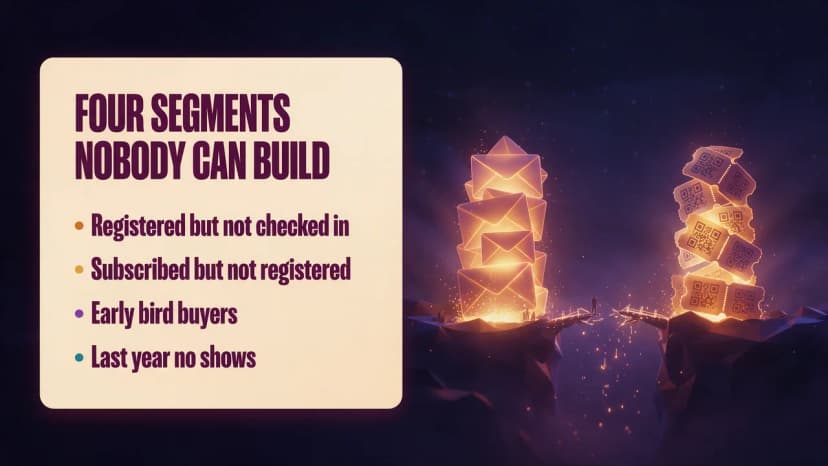
Because they are two separate databases, and nothing travels between them unless you build the bridge. Your email tool knows who subscribed. Your ticketing tool knows who paid. Neither knows what the other knows.
That sounds abstract until you write a normal event email. Four segments every planner wants and almost nobody has:
- Registered but not checked in. The day before reminder, for ticket holders only.
- Subscribed but not registered. The only group that should get a hard sell in the final week.
- Early bird registration buyers, who deserve first refusal on next year and should never see a discount they beat.
- Last year's no shows, who need a different message from last year's attendees.
Suppression fails too. Everyone gets the hurry up email, including the forty who already bought. It reads as careless.
There are three ways out. Export and import by hand, which works until the week you are busiest. Wire the systems together with an automation layer. Or use a ticketing platform with its own email layer, so the bridge never needs building. Most event registration platforms do the first, some the second, few the third. Ticket Tailor is a capable low cost tool on the same commission free model, but it has no native email marketing layer, so you are back to an outside provider. Marketplaces like Eventbrite bring discovery traffic, but the attendee relationship sits with the platform.
Pro Tip: Keeping an outside email tool? Wire it up once instead of exporting every week. Ticket Generator connects through Zapier, triggering when a guest registers or a ticket is generated or sent, which is how registrant data reaches Mailchimp or HubSpot. There is no native sync to either, so plan for the Zapier step.
How Does Ticket Generator Handle Event Email Marketing?
Ticket Generator is built for organizers who already have their audience and want promotion and ticketing in one place. Campaigns is the email layer inside the platform, so the list and the ticket records are never two systems apart.
Lists and campaigns. You build subscriber lists in the dashboard, then run multi step, trigger based campaigns against them. Templates are customizable, sender details are your own so the email carries your brand, and performance is tracked in the same view. Drafts can be edited before sending and a sent campaign duplicated for the next event.
Ticket delivery is separate, and that is the point. Confirmations and ticket emails go out through the ticketing side, in batches of up to 1,000 guests per send, across email, SMS and WhatsApp. Schedule Send delivers a whole batch at a chosen date, time and time zone, and every ticket email carries the digital ticket link. For recurring events, cloning brings the settings across.
The Heartland Emmys have run this way for four consecutive years: 3,433 or more tickets across 10 or more events, inviting the same audience back each year. Ticket Generator has issued more than 1,000,000 tickets for over 30,000 events in 100 or more countries. See the full feature set, or go straight to sending tickets.
Now the honest part. If you need deep conditional branching, or you are emailing hundreds of thousands of people with no relationship to a ticket, a dedicated email provider is still the better tool and you should keep it. Ticket Generator's advantage is not that it out builds ActiveCampaign. It is that the list already knows who holds a ticket.
Which Platform Should You Pick for Your Kind of Events?
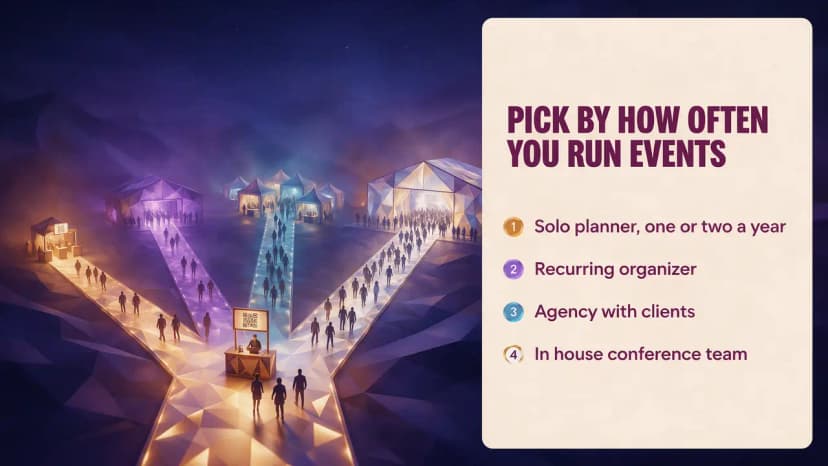
The answer depends less on a feature wish list than on how often you run events and where your attendee data lives. Four rules cover most planners.
- Solo planner, one or two events a year. Use whatever your ticketing platform already sends, and add an email tool only when you outgrow it. A monthly contact fee for a list you email four times a year is money on fire.
- Recurring event organizer. Same audience, new date, every year. Pick the tool that keeps last year's attendee list beside this year's ticket records, because that list is the asset.
- Agency with multiple clients. Separated client lists, deep automation, audit friendly reporting. ActiveCampaign or Brevo, with ticketing data pushed in through an integration rather than copied by hand.
- In-house conference or enterprise team. If registrations feed a pipeline, put email where the CRM is. HubSpot earns its price here in a way it never does for a solo planner.
One test cuts through all four. Write down the three segments you most want to email before your next event. If your tool cannot build them without an export, the tool is not the problem. The gap between your systems is.
What About Deliverability and Consent?
Deliverability is proving you are who you say you are. Consent is proving they asked to hear from you. Both are configured once, then forgotten.
Authenticate your sending domain with SPF, DKIM and DMARC, send from that domain rather than a free mailbox address, and keep it consistent so reputation accumulates in one place.
An attendee list is not a marketing list by default. Under GDPR, a ticket buyer has given you a basis for service emails about that event, not permission to market next year at them. Ask for marketing consent at registration, keep the record, and honour unsubscribes across both systems rather than only the one that sent the email. Clean bounces after every event.
Pro Tip: Set your custom sender details before your first campaign, not after. Ticket Generator lets you send Campaigns from your own branded sender identity, and the platform is ISO 27001:2022 certified and GDPR compliant, so attendee data stays handled properly while you build the list.
Final Thoughts
Every platform here sends a beautiful email. That stopped being a differentiator years ago. What still separates them for event work is whether the tool knows a subscriber from a ticket holder, and the manual work you inherit when it does not.
One event a year with a small list? Pick the simplest thing. A recurring programme? Weigh the data connection above the feature list, because that is a cost you pay every event rather than once at signup. Events feeding a pipeline? Follow the CRM. Email is one channel in the plan either way, and my guide to event marketing strategies covers where the rest of it fits.
Try Ticket Generator to run your event emails and your ticketing from one system. Your list, your attendee data, and no commission on ticket sales.
FAQs: Email Marketing Platforms for Event Planners
1. What is the best email marketing platform for event planners?
The best email marketing platform for event planners is the one that can act on registration and ticket data, because that is what separates an event list from a newsletter list. Mailchimp suits the fastest start, Brevo large seasonal lists, ActiveCampaign agencies needing branching automation, and Ticket Generator organizers keeping email and ticketing in one platform.
2. Do I need a separate email tool if my ticketing platform already sends emails?
Not always. Ticketing platforms send confirmations and ticket delivery automatically, and some, including Ticket Generator, add a campaign layer for promotion and follow up. Bring in a dedicated provider when you need deep conditional automation or a large audience with no relationship to a ticket.
3. How do I sync event registrations with Mailchimp or HubSpot?
Through an automation layer such as Zapier, not a native one click connection. With Ticket Generator, a Zapier trigger fires when a guest registers or a ticket is generated or sent, and the action pushes that contact into your email tool. Set it up once rather than exporting a spreadsheet each time.
4. How many emails should I send before an event?
Four to six suits most events: an announcement, a follow up with detail, a one week reminder, a day before reminder, and a day of logistics email. Split the list so registrants stop getting sales messages once they hold a ticket. More is fine when each email carries new information.
5. Can Ticket Generator replace my email marketing software?
For small and mid sized events, often yes. Campaigns handles subscriber lists, multi step trigger based campaigns, custom templates, sender details and performance tracking inside the platform that issues the tickets. For very large general audiences or complex branching sequences, keep a dedicated provider and connect it through Zapier.
About the author
Content Marketer at Ticket Generator
Ashish Chandra has spent 5+ years writing about event technology, covering topics such as ticket design, QR check-ins, attendee management, and event marketing strategy. As the Content Lead at Ticket Generator, Ashish has analyzed hundreds of real-world event workflows and ticketing setups, helping organizers across industries use QR-based tickets, event landing pages, and smarter ticketing systems to run smoother, better-attended events. His writing is shaped by real user needs and the questions organizers ask most often: How do I sell more tickets? How do I avoid chaos at the door? How do I make my next event better than my last? When he steps away from the screen, you'll likely find him hiking a quiet trail or tending his plants- his preferred way to reset.
Related articles
Keep reading: more guides on the same topic
 22 min read
How to Plan a Concert: A Complete Guide for Any Venue
Discover how to plan a concert with ease. Follow a proven checklist and practical tips for smooth concert planning and a great audience experience
Ashish Chandra
08 Sept 2026
 8 min read
45+ Top Raffle Prize Ideas—Gift Baskets and More
Grab attention with unique raffle prize ideas like luxury baskets, tech gadgets, and more to make your event a total success
Pooja Jena
08 Sept 2026
 24 min read
Top 10 Halloween Party Theme Ideas of 2026 | Ticket Generator
Discover the best Halloween party theme ideas & learn how to create, manage, and sell event tickets easily using Ticket Generator’s all-in-one platform.
Ashish Chandra
08 Sept 2026
Latest posts
Check out our latest articles on the blog
 21 min read
Thanksgiving Event Ideas: 15 Ways to Host a Memorable Event in 2026
Fifteen Thanksgiving event ideas for communities, offices, schools and friends, with a checklist, a three-week plan and a simple way to manage tickets and RSVPs.
Ashish Chandra
03 Nov 2026
 19 min read
Holiday Party Ideas: Themes, Food, Games, Favors and a Planning Checklist for 2026
Themes, menus, games, favors and a plan you can follow, whether you have twelve weeks or four. Includes a budget guide and a simple way to handle RSVPs and check-in.
Ashish Chandra
02 Nov 2026
 13 min read
Fundraising Event Management Software: How Much of Your Donations Do You Keep?
Your gala should raise money for your cause, not lose it to event fees. Compare fundraising software pricing, uncover hidden costs, and find the right fit for your nonprofit.
Ashish Chandra
29 Oct 2026