

Fundraising Event Management Software: How Much of Your Donations Do You Keep?
 Written byAshish ChandraLast updatedOctober 29, 2026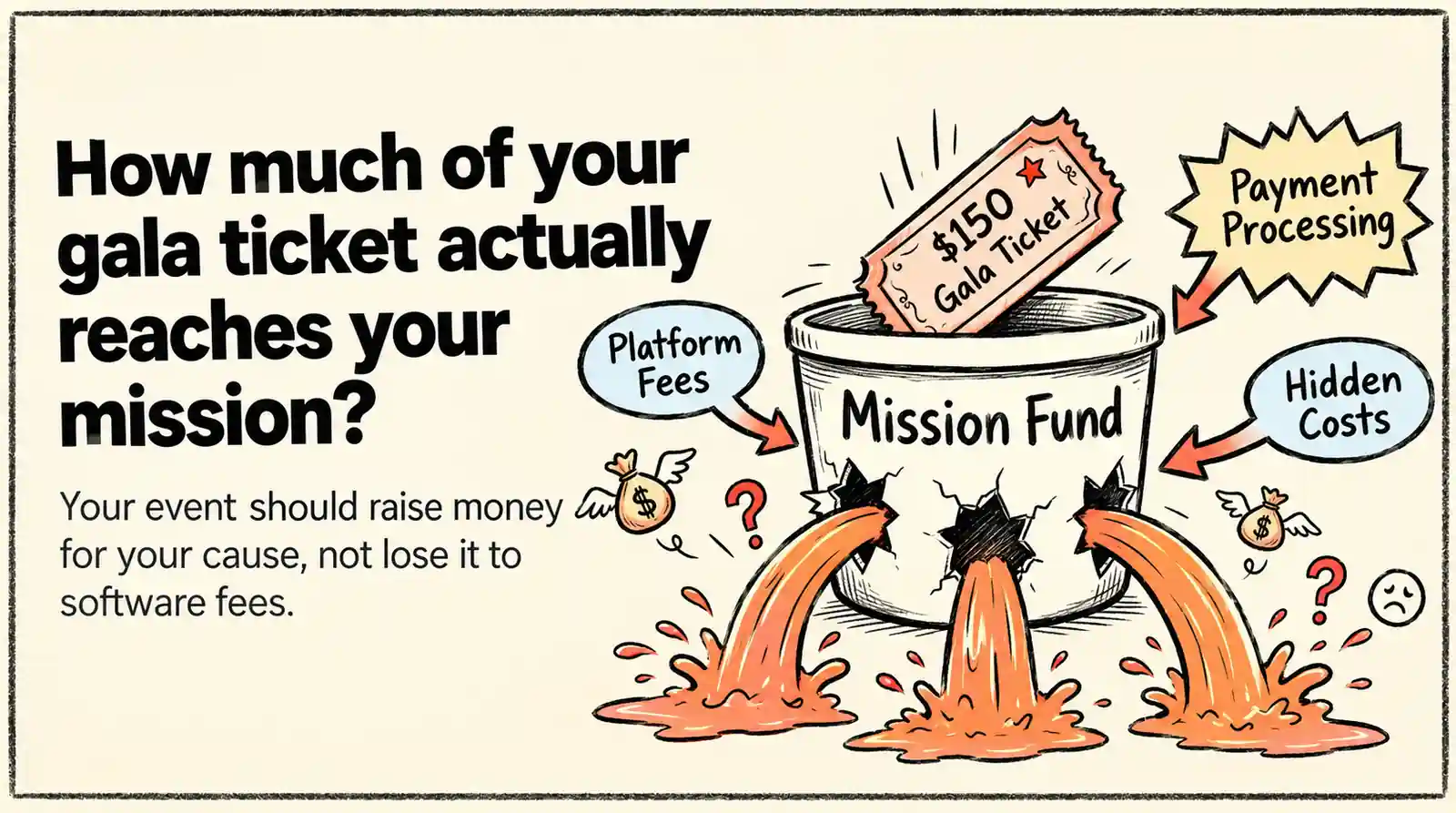
Key Takeaways:
- Most fundraising event management software either takes a cut of every ticket or passes on fees to your guests. On a 200-guest gala at USD 150 a ticket, that difference runs from USD 0 to about USD 2,300.
- “Free” event management software for nonprofits usually moves the cost to your guests through added fees at checkout.
- If your gala only needs tickets, registration, and check-in, you don’t really need an auction-and-CRM suite.
- Before you pick a tool, ask where the money lands, how fast it gets there, and how volunteers will scan guests at the door.
- Pick a tool like Ticket Generator that offers cloning of events, so you don't have to rebuild them from scratch for future events.
If you’ve ever run fundraising events, you’ve probably faced this: The gala is planned, and the venue is booked. Then comes a question your board will want answered: how much will the event software cost, and how much money will actually go to your cause?
Choosing fundraising event management software is not as simple as comparing prices. Some platforms charge a fee for every ticket sold. Others advertise free ticketing but pass on the fees to guests at checkout. On top of that, payment processing fees can add to the bill as well.
The real cost is what your nonprofit pays, what your guests pay, and how much of the money raised actually reaches your mission. You also need tools that make ticket sales and check-in smooth on the event day.
In this guide, I'll help you compare your options, including:
- When you need an all-in-one fundraising platform, and when a ticketing tool is enough
- What 200 Gala tickets could cost across five popular platforms
- How free ticketing models work and who pays the fees
- Which features help your team manage the door
- Six questions to ask before choosing your software
Let's start with the first decision: do you need a complete fundraising platform or just a reliable way to sell tickets and manage guests?
Does your Fundraiser need an all-in-one suite or a ticketing tool?
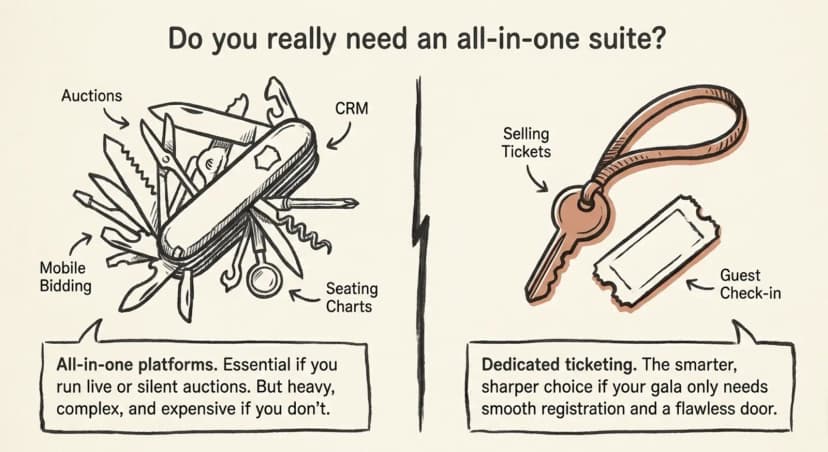
If your gala mainly needs ticket sales, guest registration, and check-in, a dedicated ticketing tool may be enough. An all-in-one platform makes more sense when you also need auctions and donor management in the same system.
Fundraising event management software generally comes in two forms. All-in-one platforms combine ticketing with features such as silent auctions, mobile bidding, and donor CRM. Dedicated ticketing tools focus on selling tickets, managing guest details, and checking people in.
Neither option is right for every gala. If auctions are a big part of your event, an all-in-one platform can keep more of your work in one place. But if you only need to sell tickets and manage entry, you could end up paying for features your team rarely uses. Some platforms also require a sales demo before you can get a clear price, while setup may involve extra onboarding.
|
What you need |
Dedicated ticketing tool |
All-in-one platform |
|---|---|---|
|
Ticket sales and registration |
Core feature |
Usually included |
|
Silent or live auctions |
Usually needs a separate tool |
Often included |
|
Donor management |
Export guest data to your CRM |
May include a built-in donor CRM |
|
Pricing |
Often priced per ticket or through credits |
May require a custom quote |
|
Setup |
Often self-serve |
May involve onboarding |
There is one trade-off to consider. Using separate tools can mean more admin work after the gala. Your team may need to match ticket sales with donor records manually. Check which data each platform lets you export before deciding.
Associations should also check how each tool handles member and non-member tickets. Separate ticket types with their own prices and ticket limits can help prevent guests from selecting the wrong option. Our guide to tickets for charity events explains how to structure different ticket types.
Once you know which features you need, the next step is to compare the costs. Let's look at what 200 gala tickets could cost across five platforms.
What 200 gala tickets really cost on fundraising event management software
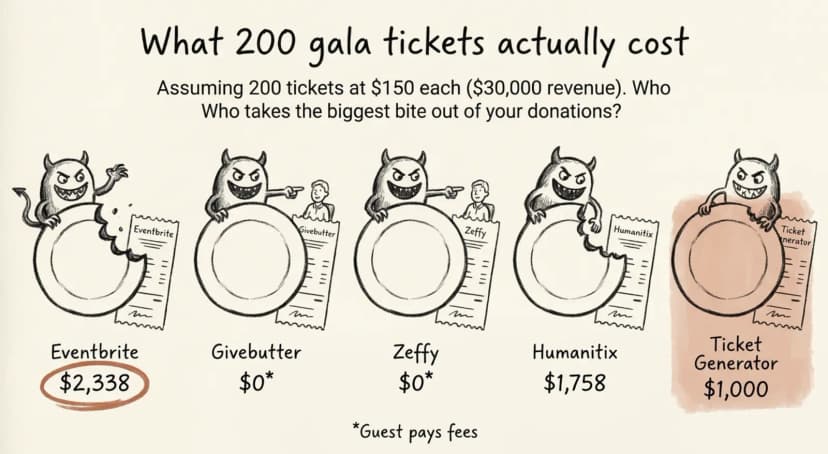
For a gala selling 200 tickets at $150 each, ticketing fees can range from $70 in platform costs to over $2,300 in combined fees. But the cheapest option for your nonprofit may ask guests to contribute at checkout.
To compare costs fairly, let's assume you sell 200 tickets at $150 each, with one ticket per order. That's $30,000 in ticket revenue. The estimates below use published US pricing checked on October 15, 2026, and assume your nonprofit absorbs the fees wherever applicable.
|
Platform |
Fee model |
Estimated cost to nonprofit |
|---|---|---|
|
Eventbrite |
3.7% + $1.79 per ticket, plus 2.9% processing per order |
$2,338 |
|
Givebutter (tips off) |
3% platform fee, plus 2.9% + $0.30 processing per order |
$1,830 |
|
Givebutter (tips on) |
Guest tips help cover fees under its tip-supported model |
$0* |
|
Humanitix (standard rate) |
2.1% + $0.99 per ticket, plus 2.9% + $0.30 processing per order |
$1,758 |
|
Zeffy |
Optional guest tips support the platform |
$0* |
|
Ticket Generator |
200 credits: $100, or $70 with an assumed 30% nonprofit discount, plus payment processing |
$1,000 with discount |
Sources: Eventbrite pricing, Givebutter pricing, Humanitix US pricing, and Zeffy pricing. Ticket Generator estimates use the pricing and discount assumptions stated above. Verify current eligibility and rates before budgeting.
The $0 estimates mean no ticketing cost to the nonprofit under the relevant tip-supported model. Guests may be asked to contribute at checkout, and the final experience depends on the platform's terms and settings.
What these numbers tell you
1. Look beyond the headline platform fee. Payment processing can account for a large share of your costs. In this example, Eventbrite's service fees alone total $1,468, before $870 in processing fees. Compare both charges, not just the advertised platform rate.
2. Understand who pays when a platform says “free.” Givebutter and Zeffy use optional guest contributions to support their services. Your nonprofit may pay $0, but guests can be prompted to contribute more at checkout. If you want every guest to pay exactly $150, check how the platform handles tips and fees before choosing it.
3. Check the price for your type of event. Some platforms offer discounted rates to eligible charities and schools. Confirm whether your organization qualifies and what conditions apply before comparing costs.
4. Check payment-processing eligibility separately. Stripe's nonprofit discount is for eligible donation-focused accounts and does not apply to ticket sales. Budget for standard processing fees on gala tickets unless your payment provider confirms otherwise. Read Stripe's guidance on nonprofit fee discounts before finalizing your budget.
One more detail matters for seated dinners. Ticket Generator uses two credits per ticket for seated events, rather than one. That changes the platform cost, so include seating requirements in your estimate.
For a broader comparison of pricing models, see our guide to nonprofit ticketing platform fees.
A low platform fee is only part of the decision. Next, let's look at what guests actually see at checkout when a platform asks them to tip.
Is free event management software for nonprofits really free?
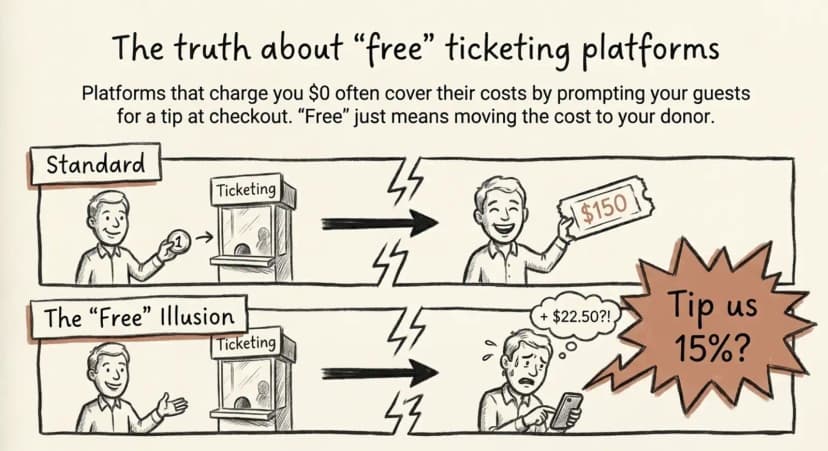
Some platforms charge nonprofits nothing but ask guests to contribute at checkout. This can make the final price less predictable and leave guests questioning the extra charge.
Tip-funded platforms may suggest a contribution during checkout, sometimes as a percentage of the ticket price. Guests may not notice the option to change it, or they may feel pressured to contribute. If your gala ticket costs $150, a 15% tip adds $22.50 to the checkout total. That can create frustration, especially when guests expect to pay a fixed price to support your cause.
For example, Zeffy offers free event ticketing for nonprofits, with no platform or payment-processing fees charged to the organization. It covers these costs through optional guest contributions at checkout. Guests can decline to contribute, and the nonprofit still receives the full ticket payment.
There is another question to ask: who handles your ticket revenue? Some platforms process payments and pay organizers out later, while others connect to your own payment account. The arrangement affects when you receive the money and who controls the payout process.
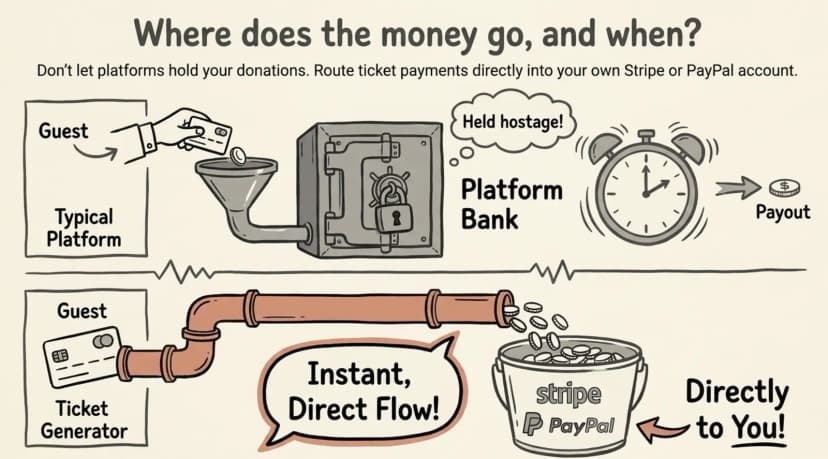
Before choosing a platform advertised as free, ask these three questions:
- What will guests pay at checkout? Are tips or extra fees suggested, and can guests easily change or remove them?
- Where does the ticket money go? Does it reach your own Stripe or PayPal account, or does the platform process and pay it out to you?
- When will I receive the money? Check the payout schedule and whether holds or delays may apply.
A tip-supported model may suit a nonprofit that wants to avoid ticketing fees and is comfortable with optional guest contributions. For a ticketed gala, however, guests should understand the full price before they pay. Unexpected checkout prompts can distract from the purpose of the event.
Tip: With Ticket Generator, you connect your own Stripe or PayPal account, so ticket payments are processed through your payment provider rather than held by Ticket Generator. You use prepaid credits for ticketing, with no ticketing commission or platform tip prompt at checkout. Payment processing fees still apply.
Once you understand the fees and payout process, there is one more thing to plan: getting guests through the door smoothly on gala night.
Ready to estimate your costs? Set up your event on Ticket Generator and calculate your ticketing costs using prepaid credits before sales begin.
What does your gala door need on the night?
Your gala needs QR Code tickets, volunteers scanning on their own phones, and instant alerts for duplicate or invalid tickets. These basics help keep queues moving, even when 200 guests arrive at once.
Without a clear check-in process, volunteers end up searching printed lists, checking forwarded tickets manually, and calling organizers to resolve entry issues. A simple plan can prevent these delays.
The week before
- Set ticket limits. Cap general, VIP, and sponsor tickets to match your venue's capacity.
- Add guest details. Include names and sponsor table numbers on tickets where supported.
- Assign scanners. Start with one scanner per 100 guests and adjust for expected arrival times.
- Practice scanning. Have every volunteer scan a test ticket on their own phone.
- Test the internet. Check Wi-Fi or mobile data at the entrance, especially if scanning requires a connection.
On the night
- Open multiple scan points during peak arrival times.
- Assign one person to exceptions, such as lost tickets, walk-ins, and name changes.
- Resend missing tickets by email or text instead of searching through printed lists.
For a step-by-step walkthrough, see our guide to QR Code check-in.
Pro Tip: With Ticket Generator, you can give volunteers scan-only coordinator access, so they can check tickets on their own phones without accessing your main account. The system flags invalid or duplicate tickets, and sample tickets let volunteers practice before the event.
With costs, payment flow, and check-in covered, you're ready to evaluate your shortlist using the questions below.
How to choose the best event management software for nonprofits: 6 questions
Compare six things before choosing your software: total cost, checkout fees, payouts, check-in, branding, and event reuse. Ask every vendor the same questions so you can compare options fairly.
- What will it cost at my guest count? Ask for the total for 200 tickets at $150 each, including payment processing.
- Will guests pay extra at checkout? Check whether tips or fees appear and how easily guests can remove them.
- Where does the money go, and when? Understand how payments are processed and when your nonprofit receives the funds.
- Can volunteers check guests in easily? Look for phone-based QR Code scanning, duplicate detection, and restricted volunteer access.
- Can I brand the event page? Check whether you can use your own logo, colors, and event details.
- Can I reuse the setup next year? Duplicating an event can save time when your gala returns.
Associations should also check whether the software supports member and non-member prices, sponsor tables, and registration approvals.
Good event registration software should cover essential tasks such as ticket categories, sales limits, and guest registration. For more ideas, see our guide to non-profit event tickets.
How Ticket Generator helps run your fundraising gala
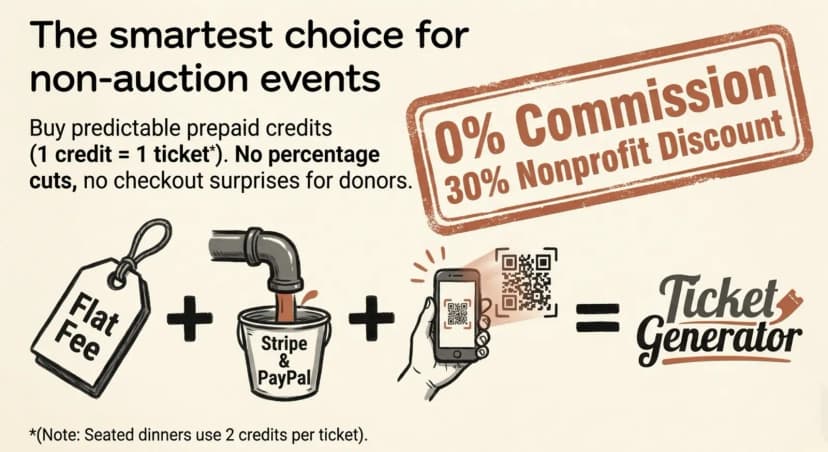
Ticket Generator focuses on ticket sales and check-in, helping nonprofits control ticketing costs without paying a percentage of every sale. It suits galas, dinners, and member events where you manage your own guests. See our non-profit events page for more.
Here's how it helps:
- Predictable ticketing costs. One credit covers one standard ticket, with 0% ticketing commission. Eligible nonprofits receive a 30% discount, and unused credits never expire.
- Payments to your account. Connect Stripe, PayPal, or Razorpay to receive payments through your own provider. Payment processing fees still apply.
- Flexible ticket categories. Set prices and limits for general admission, VIPs, and sponsors. Seated events can use a venue layout for seat selection.
- Simpler check-in. Volunteers can scan tickets on their own phones with scan-only access. The system flags valid, invalid, and duplicate tickets.
- Reusable event setup. Duplicate a previous event where supported, then update details such as dates, prices, and ticket limits.
Ticket Generator has issued more than one million tickets across 30,000+ events, and organizations such as UNHCR use the platform.
One important limitation: Ticket Generator does not include auctions or a donor CRM. You can export guest data to Excel or connect your workflow with tools such as HubSpot, while using a separate platform for auction management.
Conclusion
Choosing fundraising event management software comes down to three things: what it costs, how much money reaches your mission, and how smoothly your gala runs. Compare the total cost at your actual guest count, not just the advertised price. For 200 tickets at $150 each, our comparison showed costs ranging from $0 to about $2,338, depending on the platform and fee model.
Remember that “free” can mean asking guests to tip at checkout. Check who handles your payments, plan your check-in process, and choose software that makes it easy to reuse your setup next year.
If auctions are central to your gala, an all-in-one suite may be worth the investment. If you mainly need ticket sales, registration, and reliable check-in, a dedicated tool like Ticket Generator may be a better fit.
Your event. Your revenue. Your rules.
Ready to plan your next gala? Sign up for Ticket Generator to get 10 free credits at signup. Test your setup and estimate your ticketing costs before publishing your event.
FAQs
What is the best fundraising event management software for a small nonprofit?
It depends on whether you run auctions. If your gala mainly needs tickets, registration, and check-in, a ticketing tool usually fits better than a full suite. Compare options by the total cost to your nonprofit at your guest count, not the advertised price.
Is Eventbrite free for nonprofits?
Eventbrite is free for free events. For paid tickets in the US, its pricing page lists a 3.7% + USD 1.79 service fee per ticket plus 2.9% payment processing per order (checked October 15, 2026). Those fees apply whether guests pay them or you absorb them.
How much does silent auction software cost?
Most silent auction and mobile bidding tools quote prices after a demo, so public numbers are hard to compare. Ask each vendor for an all-in figure at your expected guest and bidder count. Include card processing and any per-item or per-event fees in that figure.
Can nonprofits charge for fundraising events?
Yes, nonprofits can sell tickets to fundraising events. Only the part of the ticket price above the value of the benefit (such as the dinner) is tax-deductible. Under IRS rules on quid pro quo contributions, payments over USD 75 need a written statement showing the deductible amount.
Does Ticket Generator take a cut of ticket sales?
No, Ticket Generator charges 0% commission. You buy credits, with 1 credit per ticket, and guests pay through your own payment account. Card processing from your payment provider still applies.
About the author
Content Marketer at Ticket Generator
Ashish Chandra has spent 5+ years writing about event technology, covering topics such as ticket design, QR check-ins, attendee management, and event marketing strategy. As the Content Lead at Ticket Generator, Ashish has analyzed hundreds of real-world event workflows and ticketing setups, helping organizers across industries use QR-based tickets, event landing pages, and smarter ticketing systems to run smoother, better-attended events. His writing is shaped by real user needs and the questions organizers ask most often: How do I sell more tickets? How do I avoid chaos at the door? How do I make my next event better than my last? When he steps away from the screen, you'll likely find him hiking a quiet trail or tending his plants- his preferred way to reset.
Related articles
Keep reading: more guides on the same topic
 7 min read
What's the first thing that comes to mind when you think of event management? Is it 'complexity,' 'stress,' or perhaps 'unpredictability'?
Explore the ways AI can improve event management. A comprehensive guide to leveraging artificial intelligence for successful events.
Yashika Tangri
29 Sept 2026
 16 min read
Online Fundraisers for Schools: Ideas, Setup, and What Actually Raises Money
Ticketed events, digital raffles, and pledge a-thons out-earn every catalog sale, if platform commissions don't eat the total first. Here's what actually raises money for schools, how to set it up, and the fees and district rules to check before you launch.
Ashish Chandra
23 Sept 2026
 29 min read
Event Email Marketing: The Complete Timeline, Sequence, and Deliverability Guide
An event tech expert's guide to event email marketing: the ten send timeline from announcement to post event survey, the triggered emails worth automating, and why event emails land in spam more often than any other kind.
Ashish Chandra
17 Sept 2026
Latest posts
Check out our latest articles on the blog
13 min readFundraising Event Management Software: How Much of Your Donations Do You Keep?
Your gala should raise money for your cause, not lose it to event fees. Compare fundraising software pricing, uncover hidden costs, and find the right fit for your nonprofit.
Ashish Chandra
29 Oct 2026
 10 min read
Halloween Masquerade Ball: How to Host a Night of Masks and Mystery
From Venetian-inspired masks to QR-coded entry, here is your complete guide to planning a Halloween masquerade ball your guests will talk about for years.
Ashish Chandra
29 Oct 2026
 10 min read
Hybrid Events Platform: How to Run One Event for In-Person and Virtual Guests
A hybrid events platform lets you run one event for both in-person and virtual attendees. Here's what a good one does and how to ticket and check in both audiences without doubling your workload.
Ashish Chandra
28 Oct 2026