

How to Choose Event Ticket Pricing Software That Lets You Keep More of Every Ticket
 Written byAshish ChandraLast updatedNovember 16, 2026
Key Takeaways:
- Good event ticket pricing software lets you create priced ticket tiers with individual capacity limits, offer early-bird and group discounts, and track how much you keep per ticket.
- Fixed, capped ticket tiers work well for most events with predictable demand. Dynamic pricing is more useful when demand fluctuates significantly and prices need to adjust accordingly.
- For a 300-guest gala with USD 100 tickets, you could pay around USD 2,500 in fees on a commission-based platform versus USD 1,100 using a credit-based platform like Ticket Generator, including card processing in both estimates.
- Set up ticket tiers as categories, apply automatic group discounts, and manage early-bird sales by setting a cap or closing date.
If you're comparing event ticket pricing software, you likely need more than a tool to publish tickets at a fixed price. You want to create multiple pricing tiers, reward early bookings, offer group discounts, limit ticket availability, and adjust prices as your event approaches, all without managing everything manually.
But pricing flexibility is only half the decision. The platform's fee structure determines how much you actually earn from each sale. A USD 50 ticket, for example, could leave you with USD 45 or USD 48 depending on the pricing model. Multiply that difference across hundreds of tickets, and it can take a noticeable cut out of your event revenue.
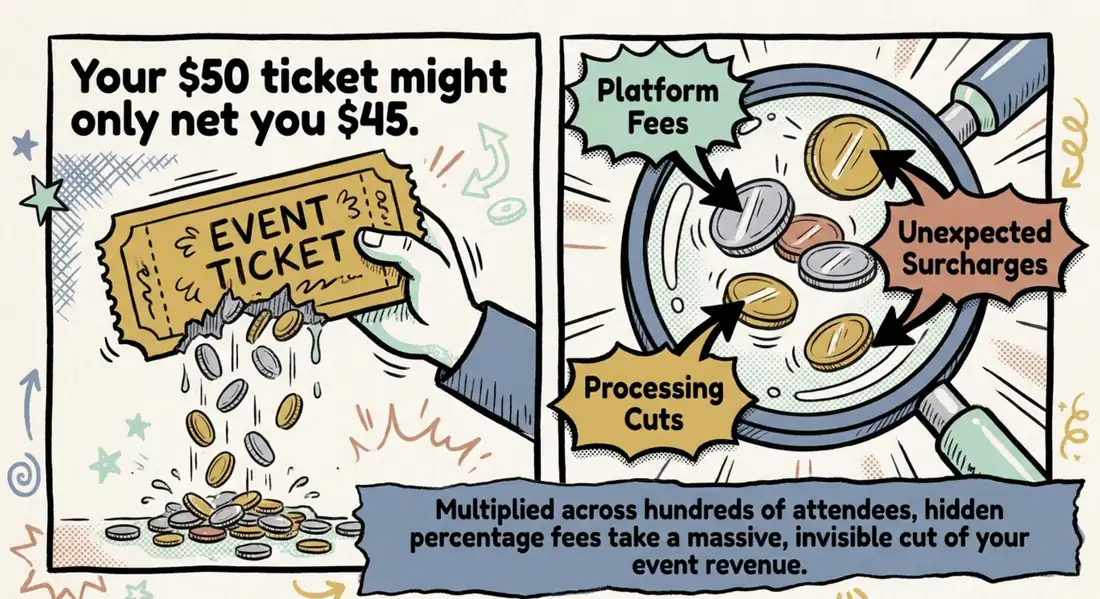
Unexpected charges can also damage attendee trust.
Did you know that a school ticketing company in Virginia Beach confirmed some families overpaid after being charged a 5% fee instead of the contracted 3%? Source: WTKR
In this guide, I'll help you evaluate event ticket pricing software based on the features that actually matter, compare pricing models to understand what you keep from every sale, and work through a real-world fee example for a 300-guest event. We'll also cover how to set up ticket tiers, early-bird pricing, and group discounts, and whether dynamic pricing is worth considering.
What should event ticket pricing software let you do?
The right event ticket pricing software should give you control over three things: how tickets are priced, how discounts are applied, and how revenue is collected and tracked.
For example, you should be able to sell early-bird tickets at a lower price, automatically stop selling them when the allocation runs out, offer group discounts at checkout, and track sales across different ticket categories. Without these controls, you'll end up managing discounts manually, tracking ticket limits in spreadsheets, or reconciling payments separately.
Use the following checklist when comparing platforms or speaking to vendors:
|
Feature to check |
Why it matters |
What to ask the vendor |
|---|---|---|
|
Ticket categories with individual prices and caps |
Lets you create General Admission, VIP, Early Bird, and other tiers, each with its own price and sales limit. |
Can each ticket type have a separate price, capacity, and design? |
|
Early-bird pricing |
Creates a limited-time or limited-quantity offer to encourage early bookings. |
Can early-bird sales close automatically by date or when the allocation sells out? |
|
Promo codes |
Lets you offer targeted discounts to members, partners, sponsors, or specific groups. |
Can promo codes be restricted to selected ticket categories? |
|
Automatic group and bundle discounts |
Applies discounts based on ticket quantity or order value without requiring attendees to enter a code. |
Can discounts be triggered automatically by the number of tickets or total order value? |
|
Seated ticketing |
Helps manage assigned seating and different prices for venue sections. |
Can attendees select seats, and are there additional fees for seated tickets? |
|
Direct payment gateway integration |
Sends ticket payments to your own payment account rather than making you wait for platform payouts. |
Do payments go directly to my Stripe, PayPal, or other connected account? |
|
Transparent pricing |
Helps you calculate costs and forecast revenue before opening sales. |
What will I pay per ticket, including platform and payment processing fees? |
|
Sales reports and exports |
Shows which ticket categories are selling, how much revenue each generates, and how pricing performs. |
Can I export sales, revenue, and ticket quantities by category? |
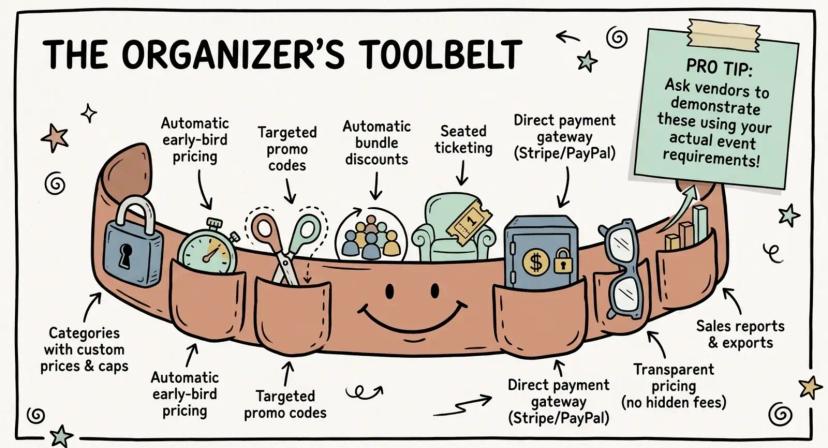
A useful way to evaluate vendors is to ask them to demonstrate these features using your actual event requirements, rather than relying on a generic product demo.
You can also compare the main options in our guide to event ticketing platforms.
One additional consideration for festival and concert organizers: Ask whether the platform supports demand-based pricing. If ticket demand changes significantly as an event approaches, automatically adjusting prices may help maximize revenue. However, not every event needs this feature. The next section explains when dynamic pricing makes sense and when fixed ticket tiers are the better choice.
Pro Tip: Before choosing a platform, give each vendor the same ticket price and ask for the exact amount you'll receive after all applicable fees, including payment processing. This makes pricing comparisons much more meaningful than comparing advertised platform fees alone.
Do you need dynamic ticket pricing software, or are fixed tiers enough?
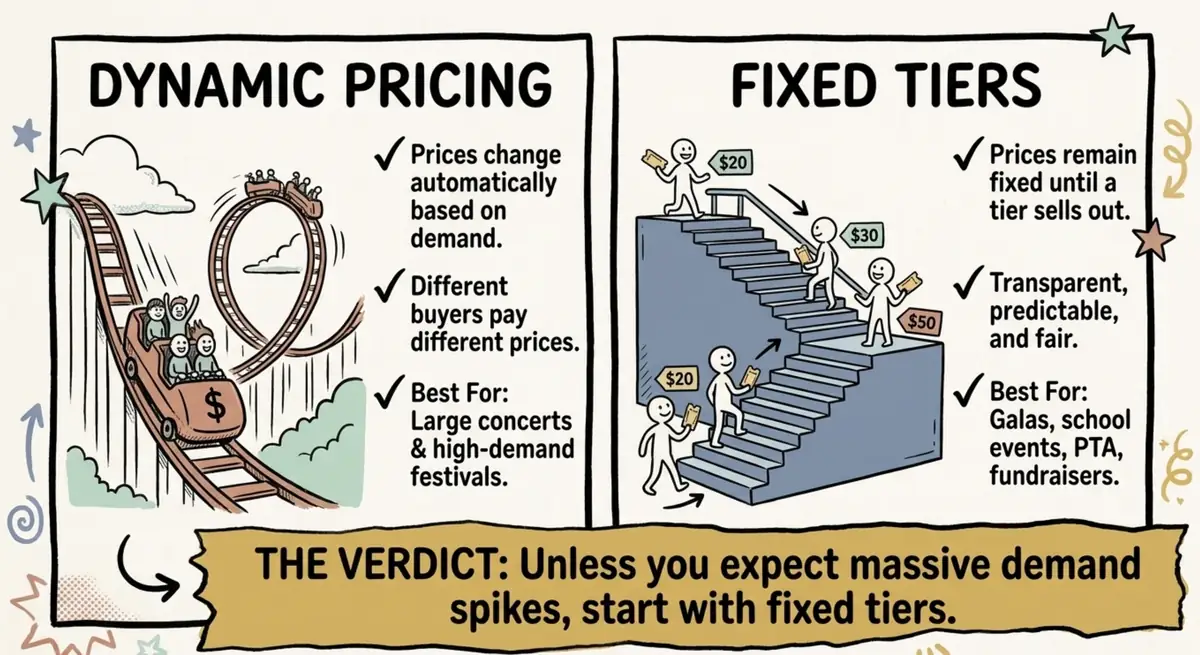
Not every event needs prices that change with demand. If you organize school events, fundraisers, galas, or recurring shows for an audience you already know, fixed ticket tiers are usually easier to manage.
Dynamic pricing automatically adjusts ticket prices based on factors such as demand, remaining inventory, or time until the event. Think of how airline ticket prices change as seats become limited. When demand is high, prices rise. When sales slow down, prices may fall.
This can help organizers capture more revenue from high-demand events. But it comes with a trade-off: buyers may feel they are being treated unfairly when two people pay different prices for the same experience. As TickPick explains, aggressive surge pricing can sacrifice long-term customer loyalty for short-term revenue.
For smaller or recurring events, the additional complexity often isn't worth it. Schools, nonprofits, agencies, and community organizers can usually achieve their pricing goals with three or four fixed tiers:
- Early Bird: A lower price for attendees who book early.
- General Admission: The standard ticket price.
- VIP: A higher-priced option with additional access or benefits.
Give each tier its own price, quantity limit, or sales deadline. This creates urgency without requiring prices to change automatically. Our guide to tiered ticket pricing explains how to structure these tiers.
For large festivals and concerts, however, demand can change considerably between the initial announcement and the event date. If you're selling thousands of tickets and expect demand spikes, dynamic pricing may be worth exploring. Start by understanding what a festival ticketing system needs to handle before deciding whether demand-based pricing is necessary.
Dynamic pricing vs. fixed ticket tiers
|
Factor |
Dynamic pricing |
Fixed tiers |
|---|---|---|
|
Best suited for |
High-demand concerts and festivals |
Galas, school events, fundraisers and recurring shows |
|
How prices work |
Change automatically based on demand or other rules |
Remain fixed until a tier closes or sells out |
|
Buyer experience |
Different buyers may pay different prices |
Prices are transparent and predictable |
|
Management |
Requires pricing rules, monitoring and suitable software |
Set prices and limits once for each tier |
|
Revenue predictability |
Revenue per ticket can vary |
Expected revenue per tier is easier to calculate |
Is dynamic ticket pricing legal in the US?
There is no blanket federal ban on dynamic pricing for live events in the US. However, organizers must comply with applicable federal and state consumer protection and pricing disclosure requirements.
Did you know that the Federal Trade Commission's Rule on Unfair or Deceptive Fees, in effect since May 12, 2025, requires live-event ticket sellers to disclose the total price upfront, including mandatory fees, rather than revealing them only at checkout? Source: TechCrunch
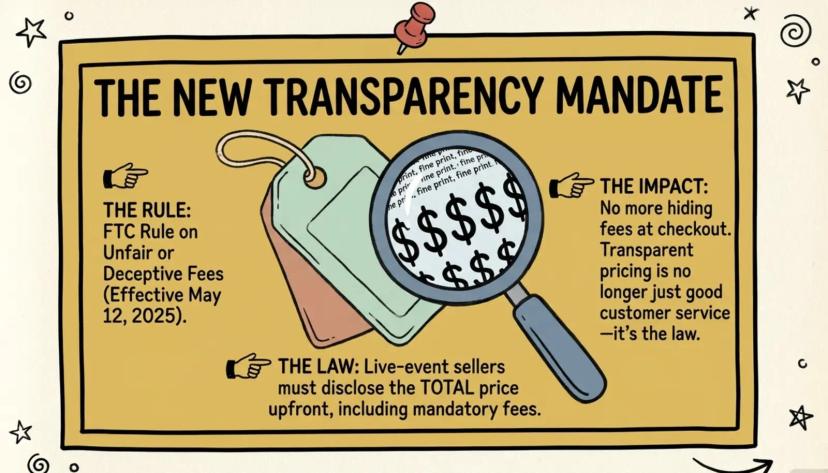
This makes transparent pricing important regardless of whether you use fixed tiers or dynamic pricing. Make sure buyers can see the actual price they will pay before completing their purchase.
The bottom line: Unless your event regularly experiences significant demand fluctuations, start with fixed ticket tiers. They're easier to manage, simpler to communicate, and give attendees more predictable pricing.
But the ticket price isn't the full picture. Platform fees and payment processing costs determine how much of that revenue you actually keep. Let's look at how different pricing models affect your earnings.
What does pricing look like for a 300-guest event?
For a 300-guest gala at USD 100 a ticket, fees land near USD 2,500 on a commission model and about USD 1,100 on credits, with card processing included in both.
Say you run a non-profit gala for 300 guests and absorb the fees so donors pay a round price. TicketSpot puts absorbed fees for a gala this size at USD 900 to USD 1,680, depending on the platform. Here is how two models compare.
|
Line item (USD) |
Commission model (Eventbrite) |
Credits (Ticket Generator) |
|---|---|---|
|
Platform fee per ticket |
5.49 |
0.50 |
|
Processing per ticket |
2.90 |
3.20 |
|
Platform cost for 300 tickets |
1,647 |
150 (3 packs of 100 credits) |
|
Processing for 300 tickets |
870 |
960 |
|
Total fees |
about 2,517 |
about 1,110 |
Assumptions: one ticket per order, Eventbrite's US pricing of 3.7% + USD 1.79 per ticket plus 2.9% card processing, and standard card processing of 2.9% + USD 0.30 on Ticket Generator credits at USD 0.50 each. Rates change, so confirm current pricing before you budget.
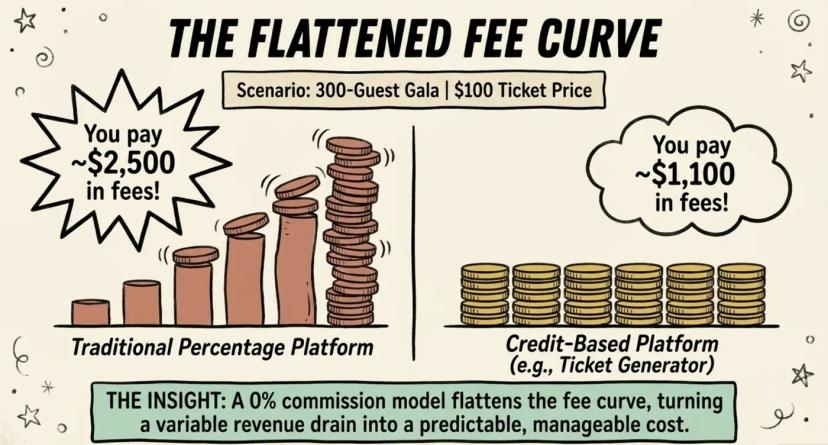
Seated galas use 2 credits per ticket, so 300 seats need 600 credits. That is USD 300 in 100-credit packs, or USD 400 for a 1,000 pack with 400 credits left for next year. Verified non-profits also get 30% off credits.
School events work the same way. A spring play with 500 tickets at USD 10 costs USD 250 in credits. Credits never expire, so if you buy a 1,000 pack instead, the 500 credits you don't use carry over to prom.
The gap grows with your price. A commission takes a share of every dollar, while a credit costs the same on a USD 10 ticket and a USD 100 one.
Prepaid per-ticket tools such as Ticket Tailor land close to the credit numbers, so run your own figures. For setting the price itself, our guide on how to price tickets for an event walks through the steps. Gala teams comparing tools can also read our roundup of event registration platforms for nonprofits.
Once the numbers make sense, the last step is building the tiers and discounts in the tool itself.
How do you set up tiers, early-bird, and group pricing in your ticketing tool?
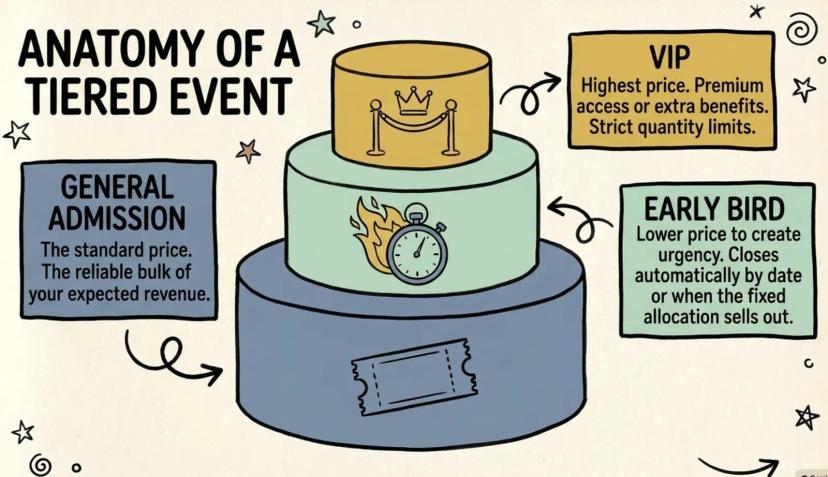
Start by creating a separate ticket category for each price tier, with its own price and sales limit. Then configure discounts for group bookings and decide when early-bird sales should close.
Keep the number of ticket options manageable, since too many choices can overwhelm buyers and make checkout decisions harder (Ticket Fairy).
Follow these steps to configure your pricing:
- Create your event and define the ticket tiers. Add your event name, date, time, and venue. Decide which categories you need, such as Early Bird, General Admission, Student, and VIP.
- Set a price and capacity for each category. Assign each tier its own price and maximum ticket quantity. You can also use different ticket designs to help staff identify VIP, student, and other ticket types during check-in.
- Connect your payment gateway. Integrate your Stripe, PayPal, or Razorpay account so ticket payments reach your account. Complete any required gateway configuration before opening sales.
- Configure discounts and offers. Create automatic discount rules based on ticket quantity or order value. You can also set up bundle offers, such as buy two tickets and get one free, or promo codes that apply only to selected categories.
- Set your early-bird sales limit. Give the early-bird category a fixed allocation so sales stop when all discounted tickets are sold. If you also want a date-based cutoff, close the category when the deadline arrives.
- Test the checkout before publishing. Use the event page's test link to check ticket selection, discount application, payment flow, and confirmation emails before sharing the event with attendees.
- Review your sales and attendance reports. Export the data by ticket category to see how many tickets sold at each price, which offers performed well, and how many attendees checked in.
Need help deciding when to open and close discounted sales? Our guide to early-bird registration covers timing, allocation limits, and strategies for encouraging early bookings.
Pro Tip: Look for a ticketing tool that applies group discounts automatically at checkout. For example, if someone books 10 tickets, the applicable discount should appear without requiring them to find and enter a promo code.
These steps cover the basic pricing setup. But how do you manage them without paying for a complex ticketing suite or manually tracking every sale? Here's how Ticket Generator handles these requirements.
How Ticket Generator handles ticket pricing for known audiences
If you organize recurring galas, school events, fundraisers, or client events, you may not need a marketplace or an enterprise event management suite. You need a straightforward ticketing system that lets you control prices, manage discounts, collect payments, and track sales.
Ticket Generator offers these capabilities through a self-service ticketing platform:
- Predictable per-ticket costs: Buy credits instead of paying a percentage of every ticket sale. Ticket Generator charges 0% commission, and unused credits never expire. You can carry them forward to your next event.
- Payments directly to your account: Connect your own Stripe, PayPal, or Razorpay account. Attendees pay through your gateway, and Ticket Generator never holds your ticket revenue.
- Flexible ticket categories: Create separate Early Bird, General Admission, Student, and VIP categories, each with its own price, design, and capacity limit.
- Automatic discounts and offers: Set up discounts based on ticket quantity or order value, create bundle deals, and issue promo codes for selected ticket categories.
- Exportable sales reports: Download Excel and PDF reports to review ticket sales, revenue, and attendance by category.
Know the limitations before choosing: Ticket Generator does not offer automatic demand-based pricing. You control early-bird availability through ticket limits or by manually closing the category when your sales window ends.
The platform has issued 1M+ tickets across 30,000+ events in 100+ countries, with organizations including UNHCR, the University of Southampton, and NYC Public Schools using its ticketing capabilities.
Conclusion
The right event ticket pricing software should make it easier to control what attendees pay and what your organization earns.
For most events with predictable audiences, fixed ticket tiers, early-bird allocations, and automatic group discounts provide enough flexibility. You don't necessarily need dynamic pricing or an expensive enterprise suite.
Before choosing a platform, compare its pricing controls, calculate your total cost per ticket, and check where your payments go.
If you want predictable per-ticket costs, credits that never expire, and direct payment collection, Ticket Generator is worth considering.
Your event. Your revenue. Your rules.
Ready to set up your ticket pricing? Create your event with Ticket Generator and get your first 10 free credits at signup.
FAQs
What is the best event ticket pricing software for small recurring events?
Look for capped ticket categories, automatic discounts, your own payment gateway, and a flat per-ticket cost. Dynamic pricing is rarely needed for events of 100 to 2,000 guests. Compare tools on what you net per ticket at your price.
Is dynamic pricing illegal in the US?
No, there is no federal ban on dynamic pricing. Since May 12, 2025, the FTC requires live-event prices to show mandatory fees upfront. State rules vary, so check your local law.
Is there a ticketing app with no fees?
Not really, because someone always pays card processing. Tools without a commission charge a small fixed amount per ticket instead of a percentage. Our list of best low fee ticketing sites compares the options.
Can I pass ticketing fees on to buyers?
Most tools let you, but buyers notice added charges at checkout. With no platform fee on the buyer, only card processing is left to decide on.
Does Ticket Generator support early-bird and group pricing?
Yes. It uses ticket categories with their own price and cap, automatic discount rules, bundle deals, and promo codes. It does not switch prices automatically by date, so you close early-bird by cap or by hand.
About the author
Content Marketer at Ticket Generator
Ashish Chandra has spent 5+ years writing about event technology, covering topics such as ticket design, QR check-ins, attendee management, and event marketing strategy. As the Content Lead at Ticket Generator, Ashish has analyzed hundreds of real-world event workflows and ticketing setups, helping organizers across industries use QR-based tickets, event landing pages, and smarter ticketing systems to run smoother, better-attended events. His writing is shaped by real user needs and the questions organizers ask most often: How do I sell more tickets? How do I avoid chaos at the door? How do I make my next event better than my last? When he steps away from the screen, you'll likely find him hiking a quiet trail or tending his plants- his preferred way to reset.
Related articles
Keep reading: more guides on the same topic
 10 min read
Hybrid Events Platform: How to Run One Event for In-Person and Virtual Guests
A hybrid events platform lets you run one event for both in-person and virtual attendees. Here's what a good one does and how to ticket and check in both audiences without doubling your workload.
Ashish Chandra
28 Oct 2026
 17 min read
Sports Tournament Event Ticketing: What Organizers Need to Know
Sell tournament tickets online, check in every ticket on a phone, and see what each pricing model costs for one tournament.
Ashish Chandra
28 Oct 2026
 9 min read
Ticketmaster Reserved Seating: How It Works and a Better Fit for Smaller Events
Ticketmaster reserved seating works well for arenas. If you run a theatre, gala, or mid-size show, see how it works, what it costs, and how to switch.
Ashish Chandra
16 Oct 2026
Latest posts
Check out our latest articles on the blog
 13 min read
Fundraising Event Management Software: How Much of Your Donations Do You Keep?
Your gala should raise money for your cause, not lose it to event fees. Compare fundraising software pricing, uncover hidden costs, and find the right fit for your nonprofit.
Ashish Chandra
16 Nov 2026
13 min readHow to Choose Event Ticket Pricing Software That Lets You Keep More of Every Ticket
Pick ticketing software on pricing controls and net per ticket, not headline fees. A feature checklist, fee math, a 300-guest example, and setup steps.
Ashish Chandra
16 Nov 2026
 14 min read
Hanukkah Party Ideas: 11 Fun Themes, Food, Games and a Plan for 2026
Eleven Hanukkah party ideas, from a classic candlelight dinner to a TV-themed heist night, plus décor, food, a countdown plan and an easy way to handle RSVPs and check-in.
Ashish Chandra
16 Nov 2026