

Sports Tournament Event Ticketing: What Organizers Need to Know
 Written byAshish ChandraLast updatedOctober 28, 2026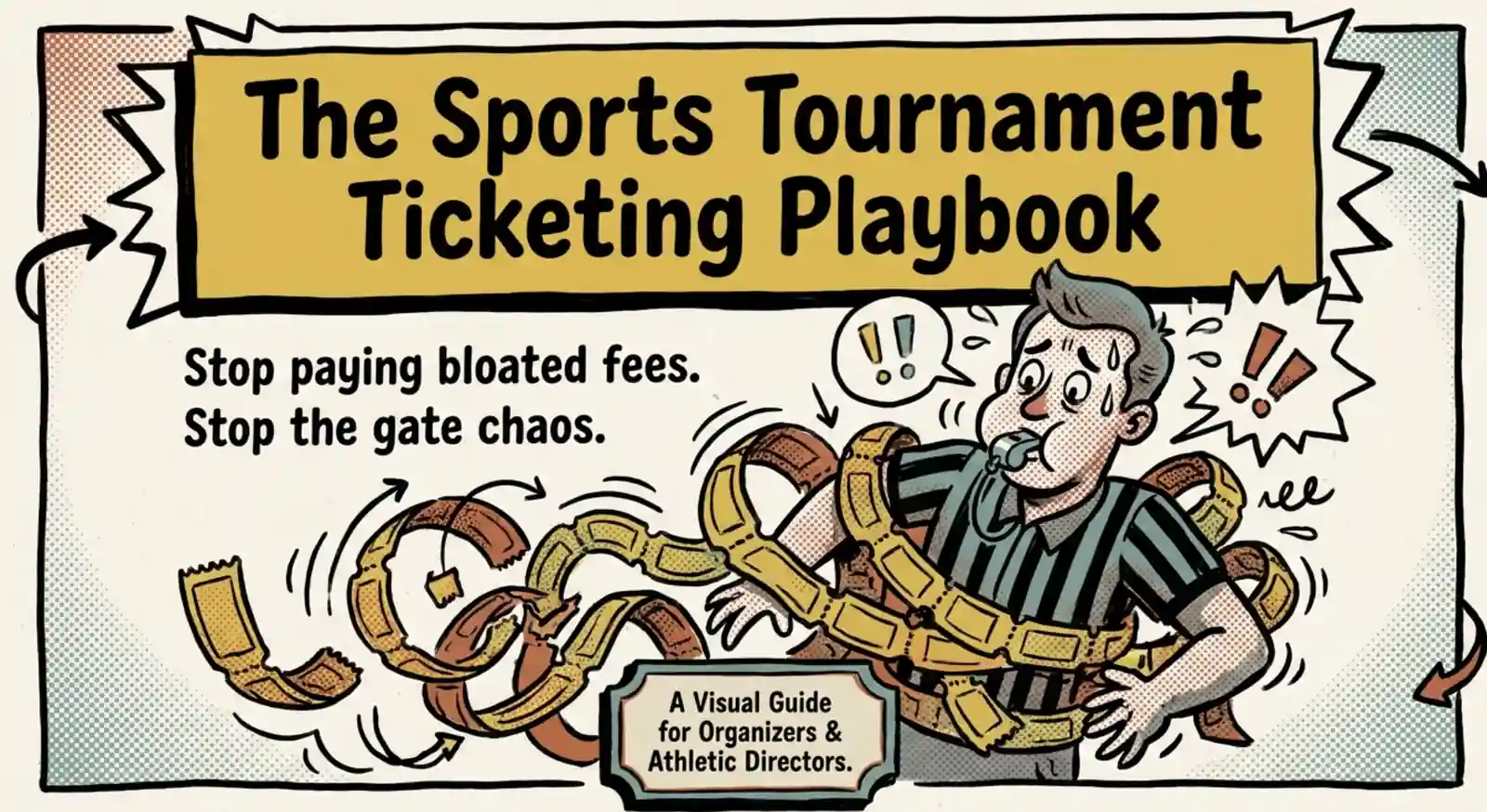
Key Takeaways:
- An event ticketing platform for sports tournaments should let you sell tickets online, handle multi-day entry, and check in visitors right from a phone.
- Say you sell 800 passes at USD 10. Eventbrite's US service fee works out to about USD 1,728. TicketSpice comes to USD 792. With Ticket Generator, you buy a USD 400 credit pack, spend 800 credits on this tournament, and keep 200 for the next one. Payment processing is extra in all three cases.
- Platforms that let you "pass fees to the attendee" do not remove the cost. They move it to families who are already paying 46% more for youth sports than they did five years ago.
- Offer day and weekend passes so families who attend for several days don't have to pay twice.
- Check the refund policy before you take money for an outdoor tournament. Some platforms keep their service fee even when the event is canceled.
- Volunteers can check tickets on their own phones at every entrance, and Ticket Generator flags duplicate passes.
- Copy your event setup for the next tournament instead of rebuilding it.
It's Saturday morning. Your sports tournament is about to start, and a line of parents is waiting at the gate. One volunteer is collecting cash. Another is handing out wristbands. Some families are buying passes for the second day, while others are asking why online tickets cost more than expected.
When you're running a sports tournament, ticketing should not add to the workload or eat into your budget. The right event ticketing platform for sports tournaments helps you sell tickets and weekend passes online, check in visitors using a phone, and keep ticketing fees under control.
This matters because families already spend a lot on youth sports. The Aspen Institute's Project Play survey found that US families spent an average of USD 1,016 on their child's primary sport in 2024. That was a 46% increase since 2019 (Project Play, 2025). Team fees, travel, and private training all add to the cost. Extra ticket fees are another expense families may question.
For organizers, those fees matter too. Every dollar spent on ticketing is a dollar less for equipment, referees, facilities, or the next tournament. That's why it helps to choose a platform with clear pricing, passes that cover multi-day events, and a check-in that works on any phone without needing extra hardware.
If you're comparing different tools, our guide to event ticketing platforms covers the wider market.
In this guide, I'll cover what tournament ticketing really costs, what happens to your fees if the event is rained out, the features your tournament actually needs, how to sell weekend passes, how to run check-in across several entrances, and how to reuse the whole setup next season. Let's start with the money, because that's usually what decides it.
What do sports ticketing systems really cost per tournament?
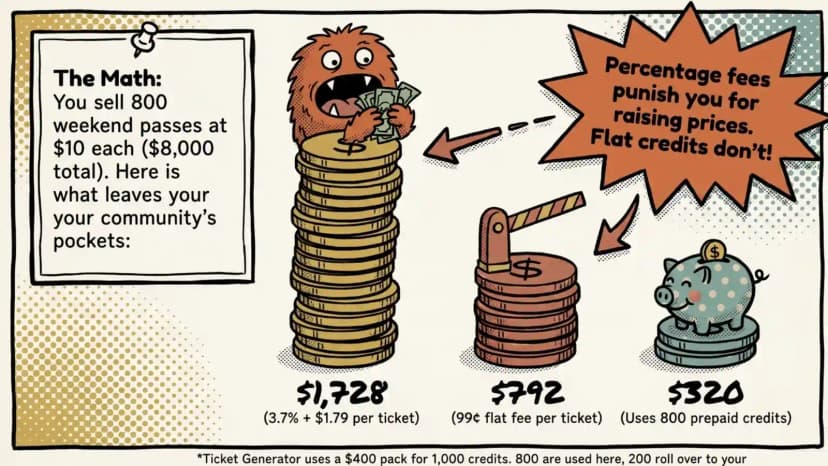
Sports ticketing platforms usually charge in one of three ways: a percentage of each sale as commission, a fixed fee per ticket, or prepaid credits. Payment processing fees apply on top in every case.
Let's say you sell 800 passes at USD 10 each, bringing in USD 8,000 before fees. Here's how the costs compare.
- Eventbrite: Its US pricing page lists a service fee of 3.7% plus USD 1.79 per ticket, along with 2.9% payment processing per order (Eventbrite pricing, checked October 27, 2026). Rates vary by country and plan tier, so check the figure that applies to you. At these rates, the service fee is about USD 1,728 for 800 passes, before payment processing.
- TicketSpice: It charges USD 0.99 per ticket, plus payment processing at 2.9% and USD 0.30 per transaction (TicketSpice pricing, checked October 27, 2026). That works out to USD 792 in ticket fees for 800 passes, before processing.
- Ticket Generator: It uses prepaid credits, where one credit covers one ticket. The smallest pack that covers this tournament is 1,000 credits at USD 400. You pay USD 400 up front, 800 credits go to this event, and the remaining 200 stay in your account for the next one, because credits don't expire. Payment processing runs through your own provider.
Compare like for like: USD 400 is the money that leaves your account, and USD 320 is what this one tournament consumes. Either way you're well under the commission model, and the gap widens as ticket prices rise. A percentage fee grows every time you raise the ticket price. A credit doesn't.
|
Model |
Platform |
Fee on 800 passes at $10 (USD) |
Who pays the fee |
Payout |
|---|---|---|---|---|
|
Commission + per ticket |
Eventbrite |
$1,728 service fee, plus 2.9% processing |
Organizer or family (your choice) |
Collected by the platform, then paid out |
|
Flat per ticket |
TicketSpice |
$792 ticket fee, plus 2.9% + 30¢ processing |
Organizer or family (your choice) |
Fees deducted before deposit |
|
Prepaid credits |
Ticket Generator |
$400 credit pack (800 used, 200 banked), 0% commission, plus your gateway's processing |
Organizer, upfront |
Straight to your Stripe, PayPal or Razorpay |
Who actually pays the ticket fee?
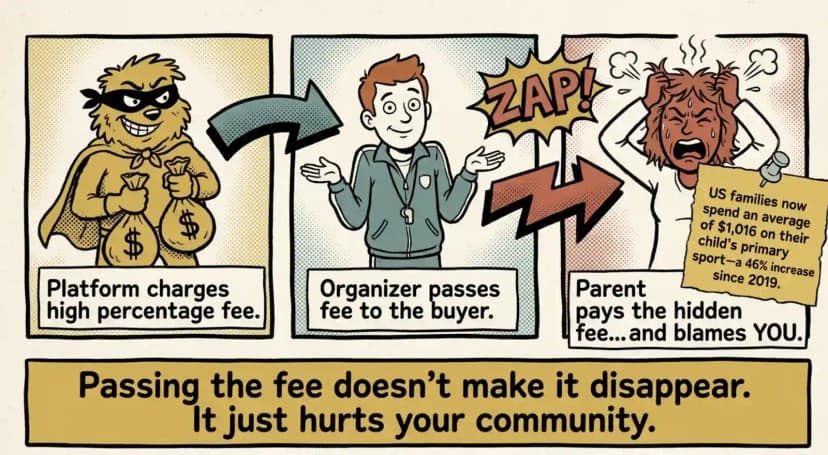
Most platforms let you add their fee to the buyer's total instead of absorbing it. On paper, that makes ticketing free for you. In practice, it turns a USD 10 pass into roughly USD 12.50 at checkout, and the family sees that breakdown before they pay.
That matters more at a youth tournament than almost anywhere else. Those same families already spent an average of USD 1,016 on their child's primary sport in 2024. A parent buying six day passes for two kids over three days notices roughly USD 15 in booking fees, and they tend to blame the organizer, not the platform.
So the real question isn't whether you pay the fee. It's whether anyone in your community has to.
To be fair, each model exists for a reason. Eventbrite brings marketplace discovery, which genuinely helps when strangers need to find your event. Tournament crowds are different: they're families who already know when and where to show up. You'd be paying a discovery fee to reach an audience you already have.
For more fee comparisons, see our list of ticketing platforms with the lowest ticket fees.
Pro Tip: Buy credits once for the season. Credits in Ticket Generator never expire, so leftovers carry to the spring tournament. Ticket money goes straight to your own Stripe account, not through a middleman.
What happens to your fees if the tournament is rained out?
Ask before you take a single payment, because the answer varies and it's expensive to find out late. Some platforms refund the ticket price to the family but keep their own service fee. That means a canceled tournament can still cost you real money.
Run it on the same numbers. You sold 800 passes at USD 10 and the forecast turns. You refund USD 8,000 to families, and if the platform's service fee is non-refundable, you absorb that on top, a four-figure loss on an event that never happened.
Prepaid credits behave differently. Credits are spent when tickets are issued, so they don't come back either, but they don't expire and they don't leave your account. The value sits there waiting for the rescheduled date instead of going to a vendor.
Three questions worth asking any vendor before an outdoor event:
- If I cancel, do I get your service fee back, or only the ticket price?
- Can I reschedule the event and keep the tickets already issued valid?
- Do refunds go out through you or through the platform, and how long do they take?
Pro Tip: Put your weather policy on the ticket page before sales open. A line like "Rain date: Sunday, same tickets valid" stops most refund requests from ever being made.
What should an event ticketing platform for sports tournaments handle?
Your platform should send ticket sales directly to your own account, support single-day, multi-day, and weekend passes, and keep entry moving so the gate doesn't back up.
It should also support re-entry and charge a fixed fee per ticket. Otherwise, you're back to managing cash at the gate.
Youth sports tournaments need different tools than professional stadium events. Stadium platforms are built around season memberships, dynamic pricing, and seat maps. A three-day youth volleyball tournament needs something simpler: easy passes, clear fees, and a scanner that volunteers can learn to use in minutes.
For example, a school hosting a two-day basketball tournament needs to sell tickets before the event, check tickets at multiple entrances on game day, and collect payments without managing everything manually.
The right platform should make all three tasks simple. Here's what to look for:
|
What to look for |
Why it matters |
What to ask the vendor |
|---|---|---|
|
Payments to your own account |
You stay in control of ticket revenue and payouts. |
Do ticket payments go directly to my Stripe or PayPal account? |
|
Day and weekend passes |
Families can buy one pass for a single day or the full tournament. |
Can one pass cover all three days of the event? |
|
Phone-based scanning and re-entry |
Volunteers can check tickets without extra equipment. Visitors can leave and return when allowed. |
Can staff scan tickets on their own phones? Can visitors re-enter after leaving? |
|
Fixed fees per ticket |
You know your ticketing costs before sales begin. |
How much do I pay per ticket? Are there any commissions or extra fees? |
|
Clear cancellation terms |
A canceled tournament shouldn't still cost you the platform's fee. |
If I cancel, is your service fee refunded or only the ticket price? |
|
Online and box office sales |
You can sell tickets online and at the venue without managing two separate systems. |
Do online and on-site sales update the same ticket inventory in real time? |
|
A dedicated ticket page |
Families can find your event and buy tickets without confusion. |
Can I create a branded page just for my tournament, without listings for other events? |
One thing to check: If you sell tickets both online and at the gate, make sure both channels share the same live inventory. When a volunteer sells the last weekend pass at the box office, the online system should update automatically. This prevents overselling and removes the need to reconcile sales records after the event.
If you want a broader look at tools for leagues and venues, see this overview of sports ticketing software.
How do you sell day and weekend passes without making families pay twice?
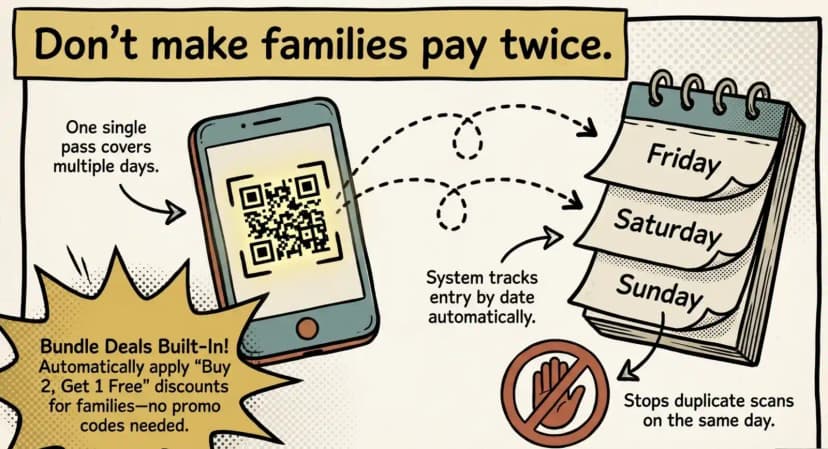
Create a separate ticket type for each visit option. Families can buy a pass for one day or the full tournament. Your check-in system tracks entry by date, so a weekend pass works once each day without requiring a new ticket.
A family attending a three-day volleyball tournament shouldn't have to buy a new ticket every morning. One weekend pass covers all three days, and the system still stops someone using the same pass to enter twice on the same day.
Set up ticket categories for your tournament
In Ticket Generator you can add multiple ticket categories to one event and give each category its own design. A three-day youth volleyball tournament could have:
- Day pass: For spectators attending on a specific day. State the valid date in the ticket details.
- Weekend pass: For families attending across multiple days. State which dates the pass covers.
- Team or group tickets: Create a category for group bookings, or issue tickets in bulk to teams and families.
- Coach and staff tickets: Use a separate category and ticket design so volunteers can identify authorized staff at a glance.
Keeping these categories in one event makes ticket management simpler, and distinct designs mean volunteers can tell ticket types apart without asking.
For a closer look at how multi-day passes work at larger events, see our guide to a multi-day event ticketing system.
Use bundle deals to sell more tickets
If families are attending together or teams want to bring more supporters, offers can encourage them to buy more tickets in one order. Ticket Generator supports three types:
- Promo codes: Give families a code such as EARLYBIRD20 for a fixed or percentage discount on selected ticket categories.
- Discount rules: Apply an automatic discount when an order reaches a minimum value or quantity, for example 10% off five or more eligible tickets.
- Bundle deals: Reward larger purchases with a deal such as Buy 2 Tickets, Get 1 Free. You choose which categories qualify and set usage limits.
Discount rules and bundle deals apply automatically when an order meets the conditions, so families don't need to enter a code.
Pro Tip: Keep group offers simple. Buy 2, Get 1 Free works well for spectator tickets, while a volume discount suits teams buying passes for several families. Check your prices and margins before launching an offer.
How do you run check-ins across several fields with volunteers?
Assign one volunteer to each entrance. They scan QR Code tickets on their own phones, and every check-in is recorded against the event.
A sports tournament ticketing system should let you manage entry across several fields without juggling paper lists. Here's how to set it up.
- List your entrances. Identify every field, court, or gym door where spectators enter. Assign a scanner to each one.
- Add your volunteers. Give each volunteer scan-only access so they can check tickets without seeing billing or other events.
- Test before game day. Use sample tickets to let volunteers practice scanning before the gates open.
- Prepare for on-site sales. Some families arrive without tickets. Take payment at the gate and issue tickets on the spot using Direct Ticketing.
- Track attendance. Monitor check-ins as tickets are scanned, then export attendance reports in Excel or PDF.
Scanning needs an internet connection, so check Wi-Fi or mobile data coverage at every entrance before the first game. Our guide to event check-in software explains more ways to manage entry.
You also need to protect against fake or reused tickets. Each Ticket Generator ticket carries a unique QR Code and Ticket ID, so scanning flags invalid tickets and duplicate entries. Learn more about how a QR Code ticket generator helps secure event entry.
Pro Tip: Never share your admin password with volunteers. In Ticket Generator, assign coordinators scan-only access so multiple volunteers can check tickets on their own phones.
How do you set up a tournament ticket page and reuse it for every event?
You don't need to build a new ticket page for every tournament. Set up your first event in Ticket Generator, publish the ticket page, and reuse the setup, updating the dates, prices, and quantities each time.
A dedicated ticket page also gives families one clear place to buy passes. Share the link in team emails, on social media, and through your school or club website.
Set up your ticket page in three steps
Step 1: Create the event and turn on paid ticketing. Log in to Ticket Generator, select Create New Event, and enter the tournament name, dates, timings, venue, and ticket activation time. These details print on the tickets, so check them. Then choose paid registration and connect your Stripe, PayPal, or Razorpay account.
Step 2: Add your ticket categories and design them. Create the categories your tournament needs (day pass, weekend pass, spectator, coach) and set a price and available quantity for each. Give each category its own design or add your school or club logo so volunteers can tell them apart at the gate.
Step 3: Test, publish, and track. Run a test purchase using the test link, publish the event page, and share the URL through your usual channels. Then watch sales from the event dashboard.
For the click-by-click version, see our guide to an online ticketing system.
Reuse the setup for your next tournament
Once your first event is ready, copy it instead of rebuilding. Update the event details, dates, prices, and ticket quantities, then publish.
Pro Tip: Keep a standard setup for your season, but check every copied event before publishing. Old dates, prices, or ticket limits confuse families if you forget to update them.
How Ticket Generator handles sports tournament ticketing
NYC Public Schools runs its events on Ticket Generator. That's the same shape of problem a school athletic director has: lots of events, lots of volunteers, and no appetite for a ticketing contract. Across all customers, the platform has issued over 1 million tickets at more than 30,000 events in 100+ countries.
It handles ticket sales, payments, and check-in without the complexity of the large sports ticketing systems built for stadiums, and your event gets its own ticket page so families aren't distracted by other listings. Here's how the features map to a tournament:
- Keep ticketing costs predictable: Prepaid credits, one credit per ticket. Credits never expire, there's no subscription, and there's no ticketing commission.
- Collect payments directly: Connect your own Stripe, PayPal, or Razorpay account, so ticket money goes through your provider rather than being held by us.
- Organize different ticket types: Categories for day passes, weekend passes, spectators, and coaches, each with its own ticket design.
- Encourage group bookings: Promo codes, automatic discount rules, and bundle deals such as Buy 2 Tickets, Get 1 Free.
- Manage entry across multiple fields: Coordinators scan on their own phones, invalid and duplicate tickets are flagged, and attendance is tracked live.
- Sell online and at the venue: Run the online event page alongside on-site ticketing, with availability synchronized across both.
- Reuse your setup: Duplicate an existing event, then update the dates, prices, and quantities for the next tournament.
Conclusion
Running a smooth sports tournament comes down to four things: knowing your ticketing costs, knowing what happens if you cancel, offering the right ticket options, and keeping entry organized.
Compare the fees before choosing a platform. Selling 800 passes at USD 10 can cost hundreds of dollars more on one pricing model than another, so check who ends up paying that fee. Ask what happens to it if the weather turns. Offer day and weekend passes so families can choose how they attend. Then give volunteers the tools to check tickets quickly at every entrance.
The result? Less time handling cash, fewer queues at the gate, and a setup you can reuse for future tournaments.
If you're running one small scrimmage with 30 spectators, a dedicated platform may be more than you need. But if you organize several tournaments each season, a reliable ticketing system saves time and controls costs. Your tournament, your revenue, your rules.
FAQs
What is the best event ticketing platform for sports tournaments?
The best fit charges a fixed cost per ticket and pays you directly. It should also sell multi-day passes and scan on volunteer phones. Stadium platforms are built for pro clubs, so they're usually too heavy for a weekend tournament.
How much does a ticketing system cost for a youth tournament?
It depends on the pricing model. On 800 passes at USD 10, Eventbrite's US service fee comes to about USD 1,728, and TicketSpice's to USD 792. Ticket Generator uses a USD 400 credit pack, of which 800 credits cover this event, and 200 carry forward. Card processing is added on top in every case.
What happens to ticket fees if the tournament is canceled?
It depends on the platform, so ask first. Several keep their service fee even after you refund the family, which means a rained-out tournament can still cost you money. With prepaid credits, there's no commission to lose, and credits you haven't used stay in your account for the rescheduled date.
Is there free sports ticketing software?
Some tools are free for the organizer but add a service fee to each family's order. The cost still exists; it just moves to parents. Check who pays before you choose.
Can families buy tickets at the gate?
Yes. Take payment at a walk-up desk, then issue the ticket on the spot with Direct Ticketing. The family gets a QR Code pass that scans like any other.
Does Ticket Generator scan without internet?
No. Ticket validation needs an internet connection. Plan a phone hotspot or venue Wi-Fi at each entrance before the first game.
About the author
Content Marketer at Ticket Generator
Ashish Chandra has spent 5+ years writing about event technology, covering topics such as ticket design, QR check-ins, attendee management, and event marketing strategy. As the Content Lead at Ticket Generator, Ashish has analyzed hundreds of real-world event workflows and ticketing setups, helping organizers across industries use QR-based tickets, event landing pages, and smarter ticketing systems to run smoother, better-attended events. His writing is shaped by real user needs and the questions organizers ask most often: How do I sell more tickets? How do I avoid chaos at the door? How do I make my next event better than my last? When he steps away from the screen, you'll likely find him hiking a quiet trail or tending his plants- his preferred way to reset.
Latest posts
Check out our latest articles on the blog
 10 min read
Hybrid Events Platform: How to Run One Event for In-Person and Virtual Guests
A hybrid events platform lets you run one event for both in-person and virtual attendees. Here's what a good one does and how to ticket and check in both audiences without doubling your workload.
Ashish Chandra
28 Oct 2026
17 min readSports Tournament Event Ticketing: What Organizers Need to Know
Sell tournament tickets online, check in every ticket on a phone, and see what each pricing model costs for one tournament.
Ashish Chandra
28 Oct 2026
 10 min read
Halloween Masquerade Ball: How to Host a Night of Masks and Mystery
From Venetian-inspired masks to QR-coded entry, here is your complete guide to planning a Halloween masquerade ball your guests will talk about for years.
Ashish Chandra
28 Oct 2026