

Event Email Marketing: The Complete Timeline, Sequence, and Deliverability Guide
 Written byAshish ChandraLast updatedSeptember 17, 2026
Key Takeaways:
- Event email marketing is the dated sequence of emails that fills, runs, and closes out a single event, so it works in bursts rather than on a weekly newsletter rhythm.
- The timeline is the strategy. Ten sends from announcement to post event survey, each with exactly one job.
- Most event campaigns fail on deliverability, not on copy. Cold lists and unauthenticated sending domains are the usual cause.
- Google and Yahoo have required SPF, DKIM, and DMARC from bulk senders since February 2024, and Apple Mail Privacy Protection has made open rate unreliable since 2021.
- Ticket Generator includes Campaigns, so your registration data and your email sequence sit in one place instead of two.
I have watched more event campaigns die in a spam folder than in a copy review. The subject lines were fine. The offer was fine. The problem was that the organizer had not emailed the list in eleven months, was sending from a domain with no history, and pushed 9,000 messages out three weeks before doors. Nothing about that send looked legitimate to a mailbox provider, so much of it never reached an inbox.
That is the honest starting point. This is a sequence of emails that fills, runs, and closes out a single dated event, and it behaves nothing like the weekly newsletter most email advice is written for. You send in bursts. Your list goes cold between events. Your deadline cannot move.
This guide covers the full send timeline, annotated examples of the sends that work, the triggers worth automating, and deliverability in depth. It also shows how to size a campaign backwards from an attendance target, what changes when you send for a client, and how to choose a tool without overbuying. Email is one channel in a bigger campaign, and if you are building that out from scratch, our wider guide to event marketing covers how it fits alongside paid, social, and on site promotion.
What is event email marketing, and how is it different from regular email marketing?
Event email marketing is the planned sequence of emails that takes a person from never having heard of your event to walking through the door and answering your survey afterwards. Regular email marketing optimizes for a repeating relationship. Event email optimizes for a single date that will not move.
Four differences follow from that, and each one changes what you should do:
- You send in bursts, not on a drumbeat. A retail brand sends fifty times a year and builds reputation steadily. You might send nine times in ten weeks, then nothing for six months. Mailbox providers read that pattern as suspicious unless you manage it deliberately.
- Your list goes cold between events. A list that was engaged last October is stale by June. Engagement decay is the biggest single input into whether your next campaign lands.
- Your deadline is real. There is no "we will catch them next month." If the early bird push slips a week, that week is gone. This is why the calendar, not the copy, is the strategy.
- Your success metric is attendance, not clicks. A campaign with beautiful click rates and a 40 percent no show rate has failed. The emails after registration matter as much as the ones before it.
You are not running a newsletter with a deadline attached. You are running a short, high stakes campaign from a standing start, and sequencing is the discipline that makes it work.
What does the email timeline for an event actually look like?
The timeline below is the spine of every campaign I have run. Ten sends, each with one job, mapped against a twelve week runway. If your runway is shorter, you compress the middle, never the ends.
|
When |
The email |
Its one job |
What ruins it |
|---|---|---|---|
|
10 to 12 weeks out |
Save the date |
Get the date into a calendar. Nothing else |
Asking for a purchase before anyone knows what the event is |
|
8 to 10 weeks out |
Early bird opens |
Convert your warmest segment at a real discount |
A deadline you later extend |
|
6 to 8 weeks out |
Agenda or speaker reveal |
Give the undecided a concrete reason |
Urgency language. This send earns attention with substance |
|
4 to 5 weeks out |
Early bird closing |
Force the decision. Send twice, at 72 hours and 12 hours |
Only one reminder. The 12 hour send usually wins |
|
2 to 3 weeks out |
Main registration push, segmented |
Volume. Your largest send |
One identical message to openers and dormant contacts alike |
|
7 to 10 days out |
Last call with social proof |
Move fence sitters by naming who is coming |
Vague claims. Name real companies or speakers |
|
48 to 72 hours out |
Know before you go |
Cut no shows. Ticket, venue, parking, timings |
Burying the ticket under three paragraphs of housekeeping |
|
Morning of |
Day of logistics and ticket resend |
Get registered people through the door |
Anything longer than a phone screen |
|
Within 24 to 48 hours after |
Thank you |
Close the loop while the event is warm |
Sending it a week later, after goodwill evaporates |
|
3 to 5 days after |
Survey and next event teaser |
Feed the next cycle |
Asking for feedback and a purchase in one breath |
Twelve week runway shown. On a four week runway keep the save the date, one registration push, the know before you go, the day of send, and the thank you. Drop the rest rather than stacking five emails into ten days.
Two rows deserve a note. The early bird closing pair is usually the highest converting moment in the sequence, because it is the only point where a genuine deadline exists. The mechanics of tiers and cutoffs are covered in our guide to early bird registration. The thank you send is the one organizers skip most often and regret most often, and we have a full breakdown with copy in the thank you email after a successful event.
Notice what the timeline is not: ten chances to say the same thing. Each send has a different job, so each one gives a reader a different reason to open it. That is what stops a burst campaign from reading like nagging.
What do strong event email marketing examples look like?
Good event emails are short, have one job, and put the action above the fold. Here are four sends from the timeline with the reasoning attached, so you can see what the structure is doing rather than copy the words.
1. The save the date
Subject: March 14. Put it in your calendar.
Body: Three lines. What the event is, who it is for, the date and city. One button: "Add to calendar." No registration link at all.
Why it works: The ask is so small that almost nobody refuses, and a calendar entry is far stickier than an email in an archive. It also does quiet deliverability work. This is your first send to a possibly cold list, and a low ask produces high engagement and low complaints, which is exactly the signal you want before the bigger sends.
2. The early bird closing, 12 hour version
Subject: Early bird ends tonight at 11:59
Body: One sentence stating the price now and the price tomorrow. The button. A one line reminder of what is included. Nothing else.
Why it works: The deadline is arithmetic, not adjectives. Two numbers do the persuading. Sending at 12 hours rather than 72 catches the people who read the first reminder, meant to act, and forgot. It rests on the rule most organizers break: when the clock hits zero, the price actually changes.
3. The know before you go
Subject: Your ticket and everything you need for Saturday
Body: QR ticket first, immediately visible. Then doors time, address with a map link, parking or transit, what to bring, and a named contact for problems.
Why it works: It cuts no shows more reliably than any promotional email in the sequence, because most no shows are friction rather than second thoughts. Someone who cannot find their ticket at 8am on a Saturday does not email you, they stay home. Putting the scannable ticket above the logistics is the highest impact formatting decision in the campaign.
4. The post event survey
Subject: Two questions about Saturday
Body: A genuine thank you, then two questions, then the honest promise that it takes ninety seconds. The next event teaser sits at the very bottom, clearly separated.
Why it works: The subject line makes a specific promise about effort and the body keeps it. Two answered questions beat twelve abandoned ones. Keeping the teaser visually separate matters, because mixing a favour and a sale in one paragraph makes the favour feel like bait. For question wording, we have a set in post event survey questions.
Pro Tip: Write the "know before you go" email before you write the launch email. It forces you to confirm doors time, parking, and accessibility while there is still time to fix them. Ticket Generator includes the digital ticket link in every ticket email, so attendees can open their scannable ticket straight from their inbox instead of hunting for a PDF.
What is event triggered email marketing, and what should you automate?
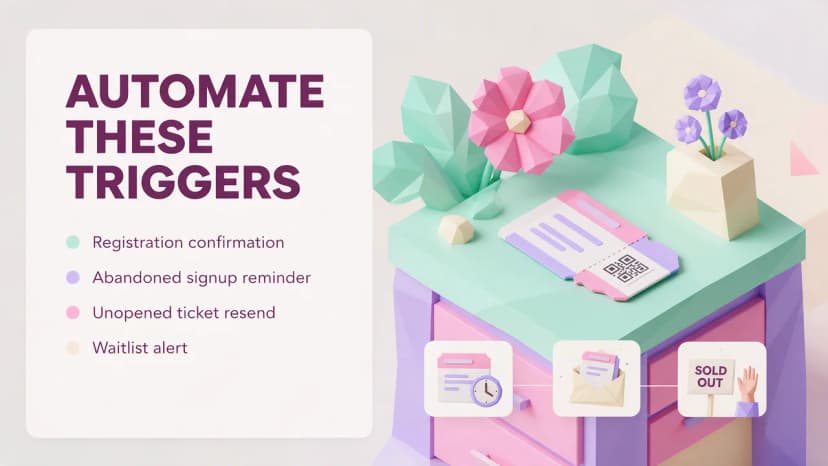
Event triggered email marketing means sending off what a person actually did rather than off the calendar. The timeline covers everyone at once. Triggers cover the individual, and that is where the real lift sits, because a message that arrives because of something you just did beats one that arrives because it is Tuesday.
The triggers worth building, in the order I would build them:
- Registration confirmation with the ticket attached. Non negotiable, and it should fire within seconds. A delayed confirmation generates support email at a rate that will surprise you.
- Abandoned registration. Someone opened the form, entered an email, and stopped. One reminder within 24 hours, naming the event, with the form prefilled if your platform allows it.
- Ticket issued but never opened. If delivery tracking shows a ticket sent but never viewed, resend it two days out through a second channel.
- Registered but did not attend last time. They already said yes once and something got in the way. Asking about it directly works better than pretending the history does not exist.
- Early bird deadline approaching, per person. Fire it to people who clicked pricing but did not complete, not to the whole list.
- Waitlist and sold out signals. Anyone who tried to register after capacity was reached is the highest intent contact you will ever have. Tag them and mail them first next time.
A note on terminology, because it causes real confusion. In the wider marketing world "event based email" usually means ecommerce automation firing off in app actions, which is a different discipline. Search for event triggered email marketing instead, because that is the term that returns advice about actual events.
None of this needs an enterprise automation platform. Ticket Generator's Campaigns supports multi step, trigger based sequences directly, and its Zapier integration fires on guest registered, ticket generated, ticket sent, and event started, which covers most of the list above without custom development.
How do you build an event email list that survives between events?
A list survives the gap between events when you know where every name came from and you keep mailing the good sources on a light schedule instead of going dark for six months. Provenance is not a compliance detail. It is the strongest predictor of whether a campaign lands.
Here is how I grade the sources that end up in an event list:
|
Where the contact came from |
Consent quality |
How to treat it |
|---|---|---|
|
Past attendees, from registration or ticket data |
Strong and documented |
Mail first in every campaign. They anchor engagement and protect the rest of the send |
|
Website or landing page opt in |
Strong |
Mail early, expect lower intent than past attendees, segment separately |
|
Registered but did not attend |
Strong |
Its own segment. Different message, still valuable |
|
Waitlist or sold out signups |
Strong and high intent |
Your best segment next time. Mail them before you announce publicly |
|
Sponsor or partner audience |
Not yours |
Have the partner send to their own list with your copy. Do not import it |
|
Badge scans at a trade booth |
Mixed, depending what you said at the scan |
Ask permission out loud, then mail within two weeks while they remember you |
|
Purchased, rented, or scraped lists |
None |
Do not use them. Fastest way to destroy a sending domain, and usually unlawful under GDPR |
Organizers who never have a deliverability problem are almost always running repeating events off their own attendee data. Heartland Emmys is the pattern: 3,433 tickets across more than ten events over four consecutive years on Ticket Generator, with every event feeding the next one's list with named, consented, recently engaged contacts. That is why year four is dramatically easier to fill than year one.
Between events, do not go silent. Two or three light sends across a six month gap keeps engagement signals alive and gives you a chance to prune. A short recap, next year's date, one genuinely useful piece of content. If a contact has not opened anything in twelve months, run one re engagement email and then remove them. A large dead list is worse than a small live one.
For the acquisition side, our guides to event promotion ideas and how to increase registrations for an event cover the channels that feed the list in the first place.
Building a list that outlives one event starts with owning your attendee data. Ticket Generator issues tickets and registrations under your own brand, so every past attendee stays yours.
Why do event emails land in spam, and how do you stop it?
Event emails land in spam because they look, to a mailbox provider, exactly like the behaviour of a spammer: a sudden high volume send, from a domain with little sending history, to a list with a lot of dormant addresses. None of that is about your content. It is about pattern and reputation.
Since February 2024, Google and Yahoo have enforced explicit requirements on anyone sending more than 5,000 messages a day. Google Workspace Admin Help sets out the rules for Gmail: SPF and DKIM on your sending domain, a DMARC record on that domain (the enforcement policy can be set to none, but the record must exist), one click unsubscribe headers on marketing mail, and a spam complaint rate kept below 0.3 percent (Google Workspace Admin Help). Yahoo's Sender Hub states the same authentication baseline, requires a DMARC policy of at least p=none that passes, holds bulk senders to a spam rate below 0.3 percent, and requires that unsubscribe requests be honoured within two days (Yahoo Sender Hub).
Plenty of organizers assume the 5,000 a day threshold does not apply to them. A single 9,000 name campaign clears it in one afternoon. Bursts are precisely the case these rules were written for.
Did you know that since February 2024 Google has required bulk senders of more than 5,000 messages a day to Gmail accounts to authenticate with SPF and DKIM, publish a DMARC record, support one click unsubscribe, and keep spam complaints below 0.3 percent? Source: Google Workspace Admin Help, 2024
Back to the scenario at the top of this article. An organizer has a 9,000 name list, last mailed eleven months ago, a brand new sending domain, and three weeks until doors. Send all 9,000 on Tuesday morning and a meaningful share goes to spam, complaints spike, and the reputation damage carries into every later send, including ticket delivery. That last part is what makes it expensive: a burned domain means people do not receive their tickets.
The recovery plan, in order:
- Authenticate before anything else. SPF, DKIM, and a DMARC record on the exact domain in your From address. This is DNS work that propagates in a day. No version of this campaign works without it.
- Send marketing from a subdomain. Use something like news.yourevent.com for campaigns and keep your main domain for transactional mail. If a campaign damages reputation, the damage is contained and ticket delivery keeps working.
- Warm up across the three weeks. Day one, the 800 most recently engaged contacts. Day three, the next 1,500 if complaints stayed clean. Then widen. You are proving people want your mail before you ask for volume.
- Segment by recency and mail the freshest first. Contacts engaged in the last 90 days go first. Contacts dormant beyond twelve months go last, in a small batch, or not at all.
- Put a real unsubscribe link in the body and one click headers in the message. Honour them within two days, as Yahoo requires. An unsubscribe is a good outcome. A spam complaint is the same decision in its expensive form.
- Watch complaints, not opens. If the rate approaches 0.3 percent, stop and fix the list before sending again. Opens will not warn you, for reasons in the measurement section below.
One more trap specific to event teams. If you push a mass send from a personal or shared inbox, you inherit none of the infrastructure that makes bulk mail deliverable. Use a proper sending platform on your own authenticated domain, always.
How do I build an event email marketing strategy that hits an attendance number?
You build an event email marketing strategy by starting at the attendance target and working backwards through your own historical rates until you arrive at the list size and send count you need. Not by starting with a content calendar.
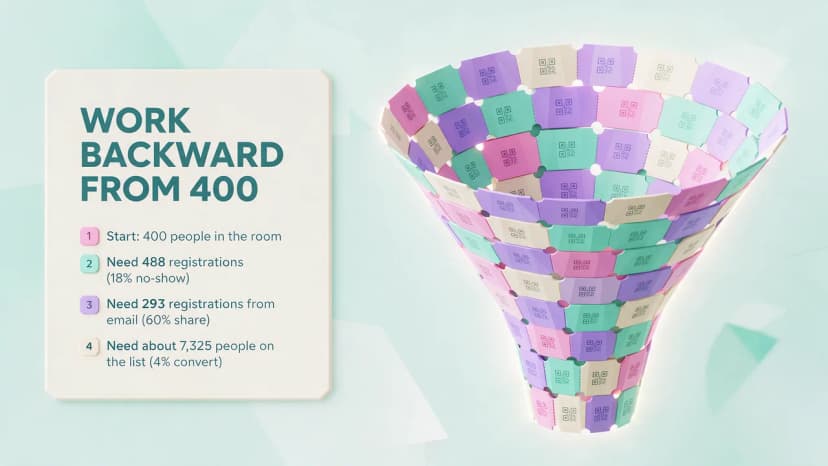
Here is the chain, worked through with a 400 attendee target. Every percentage below is a placeholder for your number from your last event. I am deliberately not quoting industry averages, because published email benchmarks are aggregated across industries that do not send the way you do, and planning an event on someone else's number is how budgets get set wrong.
- Start with attendance: 400 people in the room.
- Apply your no show rate. Say your last event was 18 percent. Registrations needed = 400 divided by 0.82, which is about 488.
- Apply email's share of registrations. If email drove 60 percent last time and the rest came from social, partners, and direct, you need about 293 registrations from email.
- Apply your list to registration rate. This is the number you measure from your first send in the sequence. If 4 percent of your deliverable list registered across the last campaign, you need a deliverable list of roughly 7,325.
- Apply deliverability. If 88 percent of your list is actually reachable, the raw list needs to be around 8,300.
Now you have a real decision. If your list is 5,000 and the math says 8,300, better subject lines will not fix it. You acquire 3,300 more contacts before the campaign, raise email's share with a stronger event landing page, or lower the target. That is a week one planning conversation instead of a week ten panic.
No historical rates because it is your first event? Run the first send, record what it does, and use that as your baseline. One real send from your own list beats any benchmark online. Then rebuild the chain with your actual numbers. For the broader channel mix, see our guide to event marketing strategies.
What changes when you send event emails on behalf of a client?
Ownership changes, and that changes everything. When an agency runs email marketing for event clients, the two decisions that matter most are whose domain the mail goes out from and who owns the list afterwards. Get those wrong and you carry risk that is not yours.
- Send from the client's domain, not yours. Recipients expect the client's brand in the From line, and it is the client's reputation that should carry the campaign. That means SPF, DKIM, and DMARC records on the client's DNS, usually the longest lead time item in the project. Ask for DNS access at kickoff, not in week six.
- Never mix clients on one sending identity. If Client A generates complaints, Client B should not feel it. Separate subdomains per client, at minimum.
- Write list ownership into the contract. Attendee data belongs to the client. Specify how it transfers at the end of the engagement. It is the first thing a data protection review will ask about.
- Check provenance before importing the client's offline list. The spreadsheet handed over on day one is often a merge of several sources, some consented and some not.
- Report registrations and attendance, not opens. Clients ask for open rates out of habit. Reset that expectation in the first report and show cost per attendee instead.
The work compounds, which is the upside. Once a client's domain is authenticated, warmed, and running on a clean list, every subsequent event lands better. The first campaign carries all the setup cost. Price it that way.
Which event email marketing best practices are not obvious?
The obvious ones are everywhere already: clear subject lines, keep it short, one call to action. These are the practices that change outcomes and that almost nobody writes down.
- Put the ticket above the fold in every post registration email. Not below the agenda, not below the sponsor block. People open these standing in a queue, on a phone, in bad light.
- Send the day of email in the attendee's local morning, not yours. On a multi city or virtual event, a 9am send from your timezone reaches half your audience at 3am. Schedule by timezone.
- Keep transactional and promotional mail on separate sending identities. Ticket delivery must arrive. Marketing can afford a bad day. Do not let them share a reputation.
- Never extend an early bird deadline you announced. It converts once and costs you every future deadline with that audience. If you need more time, launch a differently named tier.
- Segment on behaviour, not job title. "Clicked the agenda but did not register" beats "Directors." Job title tells you who they are. Behaviour tells you what they are about to do.
- Design for a phone first and test in dark mode. Mobile devices accounted for 58.4 percent of online event ticketing transactions in 2025, so the phone is the primary screen for anything ticket related. White backed logos and transparent QR codes both break in dark mode, which is exactly what people use at a venue.
- Reply To should reach a human. Someone will reply with a wheelchair access question two hours before doors. A noreply address turns that into a bad story.
- Send fewer, better emails to a cold list. When engagement is low, cutting frequency raises deliverability faster than any copy change. Counterintuitive, and it works.
Did you know that mobile devices accounted for 58.4 percent of online event ticketing transactions in 2025, making the phone the primary screen for every ticket email you send? Source: Mordor Intelligence, 2025
If invitation copy is where you want to go deeper, our guide to event invitation tips covers wording, tone, and format for the sends at the top of the timeline.
What should you measure, and what does good look like?
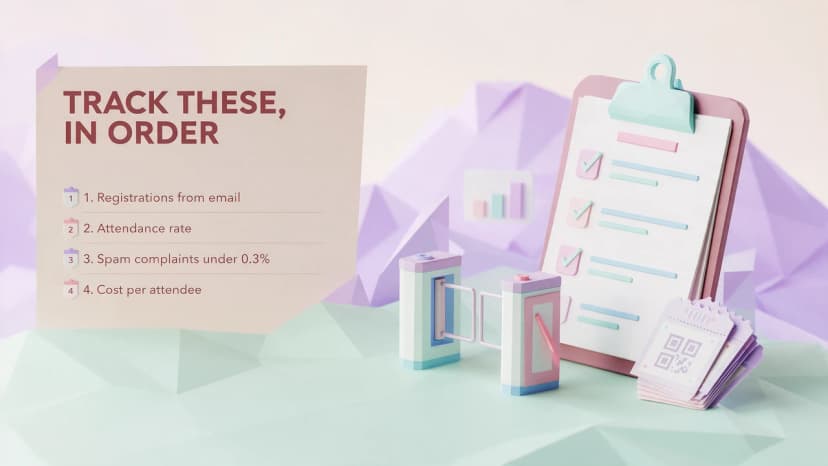
Measure registrations, attendance, and complaint rate. Treat open rate as a directional signal at best, because it has not been a reliable metric since 2021.
When Apple launched Mail Privacy Protection with iOS 15 in June 2021, it said the feature "helps users prevent senders from knowing when they open an email, and masks their IP address" (Apple, 2021). Apple's iPhone documentation says the same (Apple Support). Open tracking works by loading a tiny remote image, and Apple loads that image whether or not a human ever looked at the message, so a large share of your reported opens are machine opens. Your open rate now partly measures how many contacts use Apple Mail. It does not measure interest.
Did you know that Apple's Mail Privacy Protection, launched with iOS 15 in 2021, prevents senders from knowing when a recipient opens an email and masks the recipient's IP address? Source: Apple, 2021
Measure these instead, in order of how much they should influence decisions:
- Registrations attributed to email. Tag every link with a campaign parameter so you can separate email from social and partner traffic.
- Attendance rate against registrations. The number that decides whether the room looks full, and where your know before you go and day of emails prove their value.
- Spam complaint rate. Under 0.3 percent, per the Google and Yahoo requirements above. This is the metric that protects every future send.
- Bounce and unsubscribe rate per send. Rising bounces mean list decay. Act on the trend, not on one send.
- Click to registration rate on the landing page. Healthy clicks and weak registrations mean the problem is the page, not the email.
- Cost per attendee. Platform cost plus time, divided by people in the room. The only number a finance conversation needs.
Set your own baseline rather than chasing a published one. Record every number above on the first send of a campaign and treat that as your zero point. Your second send is measured against your first, not against a blog post's industry average. After two events you have a range built on your audience, your sending domain, and your list quality, which is more useful than any benchmark because it accounts for the three things that actually vary.
What good looks like, concretely: Felipe Motta, a food and beverage business in Panama, has run 638 tickets through Ticket Generator with 96 percent maximum attendance and 95 percent of tickets generated through the API. Attendance that close to registrations is what a well run post registration sequence produces, and it is measured at the door rather than in an email dashboard.
What is the best event email marketing software for event organizers?
The best event email marketing software for you depends on one question: are you paying to store a list you rarely mail, or paying for the volume you actually send? Event organizers hold big lists and send in short bursts, which makes contact based pricing a poor fit and catches a lot of people out.
Here is how the realistic options compare.
|
Tool |
How it is priced |
Where it fits |
The catch for event teams |
|---|---|---|---|
|
Ticket Generator (Campaigns) |
Prepaid credits for tickets. Campaigns and subscriber lists come with the platform |
Organizers who want registration data and email in one place, with no separate subscription |
An event promotion layer, not a general purpose marketing programme. Ticket email batches send up to 1,000 guests at a time |
|
Mailchimp |
Subscription scaling with contact count. Free tier caps at 250 contacts and 500 sends a month |
Teams already running wider marketing through it who want mature templates and automations |
You pay for every dormant contact all year, whether you mail them or not |
|
Mailjet |
Priced on emails sent per month, not contacts stored. Unlimited contacts from Essential up |
Burst senders with large lists. The pricing model matches the event pattern well |
Thinner event specific features. Registration and ticketing live elsewhere |
|
Constant Contact |
Monthly subscription that scales with list size |
Small teams wanting strong support and straightforward campaign building |
Same structural issue as Mailchimp: you pay to hold a list between events |
|
Cvent |
Quote based. No published pricing, routed through a demo request and a sales conversation |
Enterprise meetings programmes with complex registration, venue sourcing, and onsite badging |
Real enterprise capability at real enterprise cost and setup time. For 10 to 10,000 people it is usually more platform than the job needs |
|
Built in tools on ticketing marketplaces |
Usually bundled with a commission on each ticket sold |
Organizers already selling there who want one less login |
Limited control of sending domain and segmentation, and the audience often belongs to the platform |
Pricing models checked on each vendor's own pricing page in August 2026. Cvent publishes no pricing. Confirm current tiers before deciding, since all of these change.
Three honest observations. If you already send weekly marketing through a mature platform, do not move event email out of it just to consolidate, because deliverability reputation lives with the sending domain and the platform history.
If you hold a 20,000 name list and mail it four times a year, contact based pricing is charging you rent on an asset you barely use. Mailjet's send based model, or a platform where email comes with the ticketing, fits that pattern far better.
And no tool solves authentication for you. SPF, DKIM, and DMARC are records you add to your own DNS whichever you pick. A platform can guide you. The one that promises to do it for you is the one to be suspicious of.
How Ticket Generator supports event email marketing
Ticket Generator is built for organizers who want their registration data and their email sequence in the same system rather than synced between two. Campaigns is included in the platform, so the list you build from ticket sales is the list you mail, with no export step and no separate subscription.
What that covers, mapped to the timeline above:
- Subscriber lists built from real registrations, which is the highest quality source in the provenance table above.
- Multi step, trigger based campaigns, so confirmations, reminders, and follow ups run off registration events rather than a manual calendar.
- Custom templates and custom sender details, so campaigns go out under your brand rather than a platform's.
- Schedule Send for ticket batches with a chosen date, time, and timezone, which is how you run the day of email in the attendee's local morning.
- Email, SMS, and WhatsApp delivery, plus a digital ticket link in every ticket email, so an attendee who cannot find a PDF still gets through the door.
- Delivery tracking across sent, delivered, and bounced, which is the raw material for the bounce trend you should be watching.
- Zapier, Mailchimp, and HubSpot integrations, if your marketing lives elsewhere and you want registration data to flow into it.
Where it does not fit, plainly. Campaigns is an event promotion and attendee engagement layer, not a general purpose enterprise ESP. If you run a weekly content programme to a very large list with deep behavioural journeys and dedicated deliverability tooling, keep that where it is and use Ticket Generator for registration, ticketing, and the event sequence. Ticket email batches also send up to 1,000 guests at a time, so a 9,000 person send is nine scheduled batches rather than one click. And no platform adds DNS records for you. Authentication is still your job.
On cost, the model is prepaid credits: one credit per ticket generated, credits do not expire, and there is no commission on sales because payments go directly to your own Stripe, PayPal, or Razorpay account. New accounts get 10 free credits and non profits get 30 percent off. Against the quote based enterprise route, you can be sending inside an afternoon with no sales call. The proof that matters is repeat use: Heartland Emmys has run more than ten events across four consecutive years and 3,433 tickets on the platform.
Pro Tip: Send your day of email in the attendee's local morning rather than yours. Ticket Generator's Schedule Send lets you set a delivery date, time, and time zone for a whole ticket batch, so a multi city audience all gets their ticket at breakfast.
Final thoughts
Filling an event by email is decided by sequencing and deliverability far more than by copy. Ordinary writing on a clear timeline, from an authenticated domain, to a warm list beats brilliant writing sent cold from a new domain every single time.
None of it is free. Warming a domain takes weeks you have to plan for, keeping a list alive between events costs a few sends you would rather skip, and the trigger sequence is real setup work the first time. What you get back is a list that compounds, tickets that reliably arrive, and a room that looks the way the registration count promised.
Start with the timeline. Fix authentication before your first big send. Measure against your own baseline instead of someone else's benchmark. And keep registration data and email in one place if you can, because most of the friction in event email lives in the gap between those two systems.
Try Ticket Generator to run your registrations, tickets, and event email campaigns from one place. Your list, your brand, your data, with no commission on ticket sales.
FAQs: Event Email Marketing
1. What is event email marketing?
Event email marketing is the planned sequence of emails that fills, runs, and closes out a single dated event, from the save the date through to the post event survey. It differs from regular email marketing because you send in bursts around a fixed deadline rather than on a weekly rhythm, and because success is measured in attendance rather than clicks.
2. How many emails should I send before an event?
Around eight to ten emails across a twelve week runway, or five on a four week runway. The count matters less than the sequencing, because each email needs a distinct job such as booking the date, closing an early bird, or delivering logistics. Repeating the same message is what generates unsubscribes, not the number of sends.
3. Why do my event emails go to spam?
Usually because you are sending a large burst to a dormant list from a domain without SPF, DKIM, and DMARC records in place. Since February 2024, Google and Yahoo have required bulk senders of more than 5,000 messages a day to authenticate, support one click unsubscribe, and keep spam complaints below 0.3 percent. Authenticate first, then warm up over several days by mailing your most recently engaged contacts before widening the send.
4. Is open rate still a useful metric for event emails?
No, not as a primary metric. Apple's Mail Privacy Protection, launched with iOS 15 in 2021, prevents senders from knowing when a recipient opens an email, so a share of your reported opens are machine opens rather than human ones. Measure registrations attributed to email, attendance against registrations, and spam complaint rate instead.
5. What is the difference between event triggered email marketing and a scheduled campaign?
A scheduled campaign goes to a segment on a date you choose. Event triggered email marketing fires to one person because of something they did, such as abandoning a registration form or receiving a ticket they never opened. Triggered emails are more relevant, so build the confirmation, abandoned registration, and ticket resend triggers before adding more calendar sends.
6. Does Ticket Generator include event email marketing tools?
Yes. Ticket Generator includes Campaigns, covering subscriber lists, multi step trigger based sequences, custom templates, custom sender details, and campaign performance tracking, alongside registration and ticketing. It is built for event promotion and attendee engagement rather than as a general purpose enterprise email platform, and you still add SPF, DKIM, and DMARC records to your own DNS.
About the author
Content Marketer at Ticket Generator
Ashish Chandra has spent 5+ years writing about event technology, covering topics such as ticket design, QR check-ins, attendee management, and event marketing strategy. As the Content Lead at Ticket Generator, Ashish has analyzed hundreds of real-world event workflows and ticketing setups, helping organizers across industries use QR-based tickets, event landing pages, and smarter ticketing systems to run smoother, better-attended events. His writing is shaped by real user needs and the questions organizers ask most often: How do I sell more tickets? How do I avoid chaos at the door? How do I make my next event better than my last? When he steps away from the screen, you'll likely find him hiking a quiet trail or tending his plants- his preferred way to reset.
Related articles
Keep reading: more guides on the same topic
 23 min read
15 Hottest Wedding Venues in Delhi NCR - A Detailed Analysis
Plan your dream wedding with our guide to the top 15 Delhi NCR venues: compare costs, capacity, amenities, and expert tips to choose the perfect setting
Jayanshu Badlani
08 Sept 2026
 19 min read
Best Event Management Software in 2026: How to Compare Tools and Choose the Right Fit
Eight event management platforms compared on pricing, registration depth, engagement and support, with a plain guide to matching the tool to your event.
Ashish Chandra
27 Aug 2026
 9 min read
11 Ways Event Hosts Use to Thank First Responders (Steal These Now)
Explore eight thoughtful approaches, including writing a heartfelt thank you letter to first responders to express gratitude at your event. Show you care today!
Yashika Tangri
20 Aug 2026
Latest posts
Check out our latest articles on the blog
 13 min read
Fundraising Event Management Software: How Much of Your Donations Do You Keep?
Your gala should raise money for your cause, not lose it to event fees. Compare fundraising software pricing, uncover hidden costs, and find the right fit for your nonprofit.
Ashish Chandra
29 Oct 2026
 10 min read
Halloween Masquerade Ball: How to Host a Night of Masks and Mystery
From Venetian-inspired masks to QR-coded entry, here is your complete guide to planning a Halloween masquerade ball your guests will talk about for years.
Ashish Chandra
29 Oct 2026
 10 min read
Hybrid Events Platform: How to Run One Event for In-Person and Virtual Guests
A hybrid events platform lets you run one event for both in-person and virtual attendees. Here's what a good one does and how to ticket and check in both audiences without doubling your workload.
Ashish Chandra
28 Oct 2026