Key Takeaways: Event ticketing platforms let you create tickets, sell or register attendees, and validate entry from one dashboard, usually with QR codes. The right platform removes friction for both your team and your guests. It is rarely the one with the longest feature list. Instead, prioritize transparent pricing, QR-based check-in, branded event pages, fraud protection, and real-time reporting. The most common mistakes are choosing a platform based on price alone, skipping a test run, and falling back on manual guest lists. Ticket Generator covers all of this with credit-based pricing, zero sales commission, and duplicate-proof QR validation.
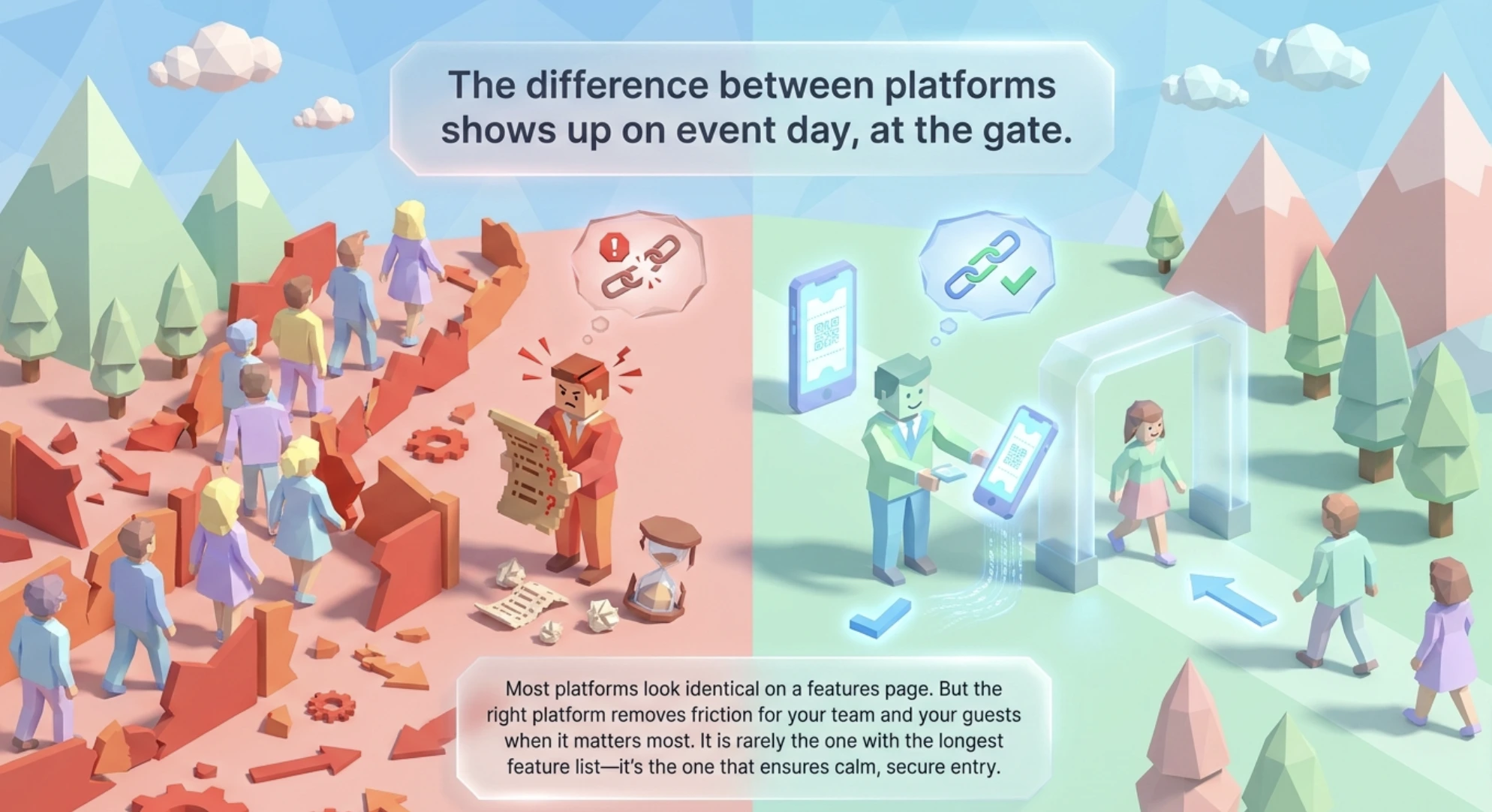
I have spent years helping organizers run events, and along the way I have compared a dozen of the major event ticketing platforms, from Eventbrite and Ticketmaster owned tools to lean credit based options. Here is the honest truth up front: most of them look identical on a features page. The difference only shows up on event day, at the gate, when the line is long and someone hands you a screenshot of a ticket.
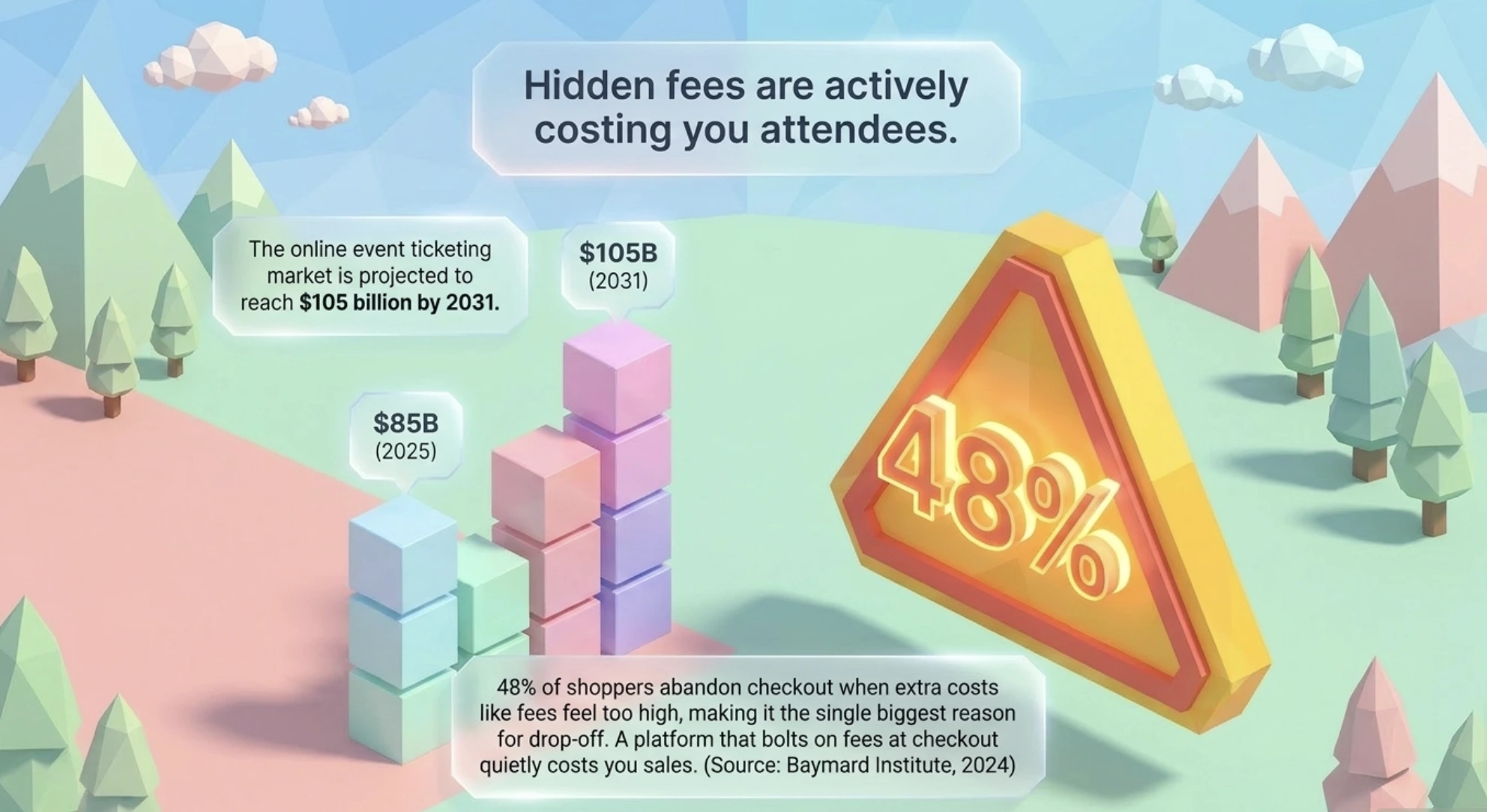
Did You Know? The online event ticketing market was worth about $85 billion in 2025 and is projected to reach roughly $105 billion by 2031. Source:
Mordor Intelligence (2026).
So here is the short answer after all that comparing. The right event ticketing platform is the one that makes selling, sending, and scanning tickets simple for your specific event, with clear pricing and no surprises at check in. That is it. Everything else is detail.
In this guide I will show you what these platforms actually do, the criteria I use to judge them, how the 12 I compared stack up on price and features, what they look like in real events, and the mistakes I see organizers make again and again. By the end you will be able to pick a platform with confidence instead of guesswork.
What is an event ticketing platform, and what should it do for you?
An event ticketing platform is a tool that helps you create tickets, manage registrations, collect payments, and control entry, all from one place. Today, attendees expect ticketing to be fast, digital, and contactless, so a good platform is not a nice-to-have anymore. It is the backbone of a smooth event.
Whether your event is in person, virtual, or hybrid, a solid platform should cover the whole journey from ticket setup to check-in. Here is what the better tools handle for you:
No code setup. You should be able to build a ticket page in minutes without a designer or developer. Add your event details, pick your ticket types, and publish.
Flexible ticket types. Free, paid, VIP, early bird, group bundles, with quantity limits and time-based rules when you need them.
Secure payments and delivery. Trusted payment gateways plus digital tickets delivered by email, SMS, or WhatsApp, each carrying a scannable code.
Branded pages. Your logo, your colors, your event, not the platform's branding stamped on top.
QR-based check-in. Attendees show a QR code on a phone or on paper, and you scan it with any smartphone. Duplicates get flagged instantly.
Real-time analytics. Live dashboards for ticket sales, revenue, and check-ins, so you can see what is happening as it happens.
If you want a deeper look at how this works across event types, my colleagues covered it well in this guide to ticketing for events.
How do I choose the right event ticketing platform?
Choose the platform that removes the most friction for your team and your attendees, not the one with the most features. Every event is different in size, budget, and goals, so I always start from what actually improves the experience and cuts the workload.
Here are the criteria I check, in the order I care about them:
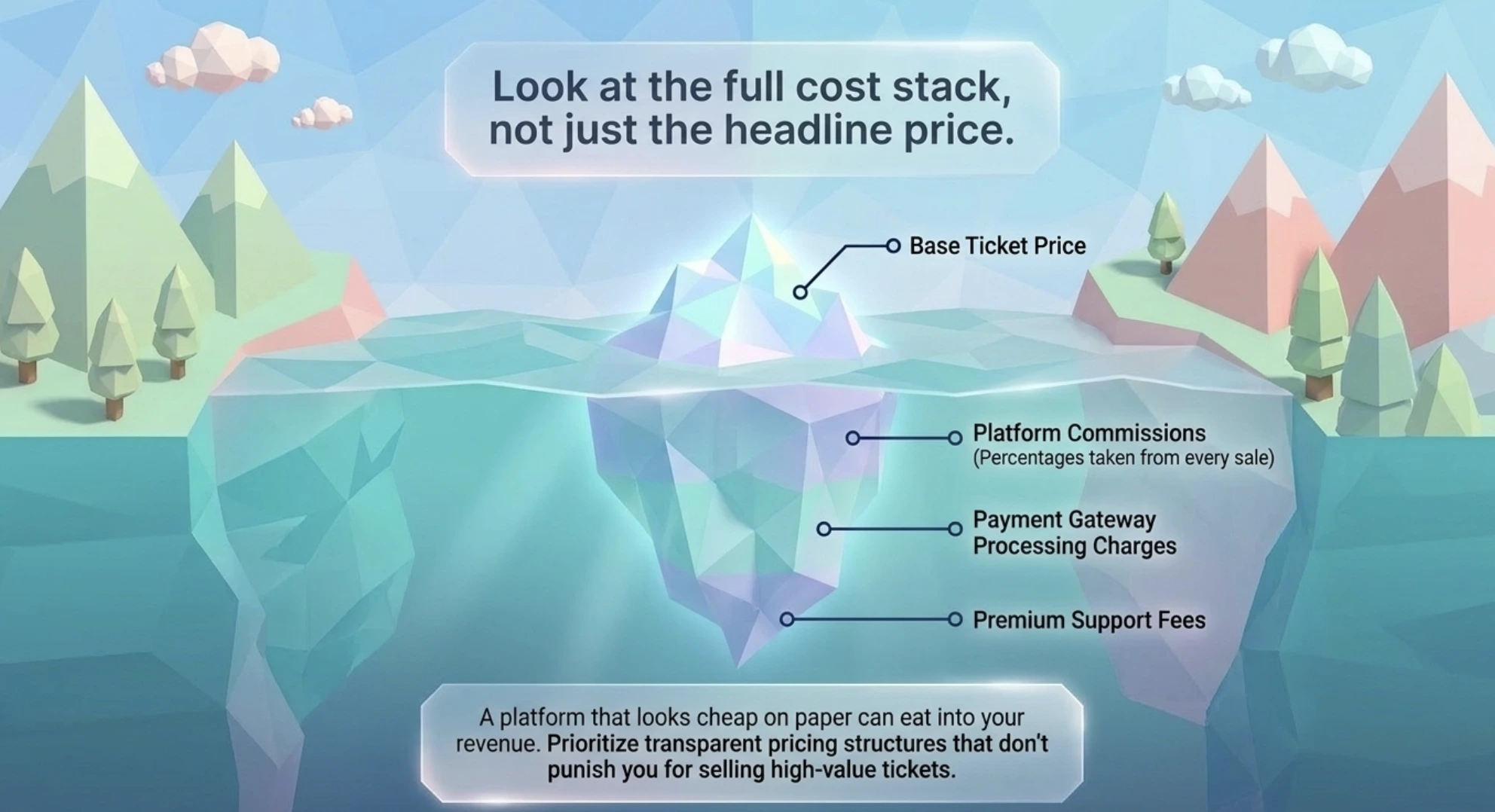
Transparent pricing. Look at the full cost, not the headline. Watch for platform commissions, payment gateway charges, and support fees stacked on top.
QR-based, mobile-friendly check-in. If you have in-person entry, scanning has to work smoothly on a normal phone for both staff and guests.
Fraud protection. Unique QR codes, secure ticket links, and duplicate detection matter, especially for free or high-volume events.
Branded ticketing. Logo placement, brand colors, and custom pages build trust and make your event look professional.
Real-time analytics. Sales, revenue, and check-in data as it happens, so you can adjust on the fly.
Simplicity versus control. Some tools give a fast no-code setup, others give deeper settings. Match the tool to your team's comfort level and timeline.
Support and reliability. Strong reviews and fast help, ideally live chat or same-day responses, matter most in the final week before an event.
Multi-event management. If you run more than one event, you want every ticket page under a single dashboard.
Did You Know?48% of shoppers abandon checkout when extra costs like fees feel too high, making it the single biggest reason for cart abandonment. Source:
Baymard Institute (2024).
That last stat is why I put pricing first. A platform that looks cheap but charges fees at checkout can quietly cost you sales. If low fees are your priority, it is worth comparing ticketing platforms with the lowest ticket fees before you commit.
Ready to run your event on transparent, commission-free pricing? Start with Ticket Generator and keep every dollar you earn.
Set Up Event Ticketing and Distribution in Minutes!
First 10 tickets free | Free account | No credit card required
Many platforms offer the same core features, so the small details decide the winner. The table below compares the 12 event ticketing platforms I looked at on how their pricing works, whether they take a cut of your sales, and the essentials most organizers care about.
Platform
How pricing works
Commission on your sales
QR check-in
Branding control
Free events
Ticket Generator
Prepaid credits, about $0.25–$0.60 per ticket
None
Yes
Full, no platform logo
First 10 tickets free
Ticket Tailor
Credit-based, roughly $0.22–$0.60 per ticket
None
Yes
Full
Free for most free events
Eventbrite
About 3.7%–8.5% plus a per-ticket fee
Yes
Yes
Limited, marketplace branding
Free for free events
TicketSpice
Flat 99¢ per ticket plus card processing
No platform percentage
Yes
Full
Yes
TicketLeap
About 2% plus a small per-ticket fee
Yes
Yes
Partial
Free for free events
Universe
About 2.5% plus a per-ticket fee
Yes
Yes
Limited
Free for free events
Purplepass
About 99¢ plus roughly 2.5% per ticket
Yes
Yes
Full
Yes
Ticketbud
Per-ticket fee plus payment processing
Yes
Yes
Full
Pay after first sale
Eventbee
Flat $1–$3.50 per ticket
No platform percentage
Yes
Full
No free tier
TicketSource
Buyer-paid booking fee on paid events
None to organiser
Yes
Full
Free for free events
Yapsody
Per-ticket fee plus a small percentage
Yes
Yes
Full
Free for free events
Showpass
Roughly 1%–2.5% plus a per-ticket fee
Yes
Yes
Full
Varies by plan
Pricing reflects each provider's publicly listed fees as of mid 2026 and can change, so confirm current rates on each provider's site before you decide.
A few patterns are worth calling out. Free events are not always truly free, since some platforms still apply fees or limit features on the free tier, which hurts community and nonprofit organizers. Commission-based tools like Eventbrite scale their cut with your ticket price, so a sold-out paid event can cost you far more than a flat per ticket model. And ease of use varies a lot, since some tools are clean and quick while others take real time to configure.
If you are moving away from a big marketplace tool, it helps to read up on the best Ticketmaster alternative and the leading Eventbrite alternatives before switching, so you know exactly what you are trading.
Set Up Event Ticketing and Distribution in Minutes!
First 10 tickets free | Free account | No credit card required
Which event ticketing platform is best for which event?
The fee table above tells you what a platform costs. This one tells you who each platform is actually built for, what it does better than the rest, and how the ticket reaches your attendee once they are in.
Platform
Best for
Standout feature
How tickets reach attendees
Ticket Generator
Branded, commission-free ticketing with strict access control
Unique QR plus unique ticket ID, flagged Valid, Invalid, Duplicate, or Expired at the gate, with no platform watermark
Email, SMS, or WhatsApp in seconds, wallet save, scheduled batches, one-click resend, delivery tracked
Ticket Tailor
Low-cost paid ticketing at volume
Credit-based pricing with no commission on sales
Instant email e-ticket plus Apple and Google Wallet passes
Eventbrite
Reaching new buyers through a public marketplace
Built-in discovery and event listings
Email e-ticket plus the Eventbrite app and wallet passes
TicketSpice
Attractions and high-volume paid entry
Flat 99¢ per ticket with a flexible page builder
Email e-ticket plus SMS text delivery
TicketLeap
First-time and small community organizers
Simple setup with the option to pass fees to buyers
Email e-ticket with QR code
Universe
Events that want Ticketmaster network distribution
Backed by Ticketmaster, which acquired Universe
Email e-ticket and mobile ticket
Purplepass
Venues running a box office alongside online sales
Several delivery methods, including a custom delivery text
Email, print-at-home, will call, and SMS text
Ticketbud
Mid-size events that want a per-ticket fee and hands-on support
Straightforward per-ticket pricing with full branding
Email e-ticket with QR code
Eventbee
Higher-priced tickets where a flat fee wins
Fixed $1–$3.50 fee regardless of ticket price
Email e-ticket with QR code
TicketSource
UK and EU organizers passing the fee to buyers
No cost to the organiser on paid events
Email e-ticket, print-at-home, and wallet passes
Yapsody
Recurring shows and performing arts venues
Multiple ticket delivery options plus white-label pages
Email e-ticket, print-at-home, and Apple Wallet
Showpass
Festivals and multi-venue operators
Gate hardware and integrations built for large crowds
Email e-ticket plus Apple and Google Wallet
The take: Best event ticketing platforms with online delivery
If online delivery is the deciding factor, the shortlist is Ticket Generator, TicketSpice, Ticket Tailor, Purplepass, and Yapsody. Every platform in the table sends a digital ticket, but these five go past a single email attachment:
Ticket Generator sends by email, SMS, or WhatsApp from one dashboard, adds wallet save, schedules batches for a set date and time, resends a lost ticket in one click, and shows delivery as sent, delivered, or bounced.
TicketSpice pairs email with SMS text delivery, which helps at attractions where buyers arrive minutes after paying.
Ticket Tailor delivers an instant email e-ticket and supports Apple and Google Wallet passes.
Purplepass covers email, print-at-home, will call, and a custom delivery text, so a venue can serve online and walk-up buyers the same way.
Yapsody offers email, print-at-home, and Apple Wallet across recurring shows.
The dedicated section below covers how fast each route actually is and what to check before you rely on it.
What are the best event ticketing platforms for corporate events?
Corporate events change the brief. The guest list is usually known in advance, attendance is invite-only or approval-based rather than open to the public, and both finance and IT get a say. So the criteria shift from selling tickets to controlling access, keeping attendee data clean, and passing a security review.
For a corporate event, I look for:
Invite-only or approval-based registration, not a public listing.
Custom registration fields, document upload, and per-person limits.
One-time QR codes with multi-gate scanning and a log of failed attempts.
Coordinator roles that see one event, not your whole account.
Security documentation your IT team will ask for, such as ISO 27001, SOC 2, and GDPR.
An API or integrations so registrations land in the systems you already run.
On that list, Ticket Generator, TicketSpice, and Yapsody handle closed corporate access control comfortably. Eventbrite and Universe are built around public discovery, which is close to the opposite of what an internal seminar or partner summit needs.
Ticket Generator is the one I reach for here, because the controls line up with how corporate events actually run: automatic or manual approval workflows and custom fields.
On top of that you get document uploads on the registration page, per-person limits, one-time QR codes that flag a reuse instantly, multi-device scanning across gates with unauthorized attempts logged, and coordinator roles restricted to a single event.
It is ISO/IEC 27001:2022 certified, GDPR compliant, and SOC 2 aligned, there is no platform watermark on the ticket, and the white-label REST API lets your own systems issue tickets.
That combination is what handled multi-location access control for DART, the Dallas Area Rapid Transit, with real-time tracking across gates. And because pricing is credit-based with zero commission, finance sees a predictable per-ticket cost instead of a percentage of an internal budget.
Platforms with instant online and digital ticket delivery
Instant online ticket delivery means the attendee holds a scannable ticket within seconds of registering or paying, with no one on your team sending anything by hand. Every platform in the comparison above delivers digitally, but they differ on channel, speed, format, and what happens when a ticket goes missing.
Four things separate a genuinely instant setup from a slow one:
Channel. Email only, or SMS and WhatsApp as well. Email deliverability is the most common failure point in ticket delivery, so a second channel is real insurance.
Speed. Issued the moment payment or registration completes, or queued in a batch someone has to trigger.
Format. A QR e-ticket that scans on a phone screen, a wallet pass, or a print-at-home PDF.
Recovery and proof. One-click resend when a guest cannot find the email, and a delivery status you can actually check.
Ticket Generator issues the e-ticket the instant a registration or payment goes through and sends it by email, SMS, or WhatsApp within seconds. Attendees can save the ticket to their phone wallet, and every email carries a digital ticket link, so nothing depends on an attachment surviving in someone's inbox.
In practice, that means you can generate and send 500 branded tickets for a known guest list before lunch, and still resend the three that bounced well before the doors open.
What do these platforms look like in real events?
The easiest way to understand a platform is to watch it solve a real problem. Here are three events I have seen play out, each with a different challenge.
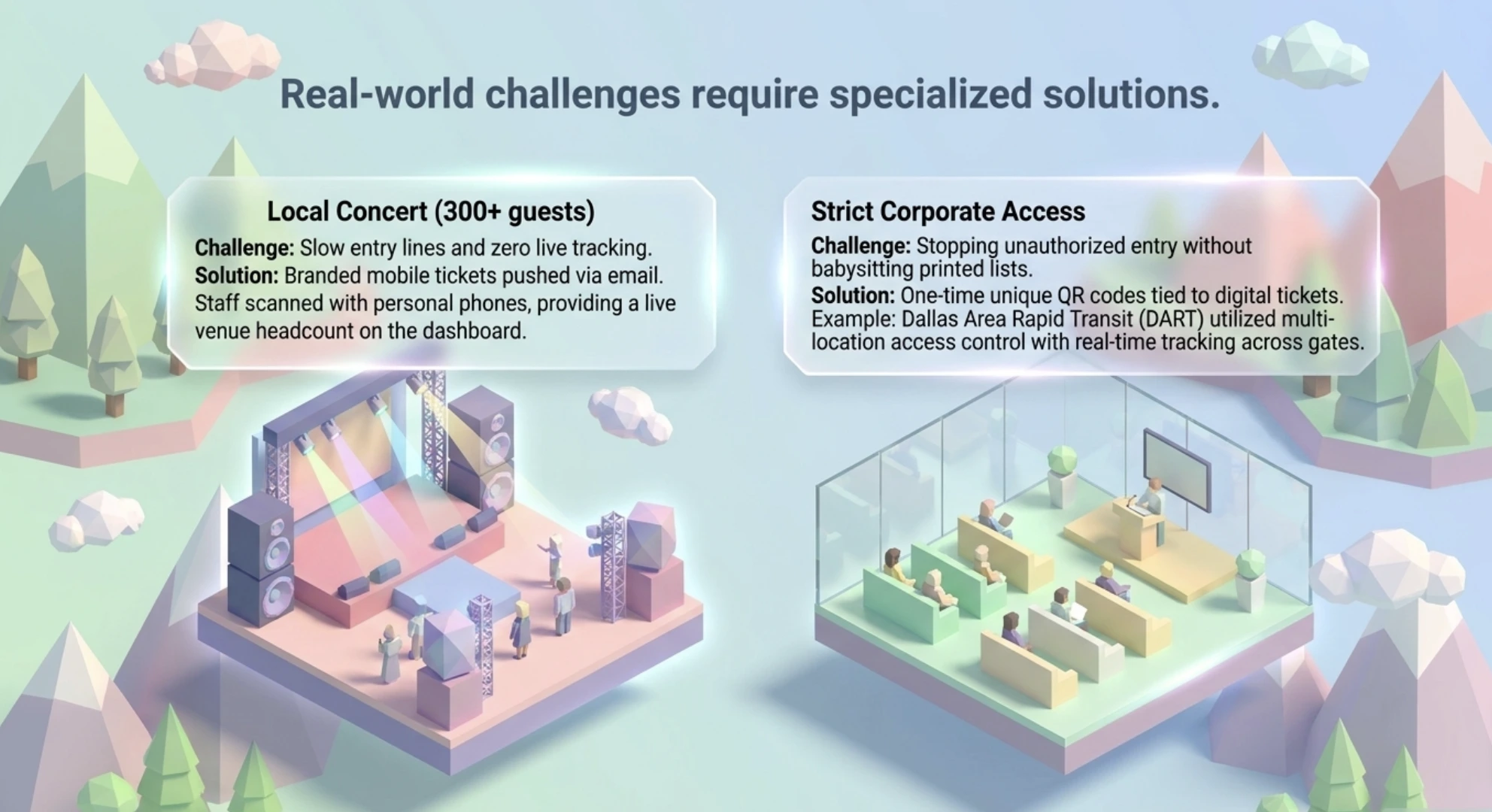
A local concert with 300-plus guests
The problem was a small team with no formal check-in system, and past shows had long entry lines. The fix was branded ticket pages and QR code entry, with tickets emailed to each guest. Entry sped up immediately, staff scanned with their phones, and the dashboard showed a live headcount inside the venue.
A corporate event with strict access control
A company ran a paid seminar and needed to stop unauthorized entry without printing name lists. One-time QR codes tied to each ticket did the job, sent digitally so they could not be copied or reused. Guests were scanned at the door, no one got in without a valid code, and there were no manual lists to babysit. This is exactly the kind of multi-location access control Ticket Generator handled for DART, the Dallas Area Rapid Transit, with real-time tracking across gates.
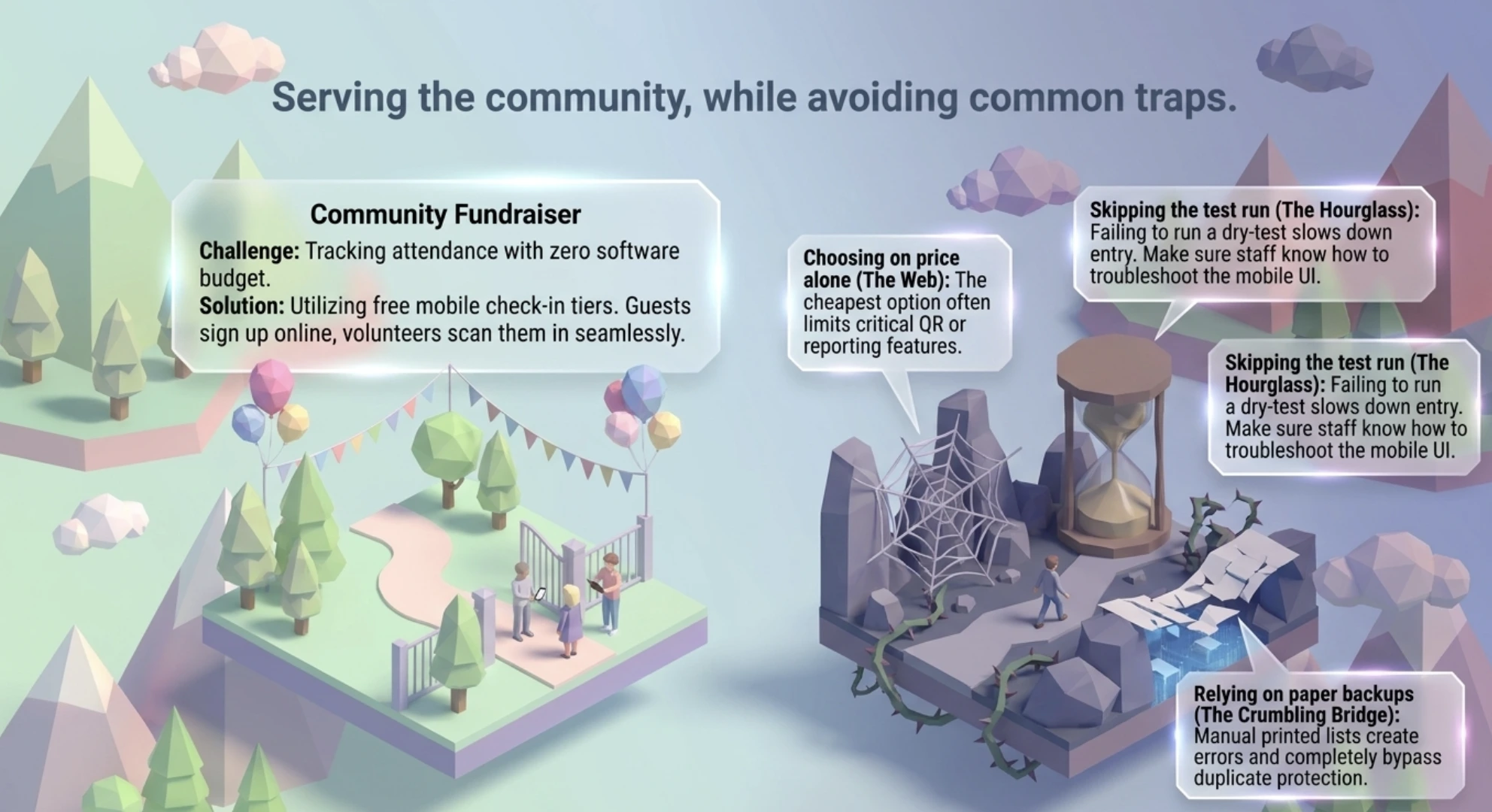
A free community fundraiser
A nonprofit wanted to track attendance but had almost no software budget, and still wanted a clean check-in. Free ticketing plus mobile check-in solved it, and setup took minutes, including their logo and colors. Guests signed up online, volunteers scanned them in, and the event felt well-run, even at zero software cost.
What mistakes do organizers make when picking a platform?
The biggest mistakes are choosing on price alone, skipping a test run, and trusting manual backups. Even a good platform falls short when it is set up the wrong way. Here are the traps I see most often:
Choosing based on price alone. The cheapest option often limits QR check-in, reporting, or branding. Pick for fit, not just the lowest tag.
Not testing before the event. Create a test event, scan a real ticket, and check the reports. Five minutes now saves a crisis on event day.
Ignoring the mobile check-in experience. Most check-ins happen on phones. If scanning is clunky, entry slows, so make sure staff know how to scan and troubleshoot.
Overlooking customization. Plain tickets with no logo look unprofessional and are harder to trust at the gate.
Relying on printed guest lists. Manual backups feel safe, but slow things down and create errors. Live check-in with duplicate protection is faster and cleaner.
Forgetting to check support. Many low-cost tools skip real-time help. Confirm what support exists before you need it under pressure.
Where does Ticket Generator fit among event ticketing platforms?
Ticket Generator is built for organizers who want branded, secure, professional ticketing without paying a commission on every sale. If you already have your audience and just need reliable ticketing, smart promotion, and clean access control, this is the sweet spot. It scales comfortably from a 10-person workshop to a 10,000-person festival.
Here is what you get, tied directly to the criteria above:
1. Credit-based pricing with zero commission. You buy prepaid credits and pay per ticket generated, not a percentage of your sales. Payments go straight to your own Stripe, PayPal, or Razorpay account, so you keep 100% of your ticket revenue. Credits never expire, you get 10 free on signup, and nonprofits get 30% off.
2. Three ways to run an event. Send tickets directly to a known guest list, collect free registrations, or take payments and issue tickets, all from the same dashboard. Registration pages support custom fields, document uploads, approval workflows (automatic or manual), and per-person limits, so you control exactly who gets in.
3. Ticket design that looks like your brand, not ours. Use the drag-and-drop designer, start from templates, or upload your own artwork, with variable fields for name, seat, row, section, and ticket ID. There is no platform watermark anywhere. You can spin up branded tickets in seconds with AI ticket design (five free tokens, four designs per request), edit in Canva through the built-in integration, and host everything on your own custom domain.
4. Duplicate-proof QR validation and access control. Every ticket carries a unique QR code and a unique ticket ID. Scan one twice and it flags instantly as Valid, Invalid, Duplicate, or Expired through the Ticket Validator app or the web validator. Multiple devices can scan at once for multi-gate entry, re-entry is supported, and unauthorized attempts get logged. It runs on any smartphone with no special hardware.
5. Multi-channel delivery. Send tickets by email, SMS, or WhatsApp, schedule an entire batch to go out at a set date and time, and resend lost tickets in a click. Delivery is tracked (sent, delivered, bounced), every email carries a digital ticket link, and you edit the ticket message once and it applies everywhere.
6. Add-ons that lift revenue. Attach scannable perks like lunch, parking, or merchandise to any ticket, either baked into the price or offered as optional upsells at checkout. Each add-on validates at the gate just like the ticket itself.
7. Built-in Campaigns for promotion. Run email marketing without a separate tool: build subscriber lists, send multi-step trigger-based campaigns, and use custom templates and sender details. For most small and mid-sized events, this replaces a standalone email platform.
8. Real-time analytics and reporting. Track ticket sales, registrations, conversion rate, page visits, and live check-ins as they happen, review coordinator activity logs, and export everything to Excel or PDF for your post-event report.
9. Made for recurring and multi-event programs. Clone an event to relaunch in minutes, run multi-day events with ticket status that resets each night, assign coordinator roles with event-level access only, and manage every ticket page from one dashboard.
10. Developer-friendly and connected. A white-label REST API (120 requests per minute) lets you generate and send tickets from your own system, and native Zapier support plus integrations with Google Analytics, Facebook Pixel, Google Sheets, Mailchimp, and HubSpot slot TG into the stack you already use.
On security, Ticket Generator is ISO/IEC 27001:2022 certified, GDPR compliant, and SOC 2 aligned, which matters when you are controlling who gets through the door. And the track record is real: more than 1,000,000 tickets generated across 30,000 plus events in over 100 countries, including recurring programs like the Heartland Emmys, which has run 10 plus events over four straight years on the platform.
Anshul Singh Bisht, our Head of Event Technology, put it simply:
"Nine out of ten organizers we onboard mention counterfeit prevention as the first reason they're switching; the cost and speed factors are added benefits. They've faced duplicate tickets at the gate, refund disputes, guests who claim they paid but aren't on the list, and they don't want to live that twice."
In short, if you want predictable pricing, branded tickets, built-in promotion, and calm, secure entry, Ticket Generator fits the way real events actually run.
Conclusion
After comparing all twelve, my conclusion is simple. A good event ticketing platform does far more than sell tickets. It keeps your team on track and gives guests a smooth experience from the first click to the moment they walk in.
The small things carry the day. QR codes, branded ticket pages, and real time tracking are what save you time and stress when it counts. Pricing matters too, because hidden fees quietly eat into both your revenue and your attendees' trust.
Whatever platform you choose, keep the goal in front of you: make your event easier to manage and better for the people attending. If you want one tool that covers branded tickets, secure QR entry, and commission free pricing in a setup you can finish in an afternoon, Ticket Generator is worth a serious look.
Try Ticket Generator to run branded, secure, commission-free ticketing for your next event. Your event. Your revenue. Your rules.
Set Up Event Ticketing and Distribution in Minutes!
First 10 tickets free | Free account | No credit card required
1. Can I use an event ticketing platform for a free event?
Yes, most event ticketing platforms support free events at no charge. Just check whether the free tier limits features or adds branding restrictions. Ticket Generator, for example, gives you your first 10 tickets free so you can run a small event or a test at no cost.
2. How do QR code check-ins work?
Each ticket carries a unique QR code that staff scan at the door using a phone or tablet. The system checks the code in real time and flags duplicates instantly, so no one reuses a ticket. You do not need special hardware, just a smartphone with a camera.
3. Do I need to install special software to sell tickets?
No, most platforms run in a browser, so you can set up and manage tickets from any computer. For scanning at the gate, some tools offer a dedicated app, while others let you use your phone's camera through a web validator. Either way, setup takes minutes, not days.
4. Can I customize the ticket design?
Yes, most event ticketing platforms let you add your logo, event name, and brand colors. Branded tickets look more professional and are easier to verify at the gate. Ticket Generator goes further with a drag and drop designer, ready-made templates, and even AI-generated ticket designs.
5. What happens if someone loses their ticket?
Attendees can usually re-download the ticket from their original email link, and organizers can resend it from the dashboard. Because each ticket is tied to a unique QR code, resending does not create a security gap. This keeps guests moving even when someone misplaces a ticket on event day.
Ashish Chandra has spent 5+ years writing about event technology, covering topics such as ticket design, QR check-ins, attendee management, and event marketing strategy. As the Content Lead at Ticket Generator, Ashish has analyzed hundreds of real-world event workflows and ticketing setups, helping organizers across industries use QR-based tickets, event landing pages, and smarter ticketing systems to run smoother, better-attended events.
His writing is shaped by real user needs and the questions organizers ask most often: How do I sell more tickets? How do I avoid chaos at the door? How do I make my next event better than my last?
When he steps away from the screen, you'll likely find him hiking a quiet trail or tending his plants- his preferred way to reset.







.png)






.webp)

.svg)
.svg)
