

How to Use a Free Ticket Selling Platform for Maximum Profits | Ticket Generator
 Written byAshish ChandraLast updatedAugust 20, 2026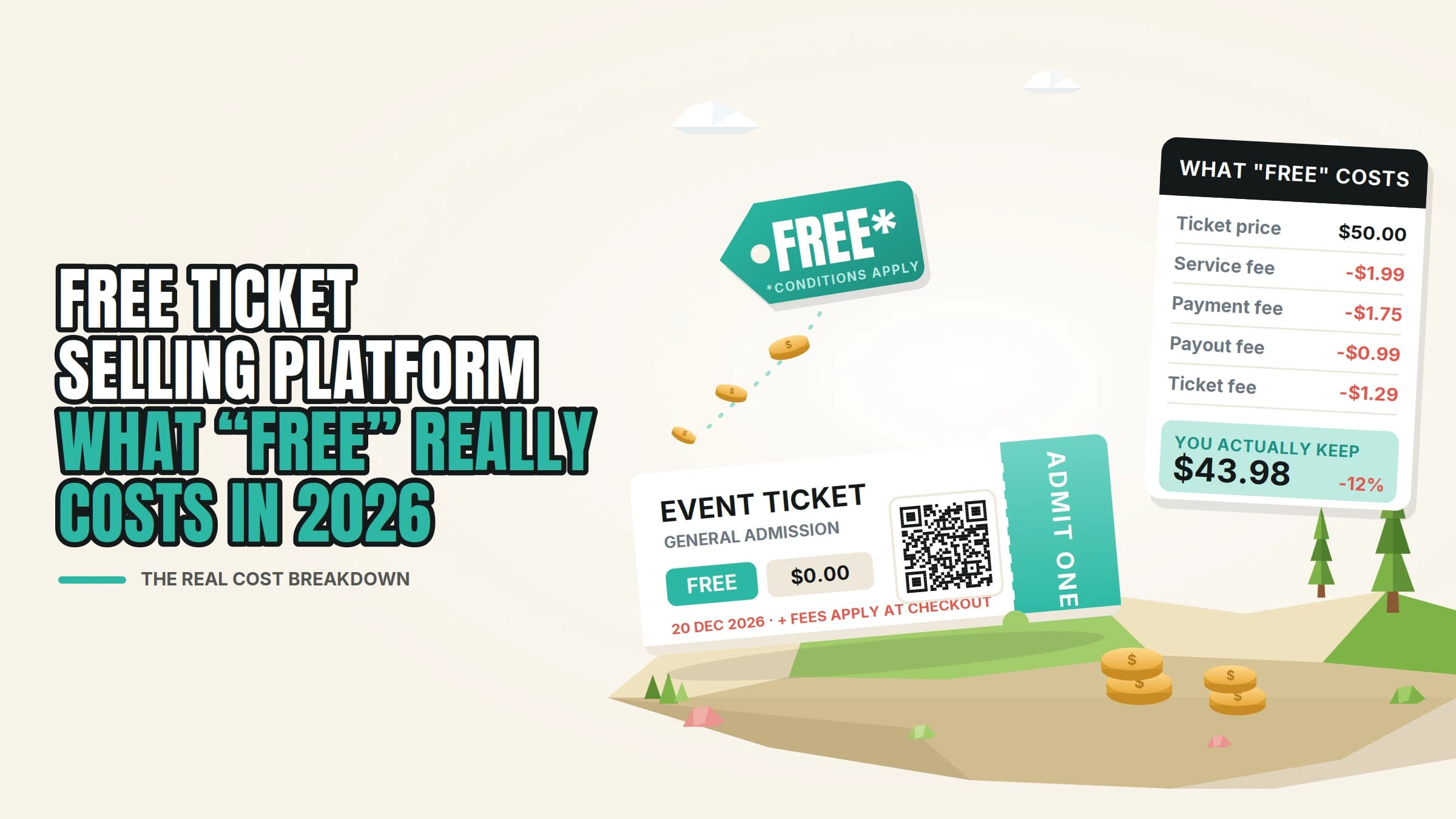
Key Takeaways:
- A free ticket selling platform means no percentage commission on your sales, not zero cost.
- Every platform charges one of three ways: a fixed fee per ticket, a cut of each sale, or a booking fee your attendee pays at checkout.
- Selling from your own official website keeps your brand, your attendee data, and your payment gateway in front of the buyer.
- Ticket Generator charges $0.25–$0.60 per ticket in prepaid credits with zero commission, paid into your own Stripe, PayPal, or Razorpay account.
- Check the free-event cap before you commit, some platforms are only free up to a limit.
Here is the part nobody prints on a pricing page: a free ticket selling platform is almost never actually free. What "free" means in this market is no percentage commission on your sales. You still pay a small fixed fee per ticket, or your attendee pays a booking fee at checkout. Those are very different things, and the difference is worth real money.
Did you know that since 12 May 2025, the U.S. Federal Trade Commission's Rule on Unfair or Deceptive Fees (16 C.F.R. Part 464) has required live-event ticket sellers to show the total price, including all mandatory fees, up front? Hidden fees are no longer just annoying. They are a compliance problem.
So the useful question is not "which platform is free." It is "who pays, how much, and where does the money land." On a single $50 ticket, the total fee ranges from about $2.00 to $5.09 across the platforms below. Across 1,000 tickets, that is roughly $3,000 of cost taken out of the transaction, money that either stays with you or never leaves your buyer’s pocket.
In this guide, I break down what "free" actually covers, compare eight platforms on their own published fees, show what a $50 ticket really costs on six of them, and explain when selling from your own official website beats listing on a marketplace. If you want the wider view of how to sell tickets online, start there and come back for the numbers.
What does a "free ticket selling platform" actually mean?

It means no commission on ticket sales. Instead of handing over a slice of every ticket between about 2% and 7% plus a per-ticket fee among the platforms below, you pay a small fixed amount per ticket, or nothing at all until you sell one.
Any ticket you sell online carries three separate costs. Platforms are only loud about the first one.
- The platform fee. Either a fixed amount per ticket (Ticket Generator, Ticket Tailor, TicketSpice) or a percentage of the sale (Eventbrite, Humanitix, RSVPify, Universe, TicketSource). Fixed fees stay flat whether the ticket costs $10 or $200.
- Payment processing. The card networks' cut, not the platform's. Stripe's standard US online card rate is 2.9% + 30¢ per transaction. PayPal's US fee schedule puts PayPal Checkout at 3.49% + $0.49 noticeably higher than the 2.9% + $0.30 everyone assumes is universal.
- Who absorbs it. The fee either comes out of your revenue or gets added to your attendees’ total. Eventbrite and Humanitix charge the buyer by default, though both let you absorb it instead. That default makes them look "free" to the organizer and costs the guest more.
That third layer is where most organizers get caught. A platform that costs you nothing is not free — the cost has moved onto the person you are trying to convince to buy, at the exact moment they are deciding.
If you want the fee question answered properly on its own, we cover no fee tickets and tickets without a service charge in more depth.
Which are the best event ticket-selling platforms for selling on your own website?
For selling from your own official website, seven of the eight platforms below will do it: Ticket Generator, Ticket Tailor, TicketSpice, TicketSource, Humanitix, RSVPify, and Universe. All seven let you take payment on your own site, and several let you run the checkout on a domain you control. Eventbrite gives you an embeddable widget but no custom domain, and its branding stays on the checkout.
This table is built from each platform’s own pricing pages and help documentation, not from third-party roundups. The last column links straight to the official source so you can check every number yourself.
|
Platform |
Sell from your own site? |
What you pay (published Aug 2026) |
Free events |
Ticket money goes to |
Official source |
|---|---|---|---|---|---|
|
Ticket Generator |
Yes — event pages on your own domain, no platform watermark |
Prepaid credits, $0.25–$0.60 per ticket. No commission on sales. Seated events use 2 credits per ticket |
First 10 tickets free; credits apply after that |
Your own Stripe, PayPal, or Razorpay — no platform hold |
|
|
Ticket Tailor |
Yes — embed, plus a custom-domain add-on from $8/month |
From £0.22 per ticket prepaid, £0.60 pay-as-you-go (+VAT). No commission. White label $49/month |
Up to 5,000 free tickets per year |
Your own Stripe, PayPal, or Square |
|
|
TicketSpice |
Yes — pop-over embed; white-label domain masking $150/year |
99¢ per ticket (49¢ on tickets $5 and under) plus 2.9% + 30¢ processing |
Free for free events only if you also run paid events |
Webconnex Payments, or your own Stripe for 1% + 25¢ extra; weekly payouts |
|
|
TicketSource |
Yes — embeddable TicketShop and WordPress plugin |
7% + VAT per paid booking (min £0.25 + VAT, card processing included), or 4.5% + VAT with your own Stripe |
Free events are free, no cap |
TicketSource pays out the Monday after your event, or direct via your Stripe |
|
|
Humanitix |
Yes — embedded checkout |
2.1% + $0.99 booking fee plus 2.9% + $0.30 processing (5% + $1.29 combined). Charities and schools 1% + $0.99 |
Free tickets are free, no cap |
Humanitix pays out within 5 business days after the event, or your own Stripe |
|
|
RSVPify |
Yes — but embeddable forms sit on the Professional plan, $409/month billed yearly |
1.95% + $0.90 per ticket plus Stripe processing. Plans start at $39/month |
Free plan available; paid plan needed at volume |
Your own Stripe |
|
|
Universe |
Yes — embeddable widgets and API |
2% + $0.59 USD per ticket, excluding VAT and processing |
Free events are free, no cap |
Universe Payments or your own Stripe |
|
|
Eventbrite |
Embed widget only — no custom domain, Eventbrite branding stays |
US 3.7% + $1.79 per ticket plus 2.9% payment processing per order |
Unlimited free events at no cost |
Eventbrite holds the funds; payout sent 3 business days after the event, arriving in about 6–8 |
Fees as published on each platform’s official pricing page or help documentation, as of 20 August 2026. Pricing varies by country; check the official source before you commit.
One column matters more than the fee itself: who pays it at checkout.
- Charged to your attendee by default: Eventbrite and Humanitix. You keep 100% of the ticket price and the buyer sees a higher total, though both platforms let you absorb the fee instead.
- Your call from the start: Ticket Tailor, TicketSpice, TicketSource, RSVPify, and Universe all let you absorb the fee or pass it on.
- Paid upfront by you, so the buyer pays nothing extra: Ticket Generator, because credits are bought in advance. Your attendee pays exactly the price you set.
What does a $50 ticket actually cost on each platform?
This is the comparison most roundups get wrong, because they quote the platform fee and quietly drop payment processing. Below, every figure includes both, using Stripe’s standard US rate where the platform runs on your own account.
|
Platform |
Total fee on one $50 ticket |
Who pays it by default |
Result |
|---|---|---|---|
|
Ticket Generator |
$2.00–$2.35 |
You (prepaid credit + your own Stripe fee) |
You keep $47.65–$48.00. Buyer pays $50.00 |
|
TicketSpice |
$2.74 |
Your choice |
You keep $47.26 if you absorb it |
|
Universe |
≈$3.34 |
Your choice |
You keep ≈$46.66 if you absorb it |
|
RSVPify |
≈$3.63 |
Your choice |
You keep ≈$46.38 if you absorb it |
|
Humanitix |
$3.79 |
Buyer |
You keep $50.00. Buyer pays $53.79 |
|
Eventbrite |
≈$5.09 |
Buyer |
You keep $50.00. Buyer pays ≈$55.09 |
Two patterns fall out of that table. Percentage models get more expensive as your ticket price rises: on a $200 VIP ticket, Eventbrite’s buyer-side total reaches about $15, while the same ticket on prepaid credits costs about $6.50 all-in, of which the platform’s own share is still just $0.25 to $0.60. And "free for the organizer" is a real option, as long as you are comfortable with your guest seeing $53.79 or $55.09 on a $50 ticket.
For a deeper fee-by-fee breakdown across more platforms, see our guides to ticketing platforms with the lowest ticket fees and the best low-fee ticketing sites.
Want to see the cheapest row applied to your own numbers? Start with Ticket Generator, your first 10 tickets are free, and no commission comes off any sale.
Should you sell on a marketplace or on your own official website?

I'd put it this way: Sell from your own website if you already have the audience. Use a marketplace when you are genuinely buying discovery you cannot get any other way.
Marketplaces like Eventbrite are open about the trade. Their pitch is a discovery engine and Eventbrite’s own pricing page cites 89 million monthly users, that puts your event in front of people who have never heard of you. If you are launching a public event in a new city, that reach can be worth the cut.
What you give up is concrete, and all three points are on the platforms’ own pages:
- Eventbrite holds the funds and sends your payout three business days after the event, arriving in roughly six to eight. Your own gateway pays on its normal schedule instead.
- Eventbrite branding stays on the checkout, and there is no custom domain option, your event sits inside a marketplace that promotes other events too.
- The buyer arrives on the platform’s page, so the relationship starts there rather than with you.
Selling from your own site flips all three. Your domain, your checkout, your gateway, your list. For recurring events that compounds: every event grows an audience you own instead of one you rent.
The hybrid approach works too. List a handful of tickets on a marketplace for reach, and drive the rest to your own page. If you are weighing this up specifically against Eventbrite, we compare the Eventbrite alternatives and break down Eventbrite pricing in detail.
Pro Tip: Selling on your own domain only helps if the ticket looks like yours too. Ticket Generator hosts event pages on a domain you control and puts no watermark or platform logo on the ticket itself, so the confirmation email your guest forwards to a friend carries your brand, not ours.
What should you check before you trust a "free" ticketing platform?
Check seven things in this order. Each one is a place where "free" quietly stops being free.
- Fixed fee or percentage? A fixed fee is predictable and rewards higher ticket prices. A percentage scales against you exactly when your event does well.
- Who pays at checkout, and can you change it? Most platforms let you absorb the fee or pass it on. Two of the eight above default to charging your guest, so check the setting rather than the marketing.
- Is there a cap on free tickets? TicketSource, Humanitix, Universe, and Eventbrite all issue free tickets at no cost with no cap. Ticket Tailor covers 5,000 free tickets a year. TicketSpice only runs free events for free if you also sell paid tickets.
- Whose account holds the money, and when do you get it? Eventbrite sends payouts three business days after your event and they land in about six to eight. TicketSource pays the Monday after. If the platform connects to your own Stripe, you are on your normal payout schedule, which matters when you have suppliers to pay before the doors open.
- Does their branding stay on your ticket? Removing it usually costs extra: Ticket Tailor sells white label at $49 a month (or a custom domain alone from $8), and TicketSpice charges $150 a year to mask its domain.
- Can every ticket be validated once, and only once? A cheap platform that lets a screenshot through the door twice is not cheap. Look for a unique QR code per ticket plus duplicate detection at the gate.
- Can you export your attendee data? If the answer is no, or it sits behind a plan upgrade, you are renting your own audience.
Did you know that extra costs like fees, shipping and tax are the top reason shoppers abandon a checkout, cited by 40% of abandoners, once you set aside the people who were only browsing? Source: Baymard Institute That is the real cost of a "free" platform that bills your guest.
How do you keep more revenue once the fees are sorted?

Cutting fees is the fastest win, but it is a one-time gain. These four moves keep compounding.
1. Price in tiers and open sales early
Early-bird pricing at 20–30% off, with a hard quantity limit, pulls cash forward so you can fund promotion from ticket revenue instead of savings. Tiered ticket pricing also shows you how demand is shaping up months out, while you can still act on it.
2. Sell add-ons instead of discounting
Parking, lunch, a merch bundle, and a workshop seat, add-ons raise revenue per attendee without touching your ticket price. Attach them to the ticket so they scan at the gate like everything else. On a commission-free platform, that revenue carries no platform cut at all, only your gateway’s processing fee.
3. Own the email list, not just the sale
Your list is the only channel you fully control. Send presales to past attendees before you announce publicly, and segment by which events they attended. Reaching a repeat buyer costs a fraction of finding a new one.
4. Turn buyers into promoters
Give each buyer a shareable code and track who actually sends sales. A referral loop turns your attendees into a distribution channel, the one thing a marketplace was supposed to sell you. For more on filling the room, see our guide to the best way to sell event tickets.
How does Ticket Generator keep more of your ticket revenue in your account?
Ticket Generator is built for organizers who already have their audience and simply want to stop paying a percentage of every sale to reach it. There is no subscription and no commission, you buy prepaid credits, and one credit generates one ticket.
Here is how that maps to the seven checks above:
- Predictable, fixed cost. Credits run from $0.60 each in the smallest pack down to $0.25 at volume, and they never expire. New accounts get 10 free credits. Seated events with a venue layout use two credits per ticket, so price that in if you sell reserved seating. Full pricing sits on the Ticket Generator pricing page.
- Your gateway, your money. Payments go straight to your own Stripe, PayPal, or Razorpay account, on that gateway’s normal payout schedule. Nobody holds your revenue until after the event, and no commission comes off the top.
- Your brand, end to end. Host event pages on a domain you control, design tickets with the drag-and-drop editor or AI ticket design, and ship them with no platform watermark anywhere.
- Tickets that cannot be reused. Every ticket carries a unique QR code and a unique ticket ID. The Ticket Validator app flags each scan as Valid, Invalid, Duplicate, or Expired, works across multiple gates at once, and needs nothing but a smartphone.
- Delivery and promotion built in. Send tickets by email, SMS, or WhatsApp, schedule a whole batch for a set time, and run email campaigns to your subscriber list from inside the same dashboard, no separate marketing tool.
- Your data, exportable. Live dashboards for sales, registrations, conversion rate, and check-ins, exportable to Excel or PDF, plus a white-label REST API if you want to issue tickets from your own system.
The proof is in the repeat business. Ticket Generator has powered more than 1,000,000 tickets across 30,000+ events in 150+ countries. The Heartland Emmys have run 10+ events on the platform across four consecutive years and 3,433 tickets, at a $50 average ticket, an Eventbrite-style buyer-side fee on that volume would have added roughly $17,000 to what their guests paid.
Anshul Singh Bisht, our Head of Event Technology, puts the switching decision like this:
"Nine out of ten organizers we onboard mention counterfeit prevention as the first reason they're switching; the cost and speed factors are added benefits. They've faced duplicate tickets at the gate, refund disputes, guests who claim they paid but aren't on the list, and they don't want to live that twice."
If you run charity or community events, start with the nonprofit event ticketing page, and ask the team about the 30% nonprofit discount on credits.
Conclusion
None of the mainstream ticketing platforms is truly free, and the ones that market themselves that way are usually charging your attendees instead of you. That is a legitimate choice, just make it deliberately, with the checkout total in front of you.
Once you know the three cost layers, the decision gets simple. Fixed fees beat percentages as soon as your tickets cost more than a few dollars. Your own website beats a marketplace as soon as you have an audience to invite. And a platform that holds your money for a week after the event costs you more than its fee suggests.
Pick the platform whose pricing you can predict, whose branding disappears behind yours, and whose money lands in your own account. Then spend the difference on filling the room.
Try Ticket Generator to sell tickets from your own website with zero commission and predictable per-ticket pricing. Your event. Your revenue. Your rules.
FAQs: Free Ticket Selling Platforms
1. Is there a truly free ticket-selling platform?
Not among the mainstream platforms, at least for paid tickets, each one charges a fixed fee per ticket, a percentage of the sale, or a booking fee added to your buyer’s total. Free tickets are a different story: TicketSource, Humanitix, Universe, and Eventbrite all issue them at no cost with no cap, Ticket Tailor covers up to 5,000 a year, and Ticket Generator gives new accounts 10 free credits. Nonprofit-only platforms such as Zeffy do advertise zero platform and processing fees, so check whether you qualify.
2. Can I sell tickets on my own website instead of a marketplace?
Yes. Ticket Generator, Ticket Tailor, TicketSpice, TicketSource, Humanitix, RSVPify, and Universe all support selling from your own site. Ticket Generator, Ticket Tailor, and TicketSpice go further and let you run the checkout on a domain you control, so buyers stay inside your brand. Eventbrite offers an embed widget but no custom domain.
3. Who pays the ticketing fee, me or my attendees?
That depends on the platform, and it is worth setting deliberately before you launch. Eventbrite and Humanitix charge the buyer by default, and both allow you to absorb it. Ticket Tailor, TicketSpice, TicketSource, RSVPify, and Universe let you choose from the start. With Ticket Generator, you buy credits upfront, so your attendee pays exactly the price you set.
4. Do free ticketing platforms still charge for free events?
Sometimes, and this is the most common trap. TicketSpice runs free events for free only if you also sell paid tickets. Ticket Tailor caps free tickets at 5,000 per year. Ticket Generator issues your first 10 tickets free, then charges a credit per ticket even when the ticket itself is free. Read the free-tier terms rather than the headline before you build your event on one.
5. How much does payment processing add on top of the platform fee?
Around 2.9% + 30¢ per transaction for standard US online card payments, which is Stripe's published rate. PayPal Checkout is higher at 3.49% + $0.49. That processing cost exists on every platform, if a comparison table leaves it out, the numbers are not comparable.
6. How hard is it to switch ticketing platforms?
Often less than a week of work. Export your attendee data, rebuild your event page, update the ticket links in your marketing, and run one test purchase end-to-end before you announce. Your audience follows you, not the platform, especially if you were already selling from your own domain.
About the author
Content Marketer at Ticket Generator
Ashish Chandra has spent 5+ years writing about event technology, covering topics such as ticket design, QR check-ins, attendee management, and event marketing strategy. As the Content Lead at Ticket Generator, Ashish has analyzed hundreds of real-world event workflows and ticketing setups, helping organizers across industries use QR-based tickets, event landing pages, and smarter ticketing systems to run smoother, better-attended events. His writing is shaped by real user needs and the questions organizers ask most often: How do I sell more tickets? How do I avoid chaos at the door? How do I make my next event better than my last? When he steps away from the screen, you'll likely find him hiking a quiet trail or tending his plants- his preferred way to reset.
Latest posts
Check out our latest articles on the blog
 12 min read
Email Marketing for Events and Webinars: What to Send, When to Send It, and How to Automate It
A step-by-step playbook for email marketing for events and webinars. Learn what to send, when to send it, and how to automate every email for in person and virtual events.
Ashish Chandra
18 Oct 2026
 10 min read
Halloween Masquerade Ball: How to Host a Night of Masks and Mystery
From Venetian-inspired masks to QR-coded entry, here is your complete guide to planning a Halloween masquerade ball your guests will talk about for years.
Ashish Chandra
18 Oct 2026
 9 min read
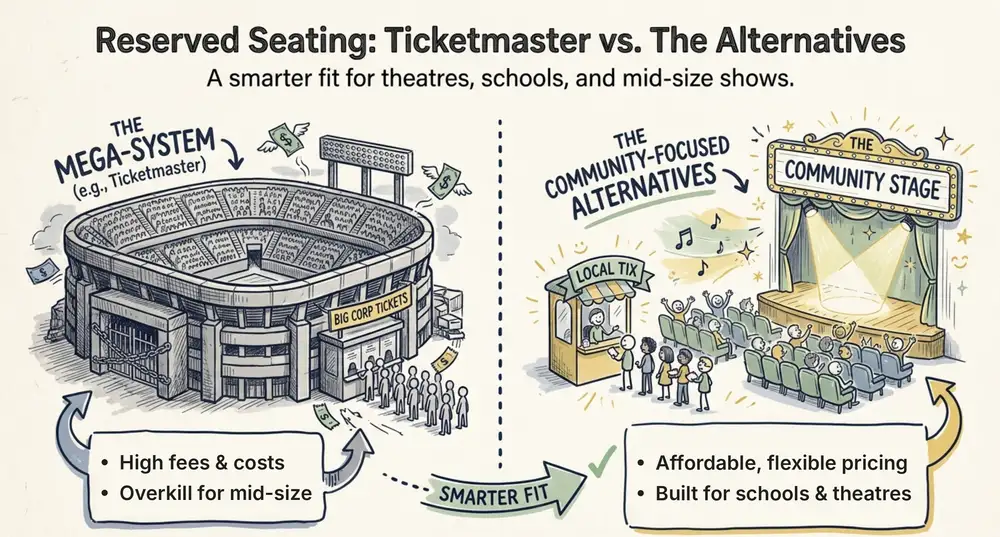
Ticketmaster Reserved Seating: How It Works and a Better Fit for Smaller Events
Ticketmaster reserved seating works well for arenas. If you run a theatre, gala, or mid-size show, see how it works, what it costs, and how to switch.
Ashish Chandra
16 Oct 2026