

Q: Are No Fee Tickets Actually Possible? A: Yes (2026 Guide)
 Written byAshish ChandraLast updatedAugust 27, 2026
Key Takeaways:
- Ticket fees are extra charges added during checkout.
- Buyers dislike ticket fees because they feel unexpected.
- No-fee tickets show one clear price upfront.
- Commission-free pricing improves trust and conversions.
- Some platforms, like Ticket Generator , give organizers full pricing control.
Buying event tickets should feel simple. You see a price, you pay that price, and you are done. But for many buyers, that is not how ticketing works anymore.
Instead, extra fees appear at checkout. Processing fees. Service fees. Convenience fees. The final price often looks very different from what was advertised.
Did you know? The FTC now requires ticket sellers to show full prices upfront, including all fees, to prevent hidden charges at checkout.
Source: Federal Trade Commission / The Verge
This is why more buyers and organizers are searching for no fees tickets. They want pricing that feels clear and honest. Organizers want fewer drop-offs. Buyers want fewer surprises.
In this guide, we explain what no-fee tickets really mean. We also look at why ticket fees frustrate people and if it’s possible to sell tickets without service charges.
We also break down how fee-free ticketing works in practice, so you can decide what is right for your event.
A. What does “no fees tickets” mean?
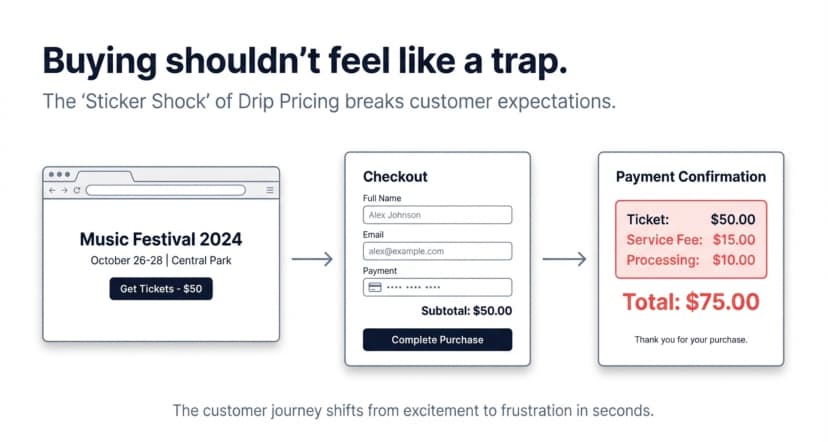
No-fee tickets mean buyers pay one clear price for a ticket, with no extra charges added at checkout. The amount shown upfront is the amount they pay in the end.
In a typical ticket purchase, the listed ticket price is not the final price. Extra fees are added later. These may include service fees, processing fees, or convenience fees. By the time buyers reach payment, the total often feels higher than expected.
In case of tickets without fees, this last-minute increase does not happen. Any costs related to ticketing are already included in the ticket price. From the buyer’s point of view, there are no surprises.
It is important to understand that no ticket fees do not always mean there are no costs involved at all. Payment processing and platform costs may still exist behind the scenes. The difference is how those costs are handled and who pays them.
For buyers, tickets with no fees feel simpler and fairer. For organizers, this pricing model sets clear expectations. It also reduces friction during checkout.
That is why more and more events are now exploring tickets without extra fees as a better way to sell tickets.
B. Why ticket fees upset buyers (and hurt sales)?
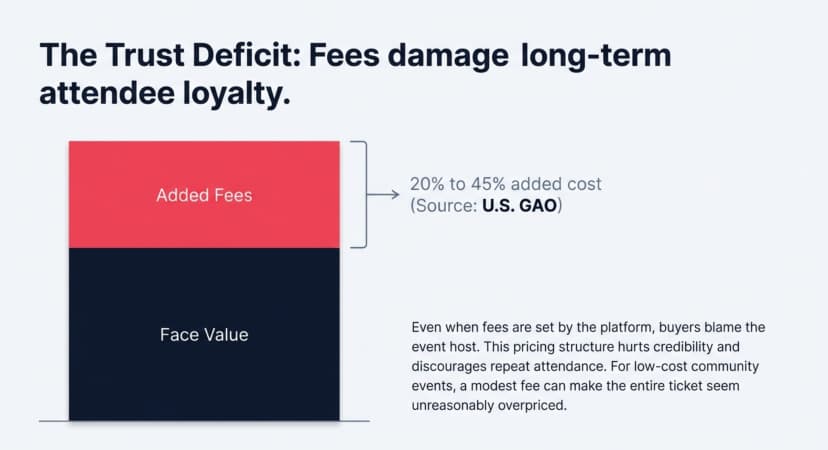
Ticket fees frustrate buyers because they break expectations. A buyer sees one price at first and expects to pay that amount. When extra fees appear at checkout, it feels like a last-minute surprise.
The issue is often not the size of the fee, but the timing. People prefer knowing the full cost upfront. When fees are added late, trust automatically drops. Some buyers pause to reconsider. Others abandon the purchase altogether.
This problem becomes worse for low-cost events. When a ticket costs a small amount, even a modest fee can feel unreasonable. A few extra dollars can make the ticket seem overpriced, even if the event itself is fairly priced.
Ticket fees also affect how buyers perceive the organizer. Even when fees are set by the platform, buyers often blame the event host. This hurt credibility and make people less likely to return for future events.
Did you know? Ticket service fees can add 20% to 45% to the face value of tickets, significantly increasing what buyers actually pay.
Source: U.S. Government Accountability Office (GAO)
For organizers, these drop-offs create real problems. Fewer completed purchases mean lower attendance and unpredictable planning. It becomes harder to estimate food, seating, staffing, and overall event flow.
This is why many organizers are moving toward towards no fees tickets. Clear pricing removes hesitation at checkout. When buyers see one clear price, they are more likely to finish the purchase. They also feel better about it afterward.
C. Are no-fee tickets actually possible?
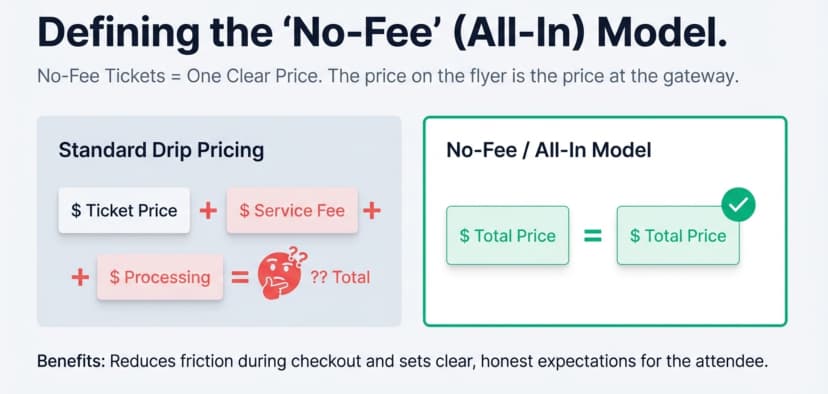
Yes, no-fee tickets are possible. But this works only if the ticketing platform gives you pricing control.
Some platforms automatically add fees at checkout. Organizers cannot remove or adjust them. In these cases, buyers always see a higher final price. This happens even when the event host wants to remove extra fees altogether.
Other platforms work differently. They let organizers decide how costs are handled. Instead of adding fees later, organizers can include the costs in the ticket price itself. From the buyer’s side, this looks like tickets with no fees, because the price never changes at checkout.
It is important to be clear about one thing. “No fees” does not mean there are no costs involved anywhere. Payment processing and platform costs still exist. The difference is visibility. With tickets without fees, buyers see one all-in price upfront.
This approach matters because pricing transparency directly affects conversions.
Did you know? 39% of shoppers abandon checkout because extra costs (shipping, tax, and fees) are too high.
Source: Baymard Institute
Research from Harvard Business Review shows that surprise fees at checkout make many people leave without buying. When prices are clear from the start, more people complete the transaction.
For organizers, this means fewer drop-offs and more predictable attendance. For buyers, it means less frustration and more trust in the event.
D. How do no-fee tickets work in practice?
No-fee tickets work because the “fee” does not show up as a separate line item at checkout. Instead, the total cost is handled before the buyer reaches the payment stage.
In most fee-free setups, organizers use an all-in ticket price. That means any platform and payment costs are already included in the ticket price. So if you need to net $20 per ticket, you price the ticket slightly higher so the buyer still pays one clean amount. The buyer sees one price upfront, and that price does not change.
Another common approach is to keep ticket prices the same and use a platform with very low fees. This does not remove fees completely, but it keeps the final price close to what buyers expect. This is useful when margins are tight.
The most important rule is simple. If you want tickets without fees, the checkout should feel predictable. Buyers should not discover extra costs at the last step.
“Extra costs too high is the number one reason for cart abandonment.”
Pro Tip: If you want no-fee tickets, use a platform that does not force fees on buyers. Ticket Generator gives you pricing control, so you can show one all-in price that stays the same at checkout—helping reduce drop-offs and keep pricing clear.
E. When no-fee tickets make sense (and when they don’t)?
No-fee tickets work best when price clarity is a priority. This is common for community events and workshops. It also works well for internal company events, nonprofits, and low-cost gatherings. In these cases, buyers expect simple pricing and are more likely to complete checkout when the price feels fair and final.
Fee-free pricing also makes sense for first-time events. Clear prices reduce questions, refund requests, and hesitation. They help build trust quickly, especially when buyers are unfamiliar with the organizer.
However, no fees tickets may not suit every event. Large concerts or high-cost productions often rely on service fees to cover platform and payment costs. When margins are tight, fully removing fees can put pressure on the organizer.
In these situations, the better option is not zero fees, but lower and transparent fees. The goal is still the same. Buyers should understand what they are paying for and why.
Pro Tip: Some events need zero fees. Others just need flexibility. Ticket Generator supports both—you can offer true no-fee tickets for smaller events or keep fees minimal for larger ones. Either way, you control how prices appear to buyers, not the platform.
F. What is a commission free ticketing platform?
A commission free ticketing platform is one that takes no percentage of your ticket sales. You pay for the software, not for each dollar your event earns, and the money moves through your own payment account rather than the platform’s.
That distinction matters more than it sounds once you start comparing no-fee options. A platform can advertise “no fees” and still take a cut, because “no fees” usually describes what the buyer sees at checkout, while commission describes what the platform takes from you. A ticketing platform no fees setup fixes the buyer’s experience. A commission free model fixes the organizer’s margin. The options worth shortlisting do both.
Three cost lines are worth separating before you compare anything:
- Platform commission: a percentage of every sale, or nothing at all.
- Per-ticket cost: a flat amount for each ticket issued, which does not move when your ticket price does.
- Card processing: roughly 2.9% + $0.30 with most gateways. Unavoidable on any paid ticket, and charged by the payment processor rather than the ticketing platform.
Only the first two actually change when you switch platforms. The third follows you.
Event ticketing no fees alternatives compared
The zero-fee corner of this market is crowded with small, focused platforms, and they price a paid ticket in very different ways. Here is how the main ones compare, checked in August 2026.
|
Platform |
Platform fee on a paid ticket |
Card processing |
Who pays at checkout |
The trade-off |
|---|---|---|---|---|
|
Ticket Generator |
0% commission. Prepaid credits: 1 credit issues 1 ticket, from $0.60 (10-pack) down to about $0.25 (10,000-pack). No subscription. Credits never expire. |
Your own Stripe, PayPal or Razorpay account, at your own negotiated rate. |
Organizer. Buyers only ever see the price you set. |
You buy credits up front instead of paying as you sell. |
|
Dispala |
0%. All ticketing features free on free and paid events. |
Stripe's standard card fees. |
Organizer, or optionally passed to buyers. |
States it will monetise later through premium features, so today's terms are not guaranteed. |
|
SeatHero |
"Zero platform fees", described as a flat-rate model. The rate itself is not published. |
Not published. |
Not published. |
Pricing sits behind a signup or demo, so you cannot compare it before talking to sales. |
|
TixFox |
Free plan: $0.00 per ticket. Standard plan: $0.39 per paid ticket, or $0.30 for tickets under $5. No monthly fee, no setup cost, no contract. |
Stripe 2.9% + $0.30 per transaction. |
Organizer's choice. A fee-control feature can pass it to attendees. |
Two plans to choose between, and the free plan's feature limits decide which you actually need. |
|
Ticketime (by Hykmah) |
No percentage per ticket. Flat subscription instead: Free $0, Professional A$50/month, Premium A$350/month, Enterprise custom. |
"Reduced payment processing rates", not specified. |
Organizer, through the subscription. |
You pay monthly whether or not you run an event. The free tier caps at 10 events a month and 100 attendees total. |
|
Presso |
Flat 1% on paid tickets. No monthly fee, no minimum, no per-ticket floor. Free tickets are not charged. |
Stripe's own fees, charged separately and not marked up. |
Organizer. The 1% is not added on at checkout. |
It is a percentage, so the cost rises with your ticket price. |
|
EventMS Pro |
0% commission. Self-hosted perpetual licence: $4,999 early-bird, normally $7,999. |
Your own gateway. |
Organizer. |
$4,999 up front, plus a VPS at roughly $20 to $40 a month, and you run the server yourself. |
|
Sprouter |
Tiered: Free tier 3% + $0.30. Pro ($10/month) 2% + $0.20. Pro+ ($50/month) 1% + $0.10, capped at $5 per ticket. |
2.9% + $0.30 per order, charged separately. |
Buyer by default. Organizers may absorb some or all of it. |
The lowest rate needs the $50/month plan, and the default behaviour adds fees to your buyer's total. |
Fees checked August 2026 from each vendor's own published pricing. Card processing of roughly 2.9% + $0.30 applies on any paid ticket whichever platform you use. Always confirm against the official pricing page of the event ticketing platform without fees you are shortlisting, because these terms change often.
A percentage scales with your ticket price. A flat per-ticket cost does not. That is the whole argument, and it is easier to see in numbers than in prose.
|
Platform fee on one paid ticket |
$20 ticket |
$50 ticket |
$200 ticket |
|---|---|---|---|
|
Ticket Generator (1,000-credit pack) |
$0.40 |
$0.40 |
$0.40 |
|
Dispala |
$0.00 |
$0.00 |
$0.00 |
|
TixFox (Standard) |
$0.39 |
$0.39 |
$0.39 |
|
Presso (1%) |
$0.20 |
$0.50 |
$2.00 |
|
Sprouter (Pro+, 1% + $0.10) |
$0.30 |
$0.60 |
$2.10 |
|
Sprouter (free tier, 3% + $0.30) |
$0.90 |
$1.80 |
$6.30 |
|
Ticketime / EventMS Pro / SeatHero |
n/a |
n/a |
n/a |
Platform fee only, excluding card processing, which is broadly comparable across all of them. Ticketime, EventMS Pro and SeatHero are marked n/a because they charge by subscription or licence rather than per ticket.
Why Ticket Generator is the stronger commission free option
Ticket Generator is not the cheapest line item in that table, and it would be dishonest to pretend otherwise. Dispala can genuinely cost $0 per ticket, and EventMS Pro does too once you have paid for the licence and stood up a server.
What Ticket Generator offers is zero commission with no percentage, no subscription, no server to run and no fee your buyer ever sees, plus the operational depth those smaller tools do not carry.
Four differences that show up once the event is real:
- Your money, your gateway. Payments settle directly into your own Stripe, PayPal or Razorpay account, so you are not waiting on a platform payout cycle.
- Cost that does not scale with price. One credit issues one ticket, from $0.60 down to about $0.25 at volume. A 1% model charges four times as much on a $200 ticket as on a $50 one. A credit costs the same either way.
- Entry control, not just checkout. Every ticket carries a unique QR code and a unique ticket ID, and the Ticket Validator app flags duplicates and expired tickets across multiple gates at once.
- Compliance you can hand to procurement. ISO 27001:2022 certified, GDPR-compliant and SOC 2 aligned, which most platforms in that table cannot show.
Add multi-channel delivery over email, SMS and WhatsApp, built-in Campaigns for promotion, and a white-label REST API, and the comparison stops being a contest about the per-ticket rate.
Pro Tip: Before you shortlist a commission free ticketing platform, price your actual volume rather than the headline rate. Ticket Generator makes that easy to model: 1,000 tickets costs $400 in credits whether those tickets sell at $20 or $200. A 1% platform fee on 1,000 tickets at $200 costs $2,000.
G. How Ticket Generator supports no fees tickets?
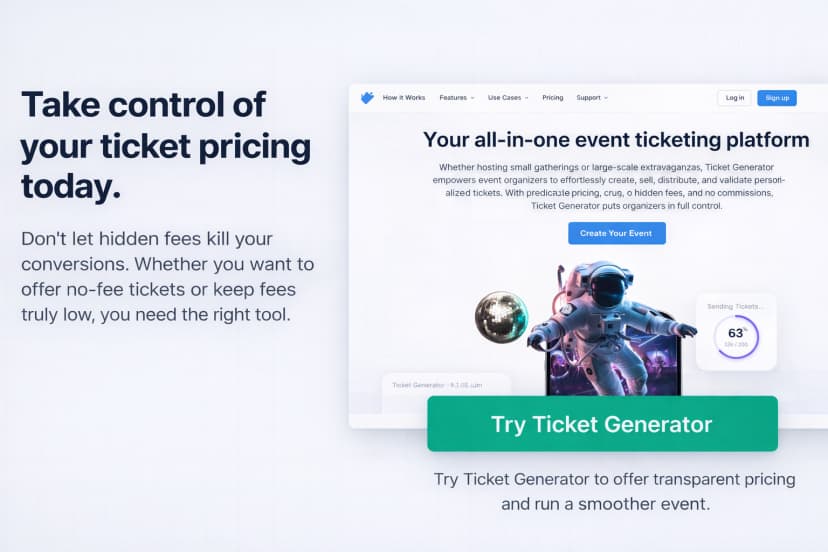
Ticket Generator is made for organizers who want control over pricing. Many ticketing platforms lock you into fixed fees and pass them to buyers. Ticket Generator works differently.
With Ticket Generator, you control how ticket prices appear. This lets you offer no-fee tickets from the buyer’s point of view. Instead of adding charges at checkout, you include costs in the ticket price. Buyers see one final price and pay exactly that.
This works best for events where trust matters. When buyers do not see surprise fees, they are more likely to finish buying tickets. They also feel better about the event and are more likely to come back or recommend it to others.
Ticket Generator also supports flexible pricing models. If fully removing fees is not practical for your event, you can still keep them low and predictable. This lets you offer tickets with no extra fees for some ticket types. You can price premium tickets differently if needed.
Tickets are digital and use QR Codes. There is no printing and no manual entry work. Staff can scan tickets using phones. This saves time and reduces effort. It also makes fee-free or low-fee ticketing easier, even for small teams.
Clear pricing also helps with promotion. You can share one ticket price on your website, emails, and social media. This avoids confusion and cuts down support questions. It also makes your event look more professional.
In short, Ticket Generator fits your pricing needs. You can offer no-fee tickets or low-fee options with full transparency. You choose what works best for your event.
Conclusion
No fees tickets change how people feel about buying event tickets. When buyers see one clear price and pay exactly that amount, trust improves. Fewer people abandon checkout. Events feel more transparent and professional.
At the same time, ticketing always involves some costs. Payment processing, platform tools, and entry management still exist. The difference is how those costs are handled. With fee-free or low-fee setups, buyers are not surprised at the last step.
For organizers, this means better conversions and more predictable attendance. For buyers, it means less frustration and more confidence in their purchase.
If you want clear and fair pricing without losing control, the right ticketing setup matters. Choose platforms that give you pricing flexibility. This makes it possible to sell tickets without extra fees and still run a smooth event.
Set clear expectations. Show one honest price. Let your event stand out for the right reasons.
Try Ticket Generator to offer no-fee tickets or keep fees truly low. Take full control of how your ticket prices appear.
FAQs: No Fees Tickets
1. What are no-fee tickets?
No-fee tickets show one final price. Buyers do not see extra charges at checkout. All costs are included in the ticket price itself,
2. Are no-fee tickets really free of all costs?
No. There are still costs like payment processing. No-fee tickets only mean buyers do not pay separate fees at checkout.
3. Can any event offer no fees tickets?
Yes, if the ticketing platform allows pricing control. Some platforms force fees. Others like, Ticket Generator, let organizers include costs in the ticket price.
4. Do no fees tickets increase ticket sales?
Often, yes. Clear pricing reduces hesitation. It helps more people finish checkout, especially for low-cost events and workshops.
5. When should I avoid no-fee tickets?
Large or expensive events may need visible fees to cover costs. In these cases, low and clear fees work better than removing them fully.
6. How can I sell no-fee tickets without hurting margins?
Use a platform that gives you pricing control. You can include costs in the ticket price or keep fees low. Tools like Ticket Generator support this approach.
7. Is Ticket Generator a commission free ticketing platform?
Yes. Ticket Generator takes 0% commission on ticket sales. You buy prepaid credits, one credit issues one ticket, and payments go straight into your own Stripe, PayPal or Razorpay account. Credits never expire, and new accounts get the first 10 tickets free.
8. Is there an official event ticketing platform without fees?
There is no single official one. Several platforms advertise zero commission, including Dispala, TixFox, EventMS Pro and Ticket Generator, and each handles the remaining costs differently. Card processing of roughly 2.9% + $0.30 still applies to any paid ticket whichever you pick, so compare each vendor’s official pricing page before you commit.
About the author
Content Marketer at Ticket Generator
Ashish Chandra has spent 5+ years writing about event technology, covering topics such as ticket design, QR check-ins, attendee management, and event marketing strategy. As the Content Lead at Ticket Generator, Ashish has analyzed hundreds of real-world event workflows and ticketing setups, helping organizers across industries use QR-based tickets, event landing pages, and smarter ticketing systems to run smoother, better-attended events. His writing is shaped by real user needs and the questions organizers ask most often: How do I sell more tickets? How do I avoid chaos at the door? How do I make my next event better than my last? When he steps away from the screen, you'll likely find him hiking a quiet trail or tending his plants- his preferred way to reset.
Latest posts
Check out our latest articles on the blog
 12 min read
Email Marketing for Events and Webinars: What to Send, When to Send It, and How to Automate It
A step-by-step playbook for email marketing for events and webinars. Learn what to send, when to send it, and how to automate every email for in person and virtual events.
Ashish Chandra
18 Oct 2026
 10 min read
Halloween Masquerade Ball: How to Host a Night of Masks and Mystery
From Venetian-inspired masks to QR-coded entry, here is your complete guide to planning a Halloween masquerade ball your guests will talk about for years.
Ashish Chandra
18 Oct 2026
 9 min read
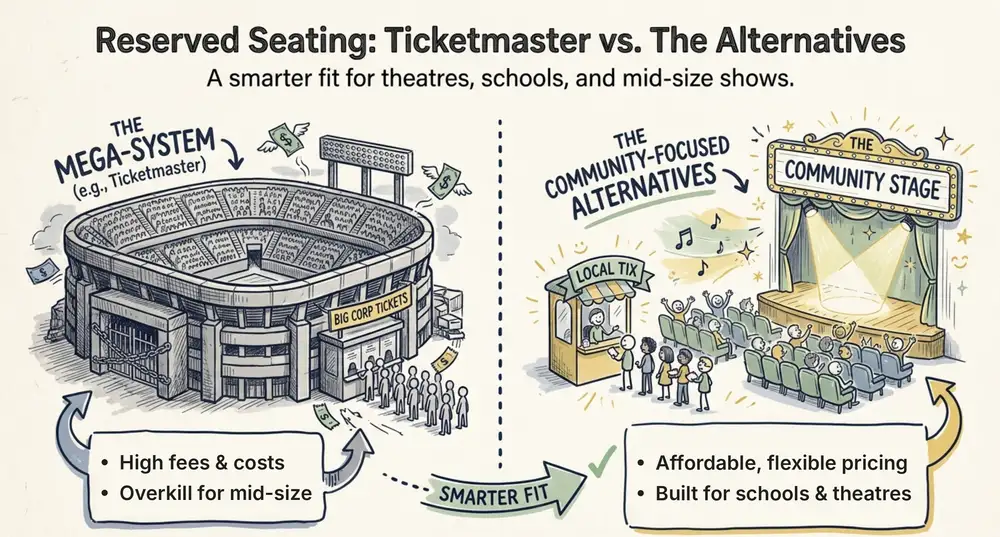
Ticketmaster Reserved Seating: How It Works and a Better Fit for Smaller Events
Ticketmaster reserved seating works well for arenas. If you run a theatre, gala, or mid-size show, see how it works, what it costs, and how to switch.
Ashish Chandra
16 Oct 2026