

Event Email Marketing Examples: Real Emails to Learn From and Templates to Copy
 Written byAshish ChandraLast updatedOctober 5, 2026
Key Takeaways:
- The best event email marketing examples pair one clear ask with one proof, such as a speaker, a deadline or a price breakdown.
- Each email should do one job: invite, persuade, guide or remind.
- You can copy the structure of any example and swap in your own details.
- Your sign-up form and ticket email should echo the promise in your invite.
- Ticket Generator helps you keep your emails, forms and tickets on one brand.
You want people to show up to your event. Email is one of the best ways to get them there. But open ten event emails and nine look the same: a logo, a date and a button that says "Register."
So what do the best event email marketing examples do differently? Short answer: they pair one clear ask with one piece of proof. The ask is a single action, like "Save your spot." The proof is the reason to act now, like a speaker, a deadline or a price breakdown.
Did you know that 76% of B2B marketers name email an effective channel for promoting events? Source: Demand Gen Report, State of Virtual Events 2023 (via Webbiquity)
Email works, but only when the message is sharp. In this guide, we walk through real emails from Webflow Conf, SXSW, Moz, Optimizely and more. We follow the order of your campaign: the invite, the promotion, the teaser, the conference run-up, the sign-up form and the reminder. After each group, you get a template to copy for your own event marketing plan. Let's start with the email that kicks it all off.
How do top brands write a marketing event invitation email?
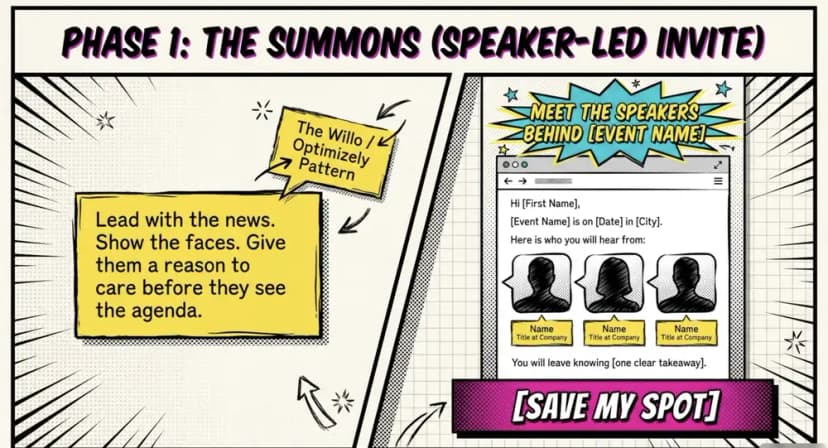
They lead with the news and one button. Then they let a single proof element do the persuading. Short copy and a clear headline matter more than clever design.
Take Webflow Conf 2024. Bizzabo points to a bold hero image with the event name and a clear "Registration is open" headline. XOXO 2024 went the other way, with lots of white space and one central button. The looks differ, but the rule is the same: nothing competes with the ask.
Willo built its invite around people. A "Meet the speakers" block with headshots, names and titles gave readers a reason to care before they saw the agenda. Optimizely went a step further and named Michael Phelps as a keynote. Campaign Monitor says that kind of access to people prospects rarely meet is a strong pull.
Want to try it? Here is a speaker-led invite you can adapt. It follows the Willo pattern. For more on wording and design, see our event invitation tips.
Subject: Meet the speakers behind [Event Name]
Hi [First Name],
[Event Name] is on [Date] in [City]. Here is who you will hear from:
• [Speaker 1], [Title] at [Company]
• [Speaker 2], [Title] at [Company]
• [Speaker 3], [Title] at [Company]
[Add a headshot beside each name.]
You will leave knowing [one clear takeaway].
[Button: Save my spot]
You have sent the invite. Now what? The next emails need to keep people moving, and that is where proof and deadlines do the heavy lifting.
What does a good event promotion email sample look like?
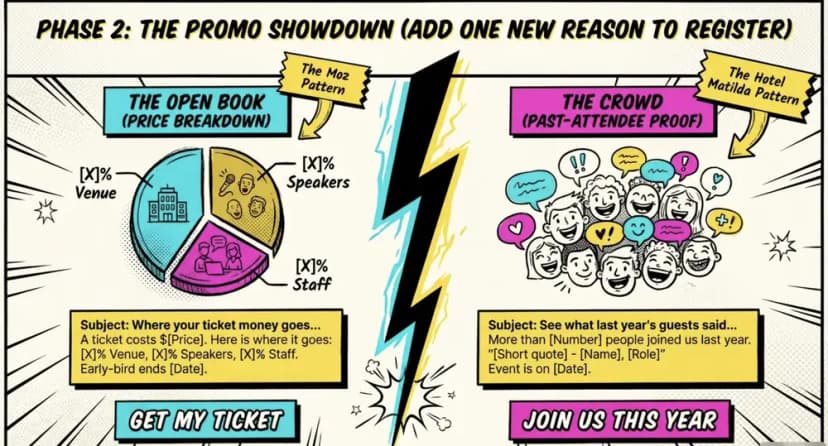
A good event promotion email sample adds one new reason to register. It backs that reason with proof and keeps the button the same. It does not repeat the invite.
Synapse paired a countdown clock with an expiring discount and a bold button, as Campaign Monitor describes. EMS used a countdown visual too, built around early-bird pricing that ends in 24 hours. Both lean on a real deadline. A fake deadline burns trust fast.
Proof does not have to be a deadline, though. Hotel Matilda showed happy attendees from past events, which taps the wish to join a crowd. Moz opened its books with an infographic of where each ticket dollar goes. Campaign Monitor notes this helps attendees make the case to their boss. These are strong event email campaign examples because each one gives readers something new to weigh. Here are two templates, one for each idea.
Subject: Where your ticket money goes at [Event Name]
Hi [First Name],
A ticket to [Event Name] costs $[Price]. Here is where it goes:
• [X]%: Venue and food
• [X]%: Speakers and travel
• [X]%: Production and staff
[Add a simple bar or pie chart.]
Early-bird pricing ends on [Date].
[Button: Get my ticket]
Subject: See what last year's guests said
Hi [First Name],
More than [Number] people joined us last year. Two of them shared this:
"[Short quote]," [Name], [Role]
"[Short quote]," [Name], [Role]
[Add a photo strip from last year.]
This year's event is on [Date].
[Button: Join us this year]
Promotion emails keep the ask alive. But sometimes you want to build interest before you reveal anything. That is where launch-style emails come in.
Can email product launch examples help you promote an event?
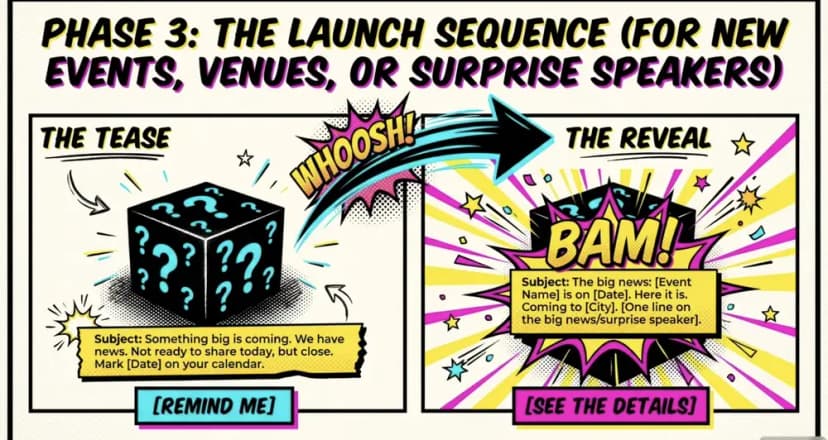
Yes! Launch emails build interest in two steps: a tease first and a reveal second. That works well for a new event, a new venue or a surprise speaker.
Livefront shows the tease at its best. Bizzabo describes a theme-led header, very little detail and a mystery image under a "Something Big Is Coming..." line. Readers had to click to learn more.
Think about the best email product launch examples in your own inbox. Most hold back the details at first. A second email then delivers the news with a date, a place and a clear button. You can run the same two-step play for an event. Here are both emails.
Subject: Something big is coming
Hi [First Name],
We have news. It is not ready to share today, but it is close.
Mark [Date] on your calendar.
[Button: Remind me]
Subject: The big news: [Event Name] is on [Date]
Hi [First Name],
Here it is. [Event Name] is coming to [City] on [Date].
[One line on the big news, such as a surprise speaker or a new venue.]
[Button: See the details]
Teasers work for events of any size. Big, multi-day conferences need more, because they have more to say.
What do conference marketing email examples do differently?
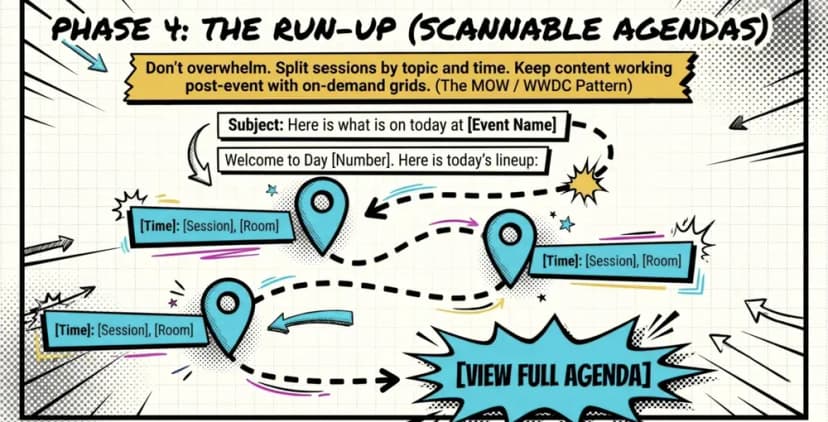
They show attendees the full range of what is on offer. Then they keep sending useful content right through the event. Here is what that looks like in practice.
- They offer many ways in. SXSW opened one email with a "We're back" headline and showed ways to speak, volunteer or sponsor. Campaign Monitor also praises a SXSW email for showing film, music and tech options, so every reader sees a fit.
- They make the agenda easy to scan. MOW sent daily agenda emails titled "Here's What's Coming Today," with sessions split by topic. WWDC used an icon-based agenda preview that matched its website.
- They keep content working after the talks. Gainsight used a Netflix-style grid of clickable tiles, so people could watch the best sessions on demand.
The MOW pattern is the easiest to copy, so let's turn it into a template. Here is a daily agenda email for any multi-day event.
Subject: Here is what is on today at [Event Name]
Hi [First Name],
Welcome to Day [Number]. Here is today's lineup:
• [Time]: [Session], [Room]
• [Time]: [Session], [Room]
• [Time]: [Session], [Room]
[Button: View the full agenda]
Pro Tip: Make your ticket look like your emails. In Ticket Generator, design tickets in the drag-and-drop designer, open them in Canva, or use AI ticket design, which returns four options per request. Your tickets carry no platform watermark, so your brand stays front and center.
WWDC shows why a matching look matters. And every one of these emails sends people to the same place: a sign-up form. If the form does not match the promise, the click is wasted. So let's look at the form next.
How do you build an email marketing event registration form that matches your emails?
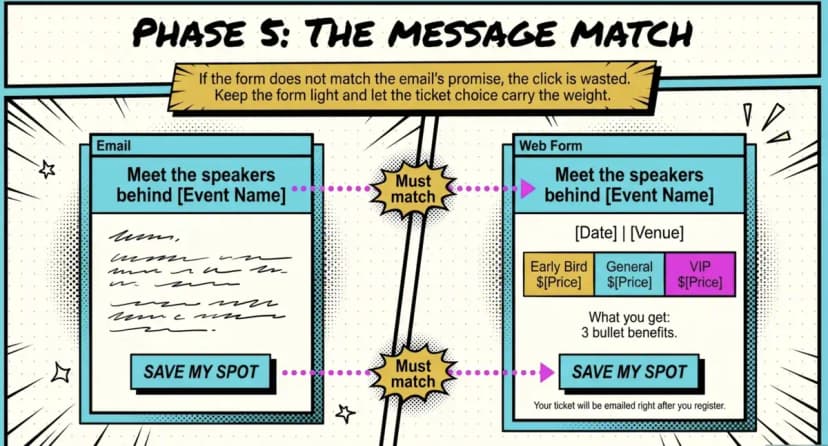
Make the form repeat the promise from the email. The same headline, date and button wording tell readers they are in the right place.
Marketers call this message match. Say your email reads "Meet the speakers behind [Event Name]." If the form opens with a plain "Registration" title, some readers pause. Others leave. So keep the form light, and let the ticket choice carry the weight. Here is an email marketing event registration form template built on that idea.
Headline: Meet the speakers behind [Event Name] (same as your email)
Subhead: [Date] | [Venue or Online]
Ticket choice: Early Bird $[Price] (ends [Date]) | General $[Price] | VIP $[Price]
Fields: Name, Email, [One more field only if you will use it]
What you get: • [Benefit] • [Benefit] • [Benefit]
Button: Save my spot (same wording as your email)
Small print: Your ticket will be emailed to you right after you register.
With Ticket Generator, you can offer several ticket categories, such as Early Bird, General and VIP, on one event registration page. If you run large events, see how a conference registration platform handles the same flow.
Pro Tip: Running an invite-only event? Choose auto or manual approval for registrations in Ticket Generator, so invite-only events stay invite-only.
Once someone signs up, your emails shift from persuading to guiding. Reminders are short, but they shape how guests feel on the day.
What do good event reminder email templates look like?
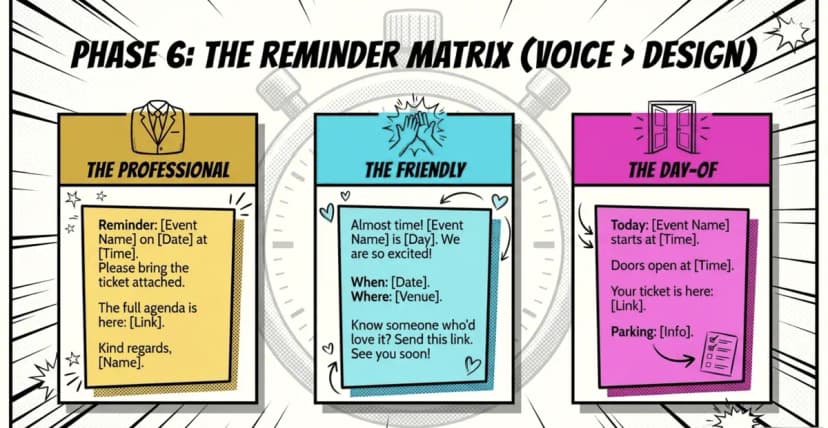
Good event reminder email templates are short, specific and sound like your brand. Pick the voice that fits your audience, then add one useful detail to each send.
Voice matters more than design here. A corporate summit and a community fair should not sound alike. Below are three templates in three voices. Need professional event reminder email templates? Start with the first one.
Subject: Reminder: [Event Name] on [Date] at [Time]
Dear [First Name],
This is a reminder that you are registered for [Event Name].
Date: [Date]
Time: [Time]
Location: [Venue and address]
Please bring the ticket attached to this email.
The full agenda is here: [Link]
If you have questions, contact us at [Email or phone].
Kind regards,
[Name], [Title]
Subject: Almost time! [Event Name] is [Day]
Hi [First Name],
We are so excited to see you at [Event Name]! Here is the quick version:
• When: [Date and time]
• Where: [Venue]
• Bring: [Item, or your ticket on your phone]
Know someone who would love it? Send them this link: [Link]
See you soon,
[Name]
Subject: Today: [Event Name] starts at [Time]
Hi [First Name],
Doors open at [Time]. Your ticket is here: [Link]
Parking: [Info]
See you soon!
Pro Tip: Edit your ticket message once in Ticket Generator and it applies to single, bulk and registration tickets. Add the date, venue and parking notes there, and every ticket email also works as a reminder. Each one includes a Digital Ticket link, so guests can open their ticket from the inbox.
You now have the examples and the templates. So how do you run them without juggling five tools? Let's look at that last.
How does Ticket Generator help you put these examples to work?
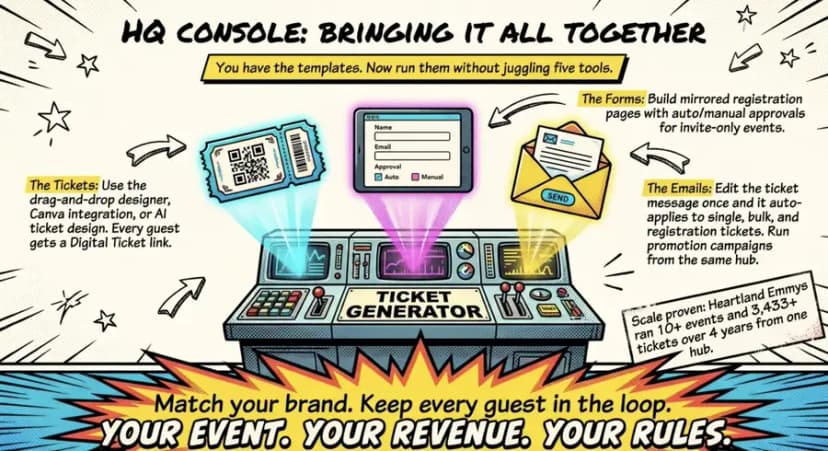
Ticket Generator is built for organizers who want their emails, forms and tickets to feel like one brand. Here is how that plays out with the examples above:
- Branded tickets: design in the drag-and-drop designer, open a design in Canva, or try AI ticket design. This is the WWDC lesson in practice: one look from inbox to venue.
- Registration pages that mirror your invite: offer several ticket categories, add custom fields and set approvals.
- One place to edit ticket messages: change the wording once and it applies across single, bulk and registration tickets.
- Campaigns for promotion emails: use custom email templates and your own sender details, then track how each campaign performs.
This setup suits teams that run repeat events. Heartland Emmys has used Ticket Generator for 10+ events and 3,433+ tickets across four consecutive years. Because tickets, forms and emails live in one place, each new event starts from the last one and not from a blank page.
Conclusion
The best event marketing emails are not complicated. Each one pairs a single ask with a single proof. Pick the example closest to your event, swap in your details and send it. Then watch which proof your audience responds to, and use more of it.
Not every event needs a countdown or a star speaker. A small workshop may only need a clear invite and a friendly reminder. And if you want your emails, forms and tickets to look like one brand, Ticket Generator is built for that. Ready to go beyond email? Explore our guides on event marketing strategies and event promotion ideas.
FAQs: Event Email Examples
What makes an event email stand out in a crowded inbox?
One clear ask backed by one strong proof. A deadline, a speaker or a price breakdown all work. Keep the design simple so the ask is the first thing people see.
How long should a marketing event invitation email be?
Keep it under 150 words, with one button. Lead with the news, add one proof and stop. Readers can find the details on your event page.
What is a good subject line for an event reminder?
Name the event and the date or time. For example, "Tomorrow: [Event Name] at [Time]" or "Reminder: [Event Name] on [Date]." Clear beats clever for a reminder.
Should event emails use images or plain text?
Both can work. Campaign Monitor describes Soho House as image-led. Bizzabo describes XOXO as clean and minimal. Pick the style that fits your brand, then test it with your own list.
What should an email marketing event registration form template include?
It should include a headline that matches your email, the date and venue, and ticket options. Add two or three fields, a short list of benefits and one button. Say when the ticket will arrive.
Can I send these emails from Ticket Generator?
Yes. Ticket Generator Campaigns supports custom email templates and sender details, and ticket emails include a Digital Ticket link. You can edit ticket messages in one place and apply them across ticket types.
About the author
Content Marketer at Ticket Generator
Ashish Chandra has spent 5+ years writing about event technology, covering topics such as ticket design, QR check-ins, attendee management, and event marketing strategy. As the Content Lead at Ticket Generator, Ashish has analyzed hundreds of real-world event workflows and ticketing setups, helping organizers across industries use QR-based tickets, event landing pages, and smarter ticketing systems to run smoother, better-attended events. His writing is shaped by real user needs and the questions organizers ask most often: How do I sell more tickets? How do I avoid chaos at the door? How do I make my next event better than my last? When he steps away from the screen, you'll likely find him hiking a quiet trail or tending his plants- his preferred way to reset.
Latest posts
Check out our latest articles on the blog
 12 min read
Email Marketing for Events and Webinars: What to Send, When to Send It, and How to Automate It
A step-by-step playbook for email marketing for events and webinars. Learn what to send, when to send it, and how to automate every email for in person and virtual events.
Ashish Chandra
18 Oct 2026
 10 min read
Halloween Masquerade Ball: How to Host a Night of Masks and Mystery
From Venetian-inspired masks to QR-coded entry, here is your complete guide to planning a Halloween masquerade ball your guests will talk about for years.
Ashish Chandra
18 Oct 2026
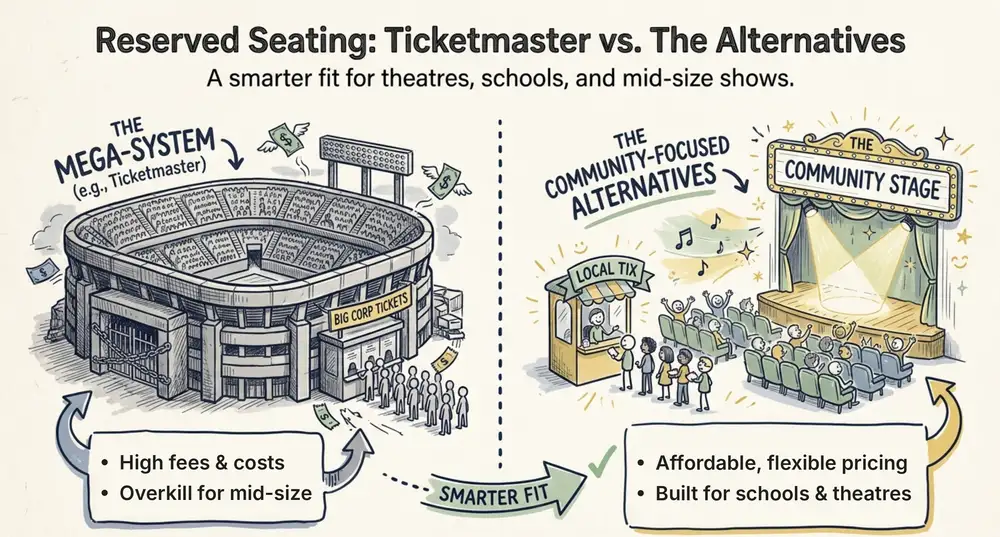 9 min read
Ticketmaster Reserved Seating: How It Works and a Better Fit for Smaller Events
Ticketmaster reserved seating works well for arenas. If you run a theatre, gala, or mid-size show, see how it works, what it costs, and how to switch.
Ashish Chandra
16 Oct 2026