

How to Increase Event Participation: 8 Practical Tactics
 Written byAshish ChandraLast updatedJuly 1, 2026
Key Takeaways:
- Event participation depends heavily on registration friction, communication frequency, and the level of commitment built into your sign-up flow.
- Free in-person events commonly experience 40–60% no-show rates, while paid events usually reduce no-shows to around 10–20%. Source: Eventtia (2025).
- To increase participation at events, you need to optimize for actual attendance, not just registrations.
- Branded ticketing, multi-touch reminders, and QR-based check-in consistently outperform spreadsheet-and-form workflows when it comes to attendance rates.
- Ticket Generator helps organizers run zero-commission, fully branded events with WhatsApp/SMS ticket distribution and real-time QR validation.
You sent 500 invitations, 320 people RSVP’d, and 180 walked in. Sound familiar?
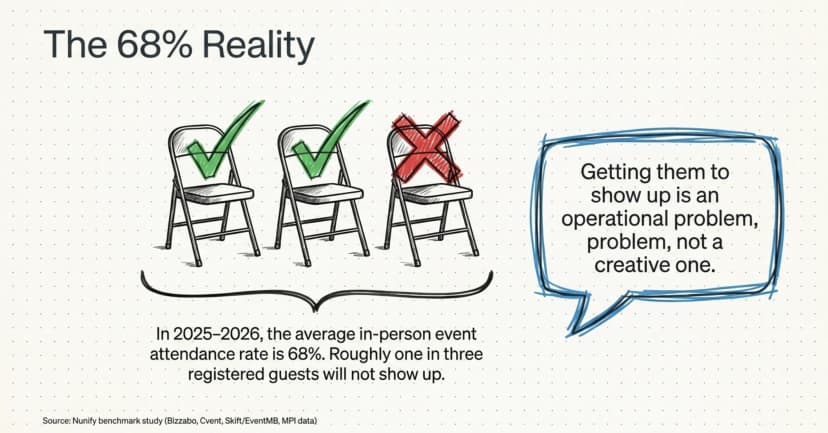
Did You Know? The average in-person event attendance rate in 2025–2026 is 68%, meaning roughly one in three registered guests does not show up. Source: Nunify Benchmark Study and MPI data (2026).
To increase participation at events, you have to design for two distinct outcomes: a clean sign-up flow that does not lose people at the form, and enough commitment plus communication between registration and event day to actually pull them through the door. Both are operational problems, not creative ones.
In this guide, I’ll break down where participation drops happen, the eight tactics that consistently lift show-up rates, and how a tighter ticketing setup closes the loop.
You will see realistic benchmarks for 2026, the friction points to fix in your registration flow, and a comparison of typical ticketing setups so you can pick what fits your event.
Let’s begin!
Why does event participation actually drop between registration and arrival?
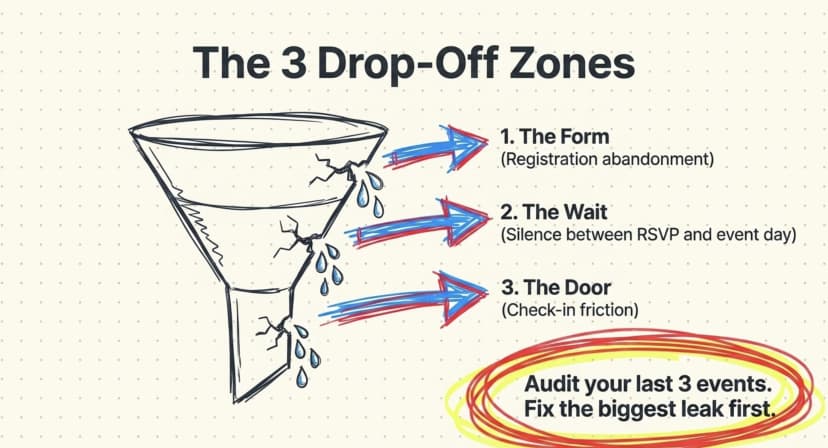
Participation drops in three places: at the registration form, between successful registration and event day, and at the door. Each gap has its own cause and its own fix.
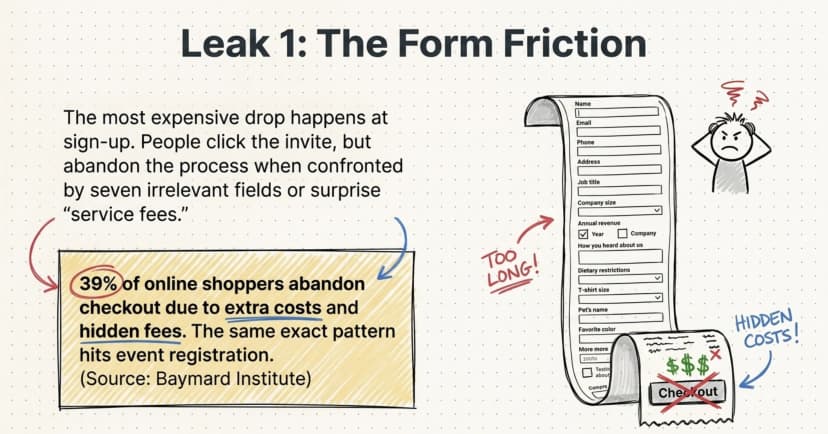
The most expensive drop happens at registration. People click the invite, land on a form, and abandon when they see seven fields, a slow page, or a ‘service fee’ they did not expect.
The metrics marketers care about most when evaluating event success are attendance rates (59%), opportunities created (50%), and event registrations (47%), per the Splash Events Outlook Report 2025, cited in Cvent’s 2026 industry round-up. Yet many organizers still treat the form as an afterthought.
The second drop is silence. A confirmation email goes out, then nothing for two weeks, then a panicked ‘tomorrow’s the event!’ reminder on event day. By then, calendars have filled up, and your guest has mentally moved on.
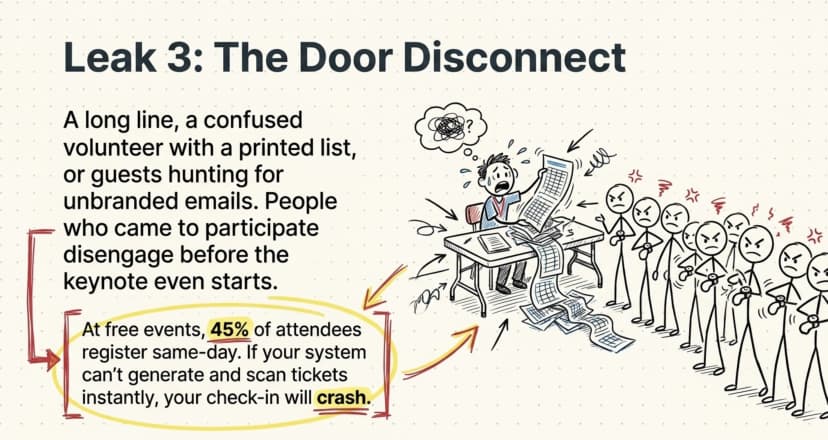
The third drop is the door itself: a long check-in line, a confused volunteer with a printed spreadsheet, or a guest who cannot find their ticket in the email thread. People who came to participate disengage before the keynote starts.
Pro Tip: Audit your last three events by drop-off stage. Track how many people started but never completed registration, how many registered but failed to attend, and how many attendees left within the first 30 minutes. Fix the largest leak first — in most cases, the biggest issue is registration friction, not the quality of your event content.
What is a realistic event participation rate to aim for in 2026?
Aim for 80%+ attendance at paid events and 50–60% at free ones; anything higher is exceptional; anything lower means your reminder or commitment system needs work.
The benchmarks have hardened in 2025–2026. Free in-person events see 40–60% no-shows, paid events closer to 10–20%, and webinars average 35–50%, according to Eventtia’s 2025 no-show study. The ‘commitment gap’ between free and paid is one of the biggest planner challenges right now.
Some sectors run hotter than the averages:
|
Event type |
Realistic attendance target (2026) |
|---|---|
|
Paid conferences and ticketed concerts |
80–90% |
|
Corporate internal events (free, expected) |
70–85% |
|
Free public meetups and webinars |
40–60% |
|
Member-only events (membership = commitment) |
70–80% |
|
Wedding / RSVP-driven events |
85–95% |
If your numbers sit well below these ranges, you are not facing a content problem; you are facing a participation system problem.
Did You Know? At free events, 45% of attendees register either on the same day or directly at the door (aggregated event registration statistics, 2025). That is why having a reliable same-day registration workflow matters — but only if your ticketing system can generate and deliver tickets instantly without slowing down check-in operations.
How do you reduce friction at the registration step?
Cut every form field that isn't operationally necessary, remove surprise fees from checkout, and design a mobile-first registration page, where most of your participation gains live.
Start with the form itself. Most registration forms ask for things organizers will never read, job title for a wedding, T-shirt size when no T-shirts exist, ‘how did you hear about us’ without a downstream owner.
39% of online shoppers abandon checkout because of extra costs like shipping and fees, per the Baymard Institute. The same pattern hits event registration; every unnecessary field or surprise charge bleeds people.
Three friction sources to fix first:
- Mandatory fields that are not actually mandatory. Make everything optional except name, email, and (if paid) payment. Add custom fields only when you will use the data.
- Hidden service fees at checkout. A $25 ticket that becomes $31.40 with ‘convenience fees’ creates the exact moment Baymard documents, the abandonment moment. Show one price.
- Slow, non-mobile pages. Your event page should load in under three seconds on a 4G phone. Anything heavier and your mobile registrants quit before the form appears.
For organizers running events on their own domain, say, register.yourcompany.com, branded URLs also boost trust. People who hit a generic ticketing platform URL feel like they are leaving your brand.
People who hit your subdomain do not. (See our deeper guide on event registration platforms for a side-by-side of which platforms support branded subdomains.)
Pro Tip: Set up a fully branded event registration page on your own domain with Ticket Generator , without platform watermarks or surprise checkout fees. Your event. Your revenue. Your rules.
Which communication tactics actually move the needle on show-ups?
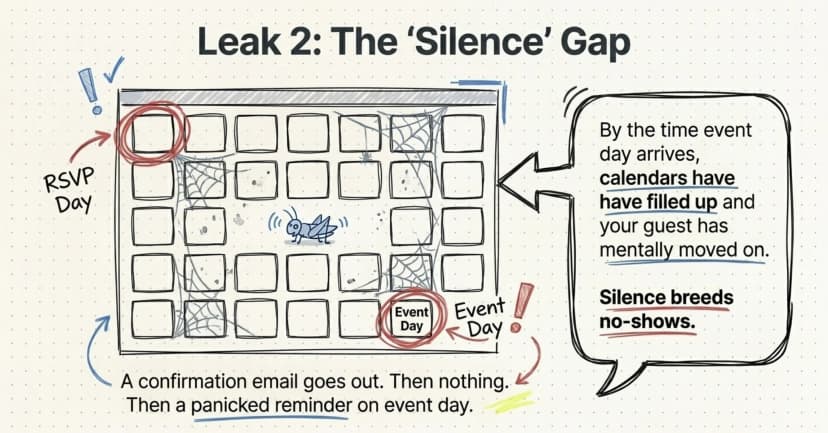
Multi-touch reminders at 7 days, 72 hours, 24 hours, and 2 hours before the event consistently outperform single-reminder workflows, especially when one of those touches is on WhatsApp or SMS rather than email alone.
Strong registration flows reduce drop-off: confirm attendance in advance, use multi-touch reminders, and personalize communication to boost turnout. The cadence matters more than the medium, but the medium matters more than most organizers think.
Email alone now sits at roughly a 30–35% open rate for event-category messages. WhatsApp messages, by contrast, are typically opened within minutes, a different reliability tier entirely.
If your audience has opted in, a WhatsApp ticket delivery plus reminder workflow can shave double-digit points off your no-show rate.
Reminder cadence that works
A reminder sequence worth copying:
- T-minus 7 days: Personal-feeling email with venue address, parking note, what to bring, and the QR ticket attached again.
- T-minus 72 hours: SMS or WhatsApp confirmation with a one-tap ‘I’m still coming’ button.
- T-minus 24 hours: Email + WhatsApp with the agenda, speaker confirmations, and weather/traffic note.
- T-minus 2 hours: A single light touch — ‘See you at 6 PM, here is your QR ticket again.’
Why the 72-hour confirmation matters most
The 72-hour confirmation does the heavy lifting. Asking people to actively reaffirm their RSVP creates a small psychological commitment and gives you a clean signal about who is actually coming, so you can adjust catering and seating.
Pro Tip: Use Ticket Generator’s built-in distribution channels — email, SMS, and WhatsApp — to run the same reminder sequence without juggling multiple tools. Tickets are fully resendable, so guests who lose their ticket can recover it in seconds instead of contacting support.
How can paid or ‘skin in the game’ tickets lift participation?
A small price tag dramatically increases participation: paid events have a 40% lower no-show rate than free ones, per Glue Up’s 2025 event-RSVP benchmark. Even a $5 ticket or refundable deposit shifts behavior because people value what they paid for.
This is the single biggest psychological lever in event ops, and most organizers underuse it. Free creates an attendance lottery. A token price (even one fully refunded at the door) creates a transaction, and transactions trigger commitment.
1. Refundable deposits
Collect $10 at registration; refund it on check-in. The deposit is paid, but the attendee's net cost is zero, and you have filtered out the most casual RSVPs.
2. Bundled perks
$15 includes a welcome drink plus early access. The value-to-price ratio feels generous; participation jumps.
3. Tiered pricing
Early-bird at $20, standard at $35, door at $50. The tier structure rewards committed buyers and creates urgency. For the full pricing playbook, see our guide on tiered ticket pricing and when to use each tier model.
If charging is genuinely off the table, for example, a free internal corporate town hall, the next-best commitment device is a named, branded ticket that the attendee has to download and present.
Even without money changing hands, receiving a uniquely named QR ticket creates a small sense of ownership.
Did You Know? At one Trinidad-based design conference, 98% of registered attendees actually showed up, significantly higher than the global benchmark for free events. Source: KHreative Works case study using Ticket Generator’s batch ticket distribution workflow (680+ tickets issued, with 91% distributed via batch delivery).
What role does ticket design and event-page branding play?
A branded, professional-looking ticket plus a clean event page is not cosmetic; it is a trust signal that directly raises participation. People show up to events that look real.
The contrast is sharpest when you imagine the opposite: a Google Form, a confirmation email with ‘do not reply,’ a printout of guest names at the door. That setup signals amateur operation. Your guest’s brain quietly downgrades the priority of attending.
Compare three common setups:
|
Setup |
Trust signal |
Typical participation impact |
|---|---|---|
|
DIY (Google Forms + spreadsheet + printed list) |
Low — feels improvised |
High no-show rate, slow check-in |
|
Generic marketplace platform (with platform branding visible) |
Medium — feels real but not yours |
Average revenue leakage to fees |
|
Branded ticketing on your own domain + custom QR ticket design |
High — feels like a premium event |
Highest show-up, fastest check-in |
A clean ticket carries your logo, the attendee’s name, a unique QR code, and the event details. That is it. No platform watermark, no third-party ad, no ‘convenience fee’ line item.
(For the pricing-and-design pairing that lifts both registration completion and arrival rate, see our piece on no-fee tickets.) People save these tickets to Apple Wallet and Google Wallet, which itself acts as a reminder.
For multi-day events, the ticket design should also visually distinguish day passes, VIP, and general admission. Color-coded categories help check-in volunteers route guests faster and reduce door congestion.
How does Ticket Generator help you increase participation at events?
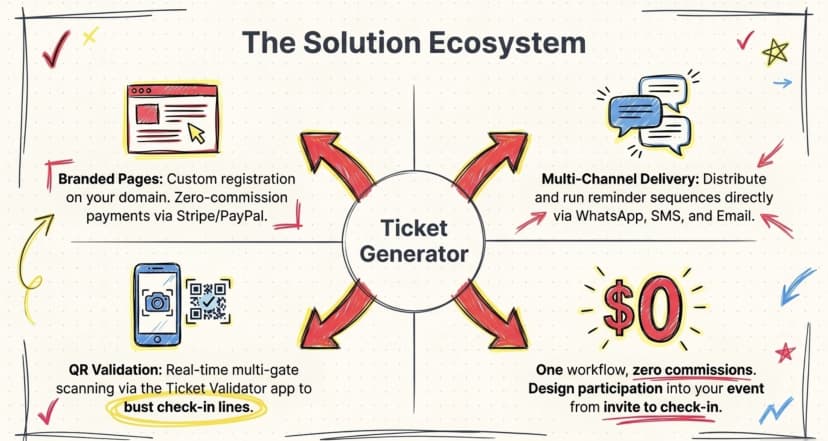
Ticket Generator is built for organizers who want full control over registration, ticket design, distribution, and check-in, without paying a commission on every sign-up. Every feature on the platform maps to one of the participation levers covered above.
Specifically, organizers running participation-sensitive events use Ticket Generator for:
- Branded registration on your own domain. Custom event pages with your logo, fonts, and colors, not a generic platform skin. This raises trust and lifts from completion.
- Zero-commission paid registrations. Payments flow directly through your Stripe, PayPal, or Razorpay account. You set the price. You see the full revenue.
- Multi-channel ticket delivery. Email, SMS, and WhatsApp distribution are useful for the multi-touch reminder cadence that drives show-ups.
- QR ticket validation via the Ticket Validator app or web validator. Multi-gate scanning, real-time duplicate detection, and re-entry support are the door experience that keeps participation feeling like a premium event.
- Real-time attendance analytics. Live dashboards show registrations vs. arrivals so you can spot drop-off patterns and fix them at the next event.
The proof is in the numbers: Ticket Generator has powered 30,000+ events and generated 1,000,000+ tickets across 100+ countries. Heartland Emmys, an Ohio-based television arts organization, has used the platform for 10+ events across 4 consecutive years, distributing more than 3,433 tickets. Felipe Motta, a Panama wine and spirits brand, hit 96% max attendance across paid events using API-driven ticket generation. Each of these is a participation outcome, not just a ticketing outcome.
Elida Martinez · Antioch University
“The ability to check in using a QR Code… and the platform to scan tickets on the phone.” For her team, that operational shift removed the paper guest lists that previously slowed door throughput at sustainability-focused campus events and helped improve on-site participation across the three events their team ran on Ticket Generator.
In short, Ticket Generator does not ‘sell tickets for you.’ It gives you the infrastructure to design participation into your event from invite to check-in.
Conclusion
Increasing participation at events is mostly about removing friction that the organizer cannot see, like a confusing form, a silent two-week stretch before the event, a clunky check-in line, or an unbranded ticket that feels disposable.
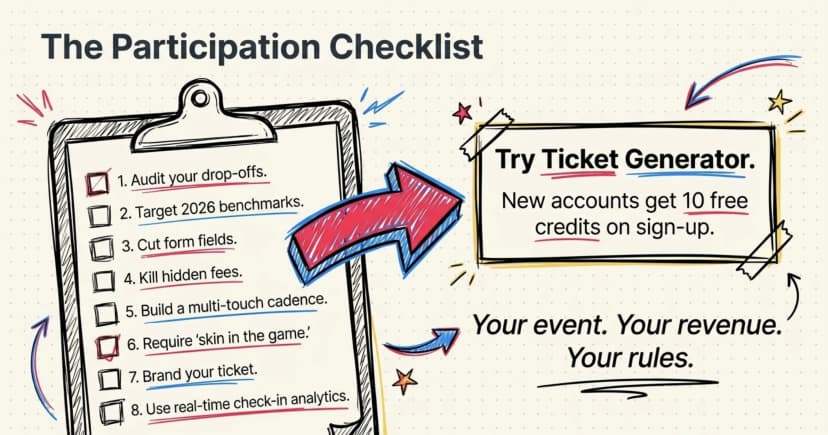
The eight tactics above (audit your drop-off stages, set realistic benchmarks, cut form fields, fix hidden fees, send multi-touch reminders, add a commitment device, brand the ticket, and use real-time analytics) compound. Each one alone might lift attendance by a few points. Run them together, and a typical 60% show-up rate moves toward 85% within a few event cycles.
The right ticketing platform makes the difference between running these tactics in five disconnected tools versus running them as one workflow. That is the gap Ticket Generator fills.
Try Ticket Generator: Start using Ticket Generator to design participation into every event you run with branded ticketing, zero commission, and real-time attendance tracking. New accounts get 10 free credits on signup. Your event. Your revenue. Your rules.
FAQs: How to Increase Participation at Events
1. What is a good event participation rate?
A good event participation rate is 80%+ for paid events and 50–60% for free events. Numbers above this range are exceptional. Numbers below it usually point to a registration friction problem or a weak reminder cadence, not poor content.
2. How can I reduce no-shows for a free event?
To reduce no-shows for a free event, add a small commitment device, a refundable deposit, a confirmation step 72 hours before, or a branded, named ticket that the attendee must download. Even a $5 ticket cuts no-shows by roughly 40% versus a fully free event, per Glue Up’s 2025 benchmarks.
3. How many reminders should I send before an event?
Send four reminders: 7 days, 72 hours, 24 hours, and 2 hours before the event. Mix the channels; email plus SMS or WhatsApp performs better than email alone. The 72-hour confirmation does the heaviest lifting because it asks the attendee to actively reaffirm their RSVP.
4. Does paid ticketing always work better than free?
Paid ticketing works better when your audience has a baseline buying willingness, which is most audiences except for internal corporate events. Even token pricing ($5–$10) creates the commitment effect that lifts attendance. Use Ticket Generator’s paid registration mode to test this without paying a commission on each sale.
5. What is the fastest way to improve check-in and reduce day-of drop-off?
Switch from paper guest lists to QR-based validation with a mobile app. A multi-gate setup lets multiple devices scan simultaneously, cutting average wait time and avoiding the front-of-line bottleneck that causes guests to leave before they get in. Ticket Generator’s Ticket Validator app (iOS, Android, and web) supports this out of the box.
About the author
Content Marketer at Ticket Generator
Ashish Chandra has spent 5+ years writing about event technology, covering topics such as ticket design, QR check-ins, attendee management, and event marketing strategy. As the Content Lead at Ticket Generator, Ashish has analyzed hundreds of real-world event workflows and ticketing setups, helping organizers across industries use QR-based tickets, event landing pages, and smarter ticketing systems to run smoother, better-attended events. His writing is shaped by real user needs and the questions organizers ask most often: How do I sell more tickets? How do I avoid chaos at the door? How do I make my next event better than my last? When he steps away from the screen, you'll likely find him hiking a quiet trail or tending his plants- his preferred way to reset.
Related articles
Keep reading: more guides on the same topic
 14 min read
Raffle vs Giveaway: What’s the Difference and Which One Should You Choose?
Learn the difference between a raffle and a giveaway. See how each works, what rules apply, and which one is right for your event.
Ashish Chandra
01 Jul 2026
 10 min read
Top Recruitment Event Ideas To Attract The Brightest Talents In Your Industry
Join us to learn recruitment event ideas with thoughtful planning and execution strategies to attract top industry talent and create lasting impressions.
Yashika Tangri
01 Jul 2026
 9 min read
Webinar Best Practices [2024]: Strategies for Predictable Success
Learn essential webinar best practices for 2024 to keep your audience engaged from start to finish—simple steps to elevate your online events.
Yashika Tangri
01 Jul 2026
Latest posts
Check out our latest articles on the blog
 21 min read
Thanksgiving Event Ideas: 15 Ways to Host a Memorable Event in 2026
Fifteen Thanksgiving event ideas for communities, offices, schools and friends, with a checklist, a three-week plan and a simple way to manage tickets and RSVPs.
Ashish Chandra
03 Nov 2026
 19 min read
Holiday Party Ideas: Themes, Food, Games, Favors and a Planning Checklist for 2026
Themes, menus, games, favors and a plan you can follow, whether you have twelve weeks or four. Includes a budget guide and a simple way to handle RSVPs and check-in.
Ashish Chandra
02 Nov 2026
 13 min read
Fundraising Event Management Software: How Much of Your Donations Do You Keep?
Your gala should raise money for your cause, not lose it to event fees. Compare fundraising software pricing, uncover hidden costs, and find the right fit for your nonprofit.
Ashish Chandra
29 Oct 2026