

Seat Booking Software: Sell Reserved Seats Online Without the Chaos
 Written byAshish ChandraLast updatedSeptember 8, 2026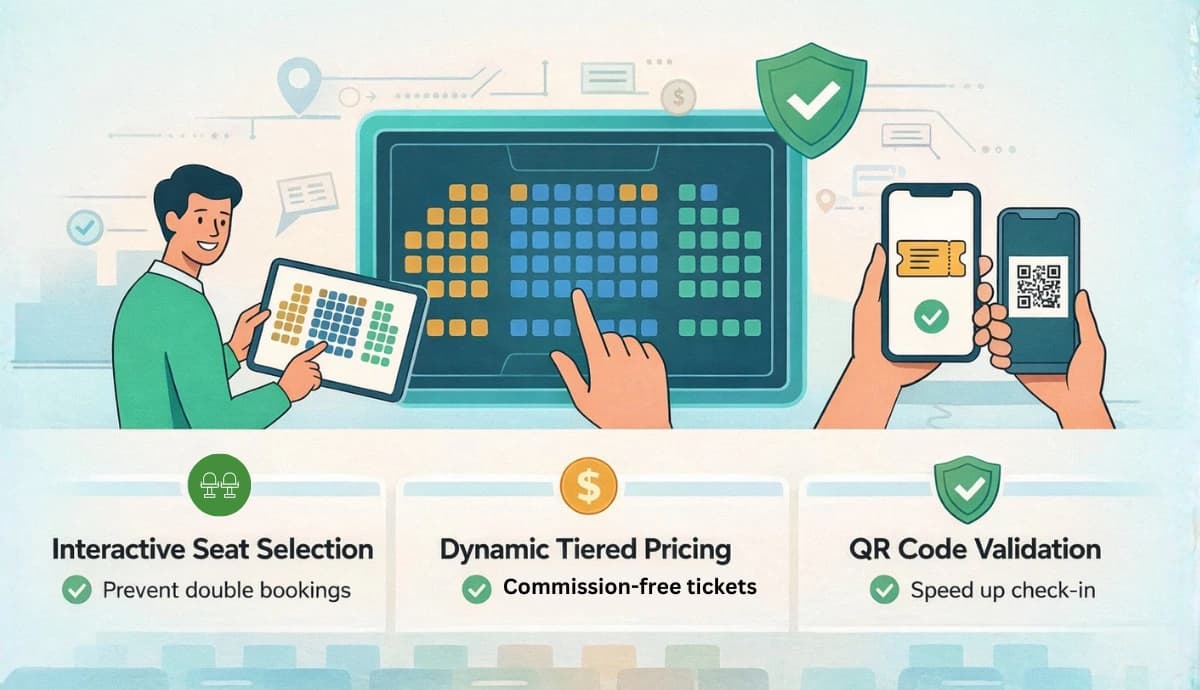
Key Takeaways:
- Seat booking software lets you sell assigned seats online using an interactive seating map.
- It prevents double bookings, improves revenue per seat, and makes check-ins smoother.
- If you're running events with fixed seating (conferences, theaters, concerts, or gala dinners), using proper seat booking software gives you full control over pricing, layout, and entry flow.
I’ve seen this happen too many times. An event sells out. But the real chaos begins at the venue.
“Someone’s sitting in my seat.” ; “That’s not the row I paid for.” ; “We manually updated the spreadsheet…”
That’s what happens when you sell tickets, but don’t control seating properly. Modern attendees expect to choose their exact seat. Not just a ticket category.
Research shows that high attendee satisfaction directly fuels revenue growth through repeat attendance, stronger word-of-mouth, and deeper brand loyalty (source: Attendee Satisfaction Rate KPI)
At the same time, event ticketing revenue is growing rapidly. Statista projects billions in global event ticket sales annually. When that much money is involved, you can’t afford operational mistakes.
That’s where seat booking software changes the game.
Instead of guessing, manually assigning seats, or using messy tools, you simply set up your event, upload your seating plan, and let attendees pick their seat directly from your event page.
Clean. Controlled. Predictable.
In this guide, I’ll break down:
- What seat booking software really is
- Why it matters more than ever
- The exact features you should look for
- How it works step by step
- And how to choose the right platform
Let’s start with the basics.
A. What is Seat Booking Software?
Seat booking software is a system that lets attendees choose their exact seat from a seating layout while buying a ticket.
Not just “VIP” or “General” on the tickets. An actual seat. Row A, Seat 12. That’s the difference.
Basic ticketing software sells access. Seat booking software sells location + experience.
For example, if I’m hosting a conference in an auditorium, I don’t want to manually assign seats after payment. I don’t want spreadsheets. I don’t want last-minute reshuffling, which sometimes happens, and we have a solution for it, as well.
But mostly, you would want attendees to open the event page, see the seating map, click their preferred seat, and complete checkout. Once they pay, that seat is locked. No duplication. No confusion.
It’s especially important for:
- Theaters
- Concerts
- Gala dinners
- Corporate conferences
- Award ceremonies
- Educational events in auditoriums
In short, if the venue has fixed seating, you need more than just ticket sales. You need seat control. And that’s exactly what a seat booking software gives you.
B. Why seat booking software matters today?
Seat selection is no longer a luxury. It’s expected. When people buy tickets online, they want control. They want to know where they’ll sit. Not just which category they’re in.
If you don’t offer seat selection, you create friction. And friction costs conversions.
Revenue is another reason. The global event ticketing market continues to grow, according to Statista. When ticket volumes rise, operational mistakes become expensive. One seating error can trigger refunds, disputes, or bad reviews.
Seat booking software solves three real problems:
First, it increases revenue per seat. Front rows, aisle seats, center blocks, you can price them differently. That’s smart monetization.
Second, it reduces disputes. When attendees choose their seats themselves, there’s less room for argument at the venue.
Third, it improves operational control. No spreadsheets. No manual seat marking. No last-minute reshuffling.
It also improves brand perception. A clean, interactive seating map feels professional. It signals that the event is organized and worth the price.
In simple terms, seat booking software helps me:
- Sell smarter
- Manage better
- Avoid chaos
And in events, avoiding chaos is everything.
C. Types of events that definitely need a seat booking software
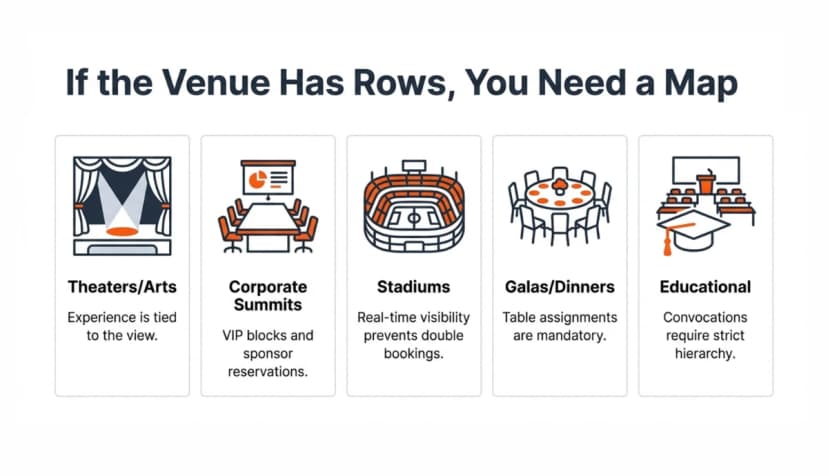
Not every event needs assigned seating. But when seats are fixed, structured, or premium, seat booking software becomes essential.
Here’s where it makes the biggest difference.
1. Theaters and performing arts
Plays, dance shows, stand-up comedy, and music concerts all need a reliable seat booking software. The seating position directly affects experience.
Front-center seats are worth more than back-row corners. Letting attendees choose improves satisfaction and reduces complaints.
2. Corporate conferences and summits
In auditoriums or seminar halls, seating matters. Sponsors want reserved blocks. VIPs need front rows. Teams may sit together. Manual allocation gets messy fast. Seat booking software keeps it clean.
3. Stadium and large venues
When you scale to hundreds or thousands of seats, manual tracking becomes impossible. Real-time seat visibility prevents double bookings and improves crowd flow.
4. Gala dinners and award ceremonies
Tables, seat numbers, VIP placements. That’s generally how these events are structured. Assigned seating is part of the experience. Selling seats without mapping creates confusion at the venue.
5. Educational institutions
Convocations, annual fests, guest lectures – auditoriums are common. Instead of first-come-first-serve chaos, institutions can control exactly who sits where.
The simple rule I follow is this: If the venue has rows, sections, or fixed seating, I shouldn’t sell blind tickets.
I should sell specific seats. That’s where seat booking software becomes non-negotiable.
D. Core features every seat booking software must have
Not all seat booking software is equal. Some tools just “add seats” as an afterthought. That’s not enough. If I’m going to rely on it for revenue and operations, it needs to handle seating properly.
Here’s what actually matters.
First, an interactive seating chart. Attendees should see a clear layout. They should be able to zoom, click, and select seats easily (even on mobile). If the map is clunky, conversions drop.
Second, real-time seat locking. When someone selects a seat during checkout, it must lock instantly. No double bookings. No race conditions. If two people can pay for the same seat, the system is broken.
Third, seat categories and dynamic pricing. The front row should not cost the same as the back row. VIP sections should be priced differently. The software should let me define categories and control pricing at the seat or section level.
Fourth, a simple seating plan setup. This is where many platforms get complicated. Some require manual seat drawing or technical configuration.
A good system should allow me to upload my seating plan image, get it approved, and have it mapped cleanly to my event page. No coding. No complex setup.
Fifth, payment integration. Seats should update automatically after a successful payment. The system must sync seat availability with checkout. If payments fail, seats should release correctly after the locking period.
Sixth, reporting and seat-level analytics. I should see which sections sold fastest. Which rows are underperforming? Which categories drive the most revenue? That insight helps optimize future events.
If a seat booking platform cannot handle these basics smoothly, it will create more work than it solves.
The goal is simple: you should be able to upload your layout, define pricing, and let attendees choose seats. The system should handle the rest. Anything more complicated than that is friction.
E. How does seat booking software work (step-by-step)?
To show you how seat booking software works in real life, I’ll walk you through the exact flow using Ticket Generator. I’m using it here because it supports reserved seating, QR tickets, bulk generation, and validation - all inside one system.
Since the seating setup happens before event creation, let’s start there.
Step 1: Sign up and create an account
Go to Ticket Generator and sign up. You won’t be asked for card details while signing up. You also get your first ten tickets free.
Step 2: Request your venue seating design
Before creating your event, go to Settings → Venue Layout.
Click on Request Venue Design.
You’ll see a pop-up asking you to provide your venue’s layout and seating details. Click Continue.
Now fill in:
- Venue name
- Venue address
- Upload your floor plan image (with diff VIP sections, special seating rules, table layouts, etc.)
- Your contact details
Submit the request. Once your draft seating map is ready, you’ll be notified. Once approved, the venue layout is added to your account. From that point on, you can reuse it for events at that venue
Here, configure your ticket types. For example:
- VIP (Front rows)
- Premium (Middle block)
- General (Rear rows)
Each tier can have different pricing. Because seats are mapped visually, you can align pricing directly to physical seat position. That’s far more powerful than category-based selling alone.
Step 3: Create your event
Now go to your dashboard and click Create New Event.
Add your event details:
- Event name
- Date and time
- Venue
- Description
Under the Venue Name section, tick the checkbox titled "Select a saved venue layout", once checked, you can see the pre-approved Seating Plan with the name in the dropdown. If you haven't already uploaded your seating layout with defined ticket tiers and zones, you can do so by clicking on "Venue layout".
Once done, click Create. Your event is now live inside the dashboard.
Step 4: Attach your approved seating plan
Once your venue layout has been approved, every new event you create will show a Seating Plan tab.
Open it. Select the pre-approved venue layout. Your interactive seating map is now linked directly to this event.
Now, you have:
- Defined ticket tiers (VIP, Premium, General)
- Assigned pricing by section
- Controlled how many seats are available
- Configured seat-level rules
This is how revenue control happens. Instead of selling blind tickets, you’re selling mapped seats.
Step 5: Design your tickets
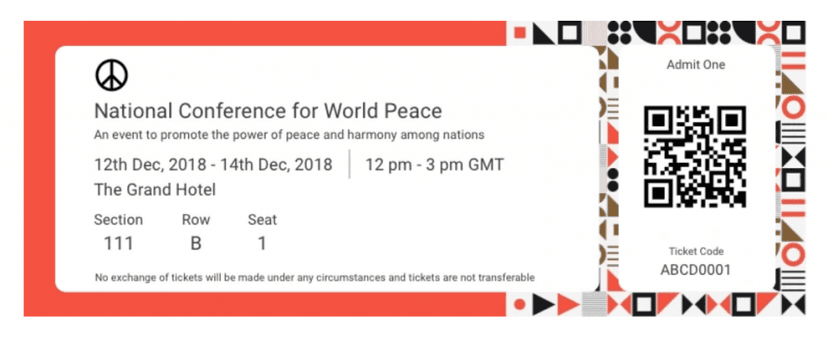
Go to the Guest Tickets section.
Click New Ticket(s) and choose:
- Bulk Ticket (for multiple guests)
- Single Ticket (for individual creation)
Now you can design your tickets in three ways:
- Upload Own Design: Use your own template and superimpose QR Codes and unique IDs.
- Edit Design: Use the built-in editor to add logos, brand colors, or background images.
- Select from Template: Choose from pre-designed ticket templates.
Click Preview to see how it looks. Once satisfied, click Done.
Every ticket will automatically include:
- Unique QR Code
- Seat number
- Section details
Step 6: Choose how tickets are delivered
After finalizing the design, choose your delivery method:
- Generate Form Link – Create a registration landing page. Approved registrants receive tickets automatically.
- Generate and Download – Download printable PDF tickets.
- Generate and Send – Send tickets via email or phone instantly.
- Generate via API – Create tickets programmatically via your own system.
Once selected, tickets are sent or downloaded. Seats update automatically based on successful ticket generation and payment. No manual marking.
Step 7: Validate tickets at entry
At the venue, validation is simple.
From your dashboard:
- Go to Manage Events
- Select the event
- Click More → Add/Edit Coordinator
- Add team member emails
They install the Ticket Validator App (iOS or Android). Once logged in, they select the event and tap Scan QR Code.
When scanned, the system instantly shows:
- Valid
- Duplicate
- Invalid
Every scan is recorded in real time. You can also monitor Attendance Analytics from the same dashboard.
Bonus: What to do in case of last-minute walk-ins?
If someone shows up without a ticket:
- Log in to your account
- Open the event
- Go to Guest Tickets
- Click New Ticket(s) → Single Ticket
- Choose delivery method
- Click Generate & Download or Generate & Send
A new ticket is created instantly. Seats update accordingly. You can also resend tickets from the same tab if someone didn’t receive theirs.
When seat booking, ticket generation, QR validation, and analytics all work together like this, the process feels controlled.
You’re not just selling tickets. You’re managing seating, revenue, and entry in one flow.
F. Benefits for Event Organizers
I’ve tested enough tools to know this: if your system is messy, your event will feel messy. A good entry pass setup fixes that before doors even open.
Here’s what actually changes when you use a proper QR-based system like Ticket Generator:
First, check-ins become fast. No paper lists. No name shouting. No confusion. Just scan and go. The QR Code either validates or it doesn’t. Clean.
Second, you reduce fraud. Each pass has a unique QR Code. Once scanned, it can’t be reused. That alone saves you from duplicate entries and awkward gate arguments.
Third, operational control. You decide ticket tiers. Seating layouts. Access levels. Validation rules. Everything sits in one dashboard. No juggling tools.
Fourth, you stay organized without spreadsheets. Guest data, ticket status, delivery logs, everything sits in one dashboard. If someone says, “I didn’t get my pass,” you can resend it in seconds.
Fifth, your team works smarter. You can assign coordinators. They scan using their phones. You monitor attendance live. No walkie-talkie chaos.
Sixth, you look professional. Branded passes. Clean QR validation. Automated emails. It instantly upgrades the experience for attendees.
Seventh, you get better brand perception. Professional seating maps. Branded tickets. Smooth QR check-ins. Attendees feel the difference immediately. It reflects on you.
And finally, you keep your revenue. With a commission-free model like Ticket Generator, you don’t lose a percentage of every ticket you sell. That matters, especially for paid events.
In short, you stop “managing entry” and start controlling it. That’s a big difference.
G. Common problems without a good seat booking software
This is where most organizers struggle, and they don’t realize it until it’s too late. You sell tickets without structured seating. Now, attendees assume seats are first-come-first-serve.
VIP guests expect front rows. General ticket holders occupy premium areas early. Conflict begins.
Or worse, two people claim the same seat because allocation wasn’t visual or system-locked.
Without seat booking software:
- You don’t see real-time seat inventory.
- You can’t price sections strategically.
- You rely on manual communication to explain seating rules.
- Your gate team handles disputes instead of scanning and moving.
And problems at the entry spread fast. One confused attendee slows down the entire line. Seat chaos isn’t dramatic. It’s subtle. It shows up as delays, complaints, and refunds.
H. How to choose the best seat booking software?
Here’s the framework I personally use before committing to any platform:
Does it offer an actual visual seating map? Not just ticket quantities, a real layout where seats are clickable and auto-locked.
Can I assign tiered pricing by section? VIP, Premium, General, clearly defined and controlled.
Is double-booking technically impossible? If seats aren’t system-locked in real time, that’s a red flag.
How smooth is validation? QR-based scanning. Fast. Mobile-friendly. No bulky hardware needed.
Can my team operate independently? Coordinator access matters. You shouldn’t be the bottleneck at entry.
Are seating, ticket delivery, and analytics integrated? If these are separate tools stitched together, friction will show up later.
Personally, I prefer systems where seating plans, QR check-ins, bulk generation, and automated delivery all work inside one environment (like Ticket Generator). When everything syncs, you don’t think about the tech during the event.
And that’s the goal. If you’re thinking about the software on event day, something’s wrong.
Conclusion
If you’re hosting a casual event with 20 people, you can manage seating manually. But the moment you introduce tiers, paid tickets, VIP rows, or serious attendance numbers, structure becomes non-negotiable.
It protects revenue. It prevents seat disputes. It speeds up check-ins. It gives you full visibility before, during, and after the event.
From my experience, the biggest upgrade isn’t the seating map itself. It’s the control. When seating, ticket tiers, QR validation, delivery, and analytics all work together, as they do inside Ticket Generator, your event stops feeling reactive.
You’re not fixing problems at the gate. You’re running the show. And that’s exactly how it should feel.
FAQs
1. Do I really need seat booking software for small events?
If it’s a free, open-seating event with limited guests, you can manage without it.
But the moment you introduce paid tickets, reserved seating, or VIP sections, software saves you from confusion. It prevents double bookings and removes manual coordination. Even for mid-sized events, that control makes a big difference.
2. How does seat booking software prevent double booking?
Seats are system-locked in real time.
Once someone selects a seat and completes payment (or reservation), that seat is automatically blocked for others. There’s no manual allocation, no spreadsheet overlap, and no “two people claiming the same row.”
3. Can I create different pricing tiers with a seating plan?
Yes. That’s actually one of the biggest advantages.
You can divide the venue into sections — VIP, Premium, General, Balcony, etc. — and assign different pricing to each. Tools like Ticket Generator let you connect seating layout with ticket tiers, so pricing is structured and clear from the start.
4. What happens if someone shows up without their ticket?
You can search and resend instantly.
Inside the dashboard, you can find a guest’s ticket and resend it via email or download it again. If QR validation is enabled, once scanned, the system updates attendance in real time.
5. Can my team help manage check-ins?
Yes. You don’t have to handle everything yourself.
You can assign coordinators who scan tickets using their phones. This speeds up entry and removes dependency on a single device or person.
6. Is seat booking software only for paid events?
No. Even free events benefit from structured seating, controlled registrations, and QR-based entry. It keeps things organized and makes the experience smoother for attendees. If you’re serious about delivering a smooth event experience, seat booking software isn’t overkill. It’s operational clarity.
About the author
Content Marketer at Ticket Generator
Ashish Chandra has spent 5+ years writing about event technology, covering topics such as ticket design, QR check-ins, attendee management, and event marketing strategy. As the Content Lead at Ticket Generator, Ashish has analyzed hundreds of real-world event workflows and ticketing setups, helping organizers across industries use QR-based tickets, event landing pages, and smarter ticketing systems to run smoother, better-attended events. His writing is shaped by real user needs and the questions organizers ask most often: How do I sell more tickets? How do I avoid chaos at the door? How do I make my next event better than my last? When he steps away from the screen, you'll likely find him hiking a quiet trail or tending his plants- his preferred way to reset.
Latest posts
Check out our latest articles on the blog
 12 min read
Email Marketing for Events and Webinars: What to Send, When to Send It, and How to Automate It
A step-by-step playbook for email marketing for events and webinars. Learn what to send, when to send it, and how to automate every email for in person and virtual events.
Ashish Chandra
18 Oct 2026
 10 min read
Halloween Masquerade Ball: How to Host a Night of Masks and Mystery
From Venetian-inspired masks to QR-coded entry, here is your complete guide to planning a Halloween masquerade ball your guests will talk about for years.
Ashish Chandra
18 Oct 2026
 9 min read
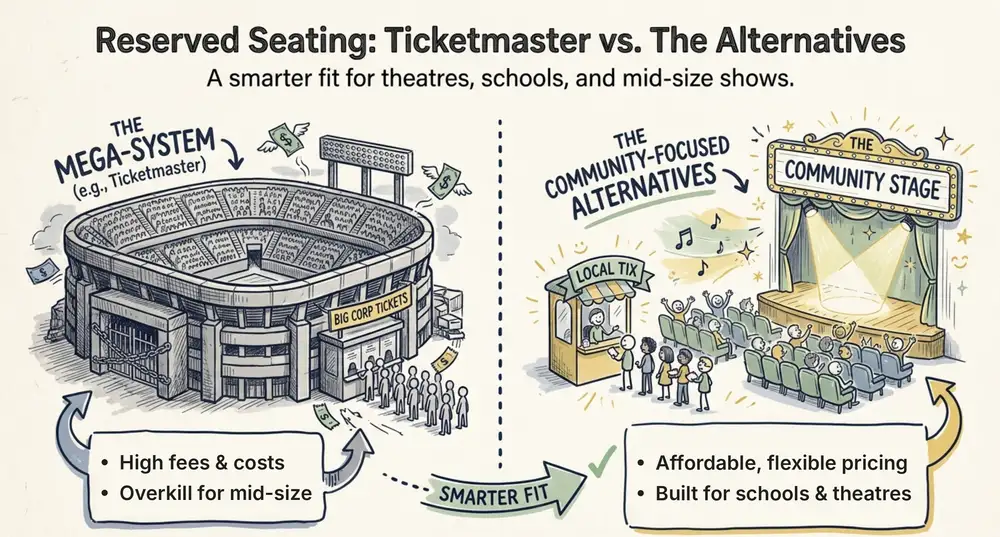
Ticketmaster Reserved Seating: How It Works and a Better Fit for Smaller Events
Ticketmaster reserved seating works well for arenas. If you run a theatre, gala, or mid-size show, see how it works, what it costs, and how to switch.
Ashish Chandra
16 Oct 2026