

Wedding Seating Plan: How to Assign Every Seat Without the Last-Minute Chaos
 Written byAshish ChandraLast updatedAugust 24, 2026
Key Takeaways:
- A wedding seating plan assigns every confirmed guest to a specific table, and often a specific chair, before the reception begins.
- Build the structure early, but commit late. Finalize after the RSVP deadline closes, or you will rebuild it three times.
- Group guests by who they will actually talk to, not by family side.
- Print the table number on each guest's entry pass so nobody queues at a board.
- Ticket Generator carries seat details onto every QR ticket and confirms who walked in.
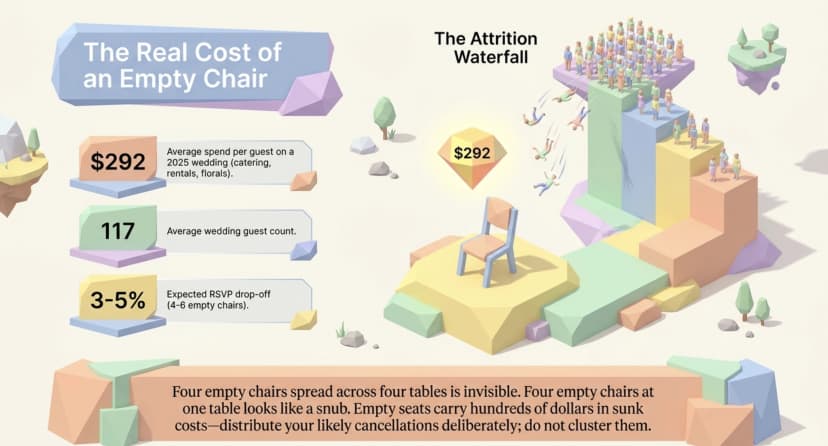
Did you know that couples spent an average of $292 per guest on their wedding in 2025? Source: The Knot Worldwide, 2026 Real Weddings Study
That number changes how you look at a room full of chairs. Every seat you assign carries a few hundred dollars of catering, rentals, and florals under one person's name. When a seat sits empty, or when two guests land at a table they should never share, your client feels it.
A wedding seating plan is the finalized map of which guest sits at which table, built after the RSVP deadline closes. You make one by locking the headcount, getting the venue's real floor plan, placing your anchor tables first, grouping everyone else by relationship rather than category, and then attaching each guest's table number to something they carry through the door.
In this guide I cover what a seating plan actually is (and how it differs from a seating chart), when to start, the seven passes I use to build one, and how to choose between open seating, assigned tables, and assigned seats. I also cover the mistakes I see most often at real weddings.
What Is a Wedding Seating Plan, and How Is It Different From a Seating Chart?
A seating plan is the decision of who sits where. A seating chart is the display of that decision, usually a board or sign at the reception entrance. The plan is the logic. The chart is the signage.
Couples use these terms interchangeably, and vendors do not. That gap causes real confusion when a client asks for a seating chart and the calligrapher quotes for escort cards. Here is the vocabulary, kept straight:
|
Term |
What it is |
Where guests see it |
|---|---|---|
|
Seating plan |
The master record of which guest is assigned to which table and seat |
Nowhere. It lives with you, the venue, and the caterer. |
|
Seating chart or table plan |
The display board listing guests grouped by table number |
At the reception entrance |
|
Escort card |
A small card telling one guest their table number |
On a table near the entrance, arranged alphabetically |
|
Place card |
A card at one specific chair with one guest's name |
On the table, at the exact seat |
|
Floor plan |
The venue's layout of tables, dance floor, bar, and service doors |
Nowhere. It is a vendor document. |
For a reception of 100 or more, you need three of these five: the plan, one display method (a chart or escort cards, not both), and place cards only if the kitchen is serving a plated meal with pre-selected entrees.
The same logic drives any event seating plan, but weddings add a variable corporate events do not have: family history. A conference attendee does not care who sits at table nine. A bride's aunt very much does.
When Should You Start the Seating Plan?
Start the rough structure when invitations go out, and finalize 7 to 10 days before the wedding, once the RSVP deadline has closed and the caterer needs a guaranteed count. Build early, commit late.
Here is the timeline I hand to clients:
- 8 to 10 weeks out. Invitations mail. Sketch table count against venue capacity. Do not name a single name yet.
- 4 weeks out. RSVP deadline. Chase non-responders by phone, not email. Email gets ignored; a call gets an answer.
- 2 weeks out. First real draft. Anchor tables placed, difficult pairings resolved on paper.
- 7 to 10 days out. Final headcount goes to the caterer and venue. Lock the plan.
- 48 hours out. Absorb late changes into existing gaps. Do not rebuild tables at this stage.
Late changes are guaranteed, so plan for them rather than resenting them. Writing for The Knot, planner Cheryl Fernandes of Glitzzy Events estimates that 3% to 5% of guests who RSVP yes will not show up. Against the 117-guest average that The Knot Worldwide reported for 2025 weddings, that is roughly four to six empty chairs on the night.
Four empty chairs spread across four tables is invisible. Four empty chairs at one table looks like a snub. That is an argument for distributing your most likely cancellations rather than clustering them.
How Do You Build a Wedding Table Plan Step by Step?
Build it in seven passes: lock the list, get the floor plan, place anchor tables, group by relationship, resolve the hard pairings, seat for access, then attach the plan to each guest's entry pass. Each pass has one job, and skipping one is where plans break.
1. Lock the guest list and confirm the real headcount
Work from one source of truth, not a shared document four relatives can edit. Every guest record needs a full name, a meal choice, an accessibility note, and a plus-one name where it applies.
If someone is still listed as "guest of Priya," you do not have a plan yet. You have a draft with a hole in it.
2. Get the venue's actual floor plan, not a generic template
Ask the venue for table shapes, capacity per table, and the exact position of the dance floor, bar, speakers, and service doors. These details decide more than aesthetics.
A 60-inch round seats eight comfortably and ten uncomfortably. Long banquet tables change who can hear whom entirely, because conversation runs down the table rather than across it.
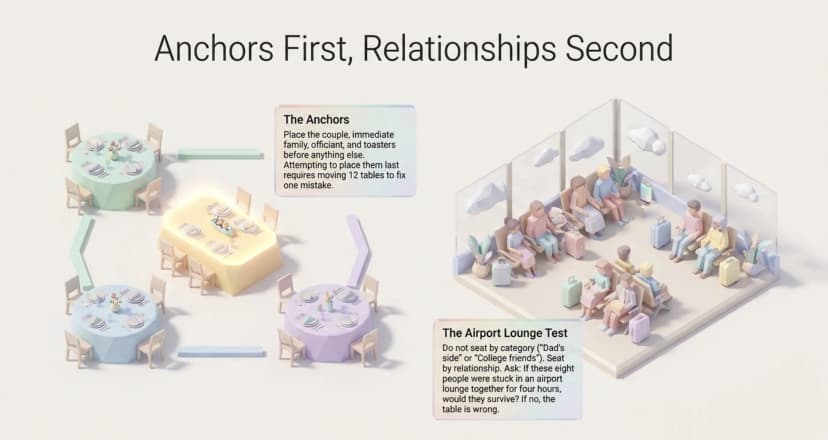
3. Place your anchor tables first
Anchor tables have no flexibility, so they get placed before anything else:
- The couple's table, whether that is a sweetheart table or a head table with the wedding party
- Immediate family on both sides, at equal distance from the couple
- The officiant and their partner
- Anyone giving a toast, seated within easy reach of the microphone
Everything else arranges itself around these four. Try to place them last and you will find yourself moving 12 tables to fix one.
4. Group by relationship, not by category
The most common failure I see is seating by label: college friends, work people, dad's side. Labels are how the invite list got built. They are not how an evening actually goes.
Ask a better question. If these eight people were stuck in an airport lounge together for four hours, would they be fine? If the answer is no, the table is wrong, no matter how tidy the label looks on your spreadsheet.
5. Resolve the hard pairings deliberately
Every wedding has three or four. Handle them on purpose, in writing, before the day:
- Divorced parents. Separate tables of equal status and equal distance from the couple. Never adjacent, never one visibly better placed than the other.
- Exes and recent breakups. Different sightlines, not just different tables. A room is smaller than it looks from a floor plan.
- Solo guests. Never build a singles table. It announces itself, guests notice, and it rarely produces the romance it is trying to engineer.
- Guests who know nobody. Seat them beside your most naturally social invitee, then tell that person quietly. A five-second briefing prevents an hour of awkwardness.
6. Seat for access and comfort
This is the pass most plans skip, and it is the one guests remember:
- Elderly guests and anyone with mobility needs sit close to the entrance and restrooms, away from the speakers
- Wheelchair users need confirmed gap width between tables, not just an assigned space
- Children sit within sightline of their parents, ideally at the table edge
- Anyone with a hearing aid goes nowhere near the DJ stack
7. Attach the plan to something each guest carries
A board at the entrance is a single point of failure. When 120 people arrive inside a ten-minute window, that board becomes a queue, and the queue becomes the first impression of the reception.
Printing each guest's table number directly on their entry pass removes the bottleneck. It also means the plan survives if a gust of wind takes the board off its easel, which I have watched happen at an outdoor venue in Rajasthan.
Pro Tip: Put the table number on the ticket itself, not just on a board. Ticket Generator supports variable fields like guest name, seat number, row, and section in the ticket design, so every pass is personalized automatically instead of hand-labelled the night before.
Stop rebuilding the table plan in a spreadsheet. Use Ticket Generator to send every guest a branded pass with their table already printed on it.
Assigned Seats, Assigned Tables, or Open Seating: Which Should You Choose?
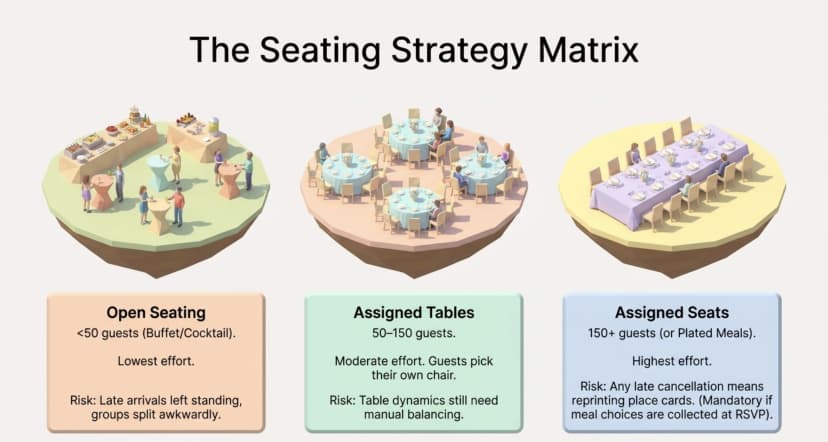
Assign tables for any wedding over 50 guests, and assign specific seats once you pass roughly 150 guests or serve a plated meal with pre-selected entrees. Open seating works only for small, informal receptions.
|
Approach |
Best for |
Guest experience |
Effort |
Main risk |
|---|---|---|---|---|
|
Open seating |
Under 50 guests, buffet or cocktail style |
Relaxed and self-selecting |
Lowest |
Late arrivals left standing; groups split awkwardly |
|
Assigned tables |
50 to 150 guests, most receptions |
Guests find their table, pick their own chair |
Moderate |
Table dynamics still need real thought |
|
Assigned seats |
150+ guests, plated dinners, formal service |
Fully guided, no hesitation at the door |
Highest |
Any late change means reprinting place cards |
Assigned seats are not just a formality signal. They are what makes plated service possible, because the kitchen needs to know which entree belongs to which chair. If your client wants a choice of main course collected at RSVP, you have already committed to assigned seats whether you planned to or not.
For the mechanics of running this at scale, including how seat data flows through to check-in, our guide to assigned seating for events goes deeper than I can here.
What Are the Most Common Seating Mistakes at Weddings?
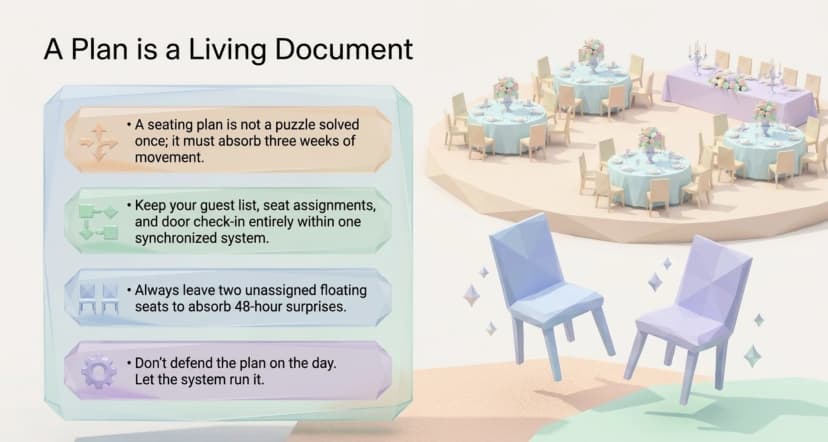
The most common mistakes are finalizing before RSVPs close, seating by category instead of relationship, and keeping the plan in one person's head. All three are avoidable in an afternoon.
- Finalizing too early. RSVPs move right up to the week of. Build the structure early, commit late.
- Forgetting the people working the wedding. Photographers, the band, the videographer, and your own team usually need vendor meals and somewhere to sit. Ask the venue where, before the day.
- Skipping the accessibility pass. Seating grandparents beside a speaker stack is not a small mistake, and it is the one guests mention afterwards.
- Keeping one copy of the plan. If it lives only on the maid of honour's phone, it does not exist. The venue, the caterer, and the day-of coordinator all need the current version.
- Tracking dietary flags separately. Kids' meals, allergies, and entree choices belong on the same record as the seat, not in a separate email thread.
- Treating the plan as final. It is a living document until the doors open. Leave two floating seats you have deliberately kept empty.
Most of these trace back to one root cause: the seating plan lives in a different system from the guest list. Every time those two drift apart, someone at the door pays for it. If you are building the wider timeline around this, our wedding planning guide sets out where seating fits against everything else.
How Does Ticket Generator Help You Run the Plan on the Day?
Ticket Generator is built for organizers who need the plan to hold up under pressure at the door. It handles RSVP collection, prints each guest's seat details onto their pass, delivers it, and confirms in real time who actually walked in.
Let me be straight about scope, because it matters when you are choosing tools. Ticket Generator is not a banquet diagram designer. You will not drag 60-inch rounds across a floor plan to see how the room looks. What it does offer is an interactive seating chart inside the ticketing tool itself, built around sections, rows, and seats. That suits ceremony seating, reserved family rows, and theatre-style setups natively. For banquet rounds, you finalize the table map with your venue, then Ticket Generator carries the assignment onto every pass and enforces it at the entrance.
The features that matter for a seated wedding:
- RSVP collection that feeds the plan. Registration pages with custom fields, so meal choice, accessibility needs, and plus-one names arrive attached to the guest record instead of scattered across text messages.
- Seat details on every pass. The ticket designer supports variable fields including guest name, seat number, row, and section, so each pass carries its own details with no manual labelling.
- Delivery on your schedule. Send passes by email, SMS, or WhatsApp in batches of up to 1,000 guests, and use Schedule Send to time the morning-of reminder without being awake for it.
- Add-ons for the extras. Attach scannable perks such as the welcome dinner, shuttle, or parking to the ticket, each validated separately at its own point.
- Check-in that tells you who is actually here. The Ticket Validator app for iOS and Android returns Valid, Invalid, Duplicate, or Expired, runs across several entrances at once, and updates attendance live.
- Multi-day weekends. Clone the event for the welcome party, ceremony, and reception, each with its own pass, guest list, and seating.
- Fully branded. No platform watermark on the ticket, and the RSVP page can sit on your agency's own domain rather than a shared one.
One caveat worth planning around: the Validator app needs an internet connection to check tickets. If the venue is a barn, a vineyard, or a hill fort with patchy signal, sort out a hotspot during the site visit rather than at 6pm on the day.
Ticket Generator has powered more than 30,000 events and over 1,000,000 tickets across 100+ countries. The closest analogue to a seated reception is the Heartland Emmys, which has run its awards gala on the platform for four consecutive years, across 10+ events and 3,433+ tickets. Same problem shape as a wedding: a seated dinner, a fixed guest list, assigned tables, and a door that has to move quickly.
Pricing is credit based rather than a subscription or a per-sale commission. One credit generates one ticket, venue layout events use two credits per ticket, and credits never expire, so anything left over rolls into the next client's wedding. New accounts start with 10 free credits, which is enough to test the flow on a real guest list before committing.
The practical gain is simple. On the day, nobody is standing at the door holding a printed list. The plan is on the pass, in the guest's pocket, and confirmed on a phone in under two seconds.
Bringing It Together
A seating plan is not a puzzle you solve once. It is a decision you protect through three weeks of movement, and the planners who do it well are the ones who build the structure early and stay flexible about the names inside it.
None of this removes the hard parts. You will still have the conversation about where the divorced parents sit, and someone will still cancel 36 hours out. What good process does is shrink those problems to their real size, so a late cancellation is a swapped chair rather than a rebuilt room.
Get the guest list, the seat assignment, and the check-in living in one place, and the plan stops being something you defend on the day. It becomes something that just runs.
Try Ticket Generator to send every wedding guest a branded pass with their seat already on it, collect RSVPs and meal choices in one place, and check the room in from a phone. Your event. Your revenue. Your rules.
FAQs: Wedding Seating and Table Plans
1. How far in advance should a wedding seating plan be finalized?
Finalize it 7 to 10 days before the wedding, once the RSVP deadline has closed and the caterer needs a guaranteed count. Start the rough table structure when invitations go out, around 8 to 10 weeks ahead, but do not assign individual names until responses are in. Anything earlier gets rebuilt.
2. Do you need assigned seats, or are assigned tables enough?
Assigned tables are enough for most receptions between 50 and 150 guests. Move to assigned seats once you cross roughly 150 guests, or whenever the meal is plated with entrees chosen at RSVP, because the kitchen needs to know which dish goes to which chair.
3. Where should divorced parents sit at a wedding?
Seat divorced parents at separate tables of equal status, placed at equal distance from the couple. Avoid adjacent tables and avoid any arrangement where one parent is visibly better placed than the other. Agree the arrangement with your client in writing before the final draft, not on the day.
4. What do you do when guests cancel after the plan is set?
Absorb cancellations into existing gaps rather than rebuilding tables. Keep two seats deliberately unassigned as float, and spread your likely cancellations across different tables so no single table ends up visibly half empty. Update the venue and caterer the same day, not the morning of.
5. Can guests be sent their table number in advance?
Yes, and it removes the queue at the entrance board. Ticket Generator lets you add variable fields like guest name, seat, row, and section to the ticket design, then send each personalized pass by email, SMS, or WhatsApp. Guests arrive already knowing where they are sitting.
About the author
Content Marketer at Ticket Generator
Ashish Chandra has spent 5+ years writing about event technology, covering topics such as ticket design, QR check-ins, attendee management, and event marketing strategy. As the Content Lead at Ticket Generator, Ashish has analyzed hundreds of real-world event workflows and ticketing setups, helping organizers across industries use QR-based tickets, event landing pages, and smarter ticketing systems to run smoother, better-attended events. His writing is shaped by real user needs and the questions organizers ask most often: How do I sell more tickets? How do I avoid chaos at the door? How do I make my next event better than my last? When he steps away from the screen, you'll likely find him hiking a quiet trail or tending his plants- his preferred way to reset.
Latest posts
Check out our latest articles on the blog
 12 min read
Email Marketing for Events and Webinars: What to Send, When to Send It, and How to Automate It
A step-by-step playbook for email marketing for events and webinars. Learn what to send, when to send it, and how to automate every email for in person and virtual events.
Ashish Chandra
18 Oct 2026
 10 min read
Halloween Masquerade Ball: How to Host a Night of Masks and Mystery
From Venetian-inspired masks to QR-coded entry, here is your complete guide to planning a Halloween masquerade ball your guests will talk about for years.
Ashish Chandra
18 Oct 2026
 9 min read
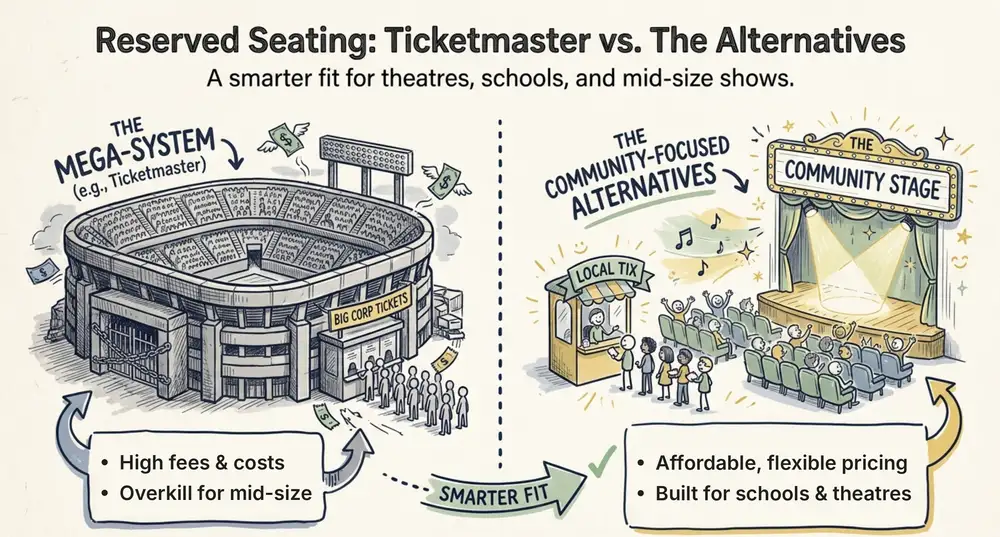
Ticketmaster Reserved Seating: How It Works and a Better Fit for Smaller Events
Ticketmaster reserved seating works well for arenas. If you run a theatre, gala, or mid-size show, see how it works, what it costs, and how to switch.
Ashish Chandra
16 Oct 2026