

Best Ticketing Software for Event Planners: How to Choose in 2026
 Written byAshish ChandraLast updatedJuly 1, 2026
Key Takeaways: The best ticketing software for event planners handles registration, payments, check-in, and reporting in one clean workflow, not five disconnected tools. Most planners lose time to messy registration and slow check-in, the two most-cited operational pain points. The right platform fixes this with QR validation, real-time analytics, and native integrations. Ticket Generator gives planners commission-free, credit-based pricing and full control over branding and data. For best results, always pick a reliable tool that matches your event size, fee tolerance, and how much you need it to talk to your other software.
If you plan events for a living, you already know the software is half the battle. The right platform makes registration, ticketing, and check-in feel invisible. The wrong one turns the morning of your event into a fire drill.
Did You Know? Around 42% of event planners say technology is a major pain point in event management, making software selection one of the most important operational decisions for successful events. Source: Etouches Survey (industry research), via Meetings & Conventions .
So what is the best ticketing software for event planners? The honest answer: it's the platform that fixes your specific bottleneck (usually registration and check-in) while giving you predictable costs and ownership of your attendee data. There is no single winner for every planner, but there is a clear set of criteria that separates a tool you'll love from one you'll abandon.
In this guide, I'll explain what to look for, the pain points the best tools solve, how the leading platforms compare, and how Ticket Generator fits planners who want control without commissions.
What makes the best ticketing software for event planners?
The best ticketing software for event planners covers the full event lifecycle (registration, payment, ticket delivery, on-site check-in, and reporting) without forcing you to stitch together separate tools.
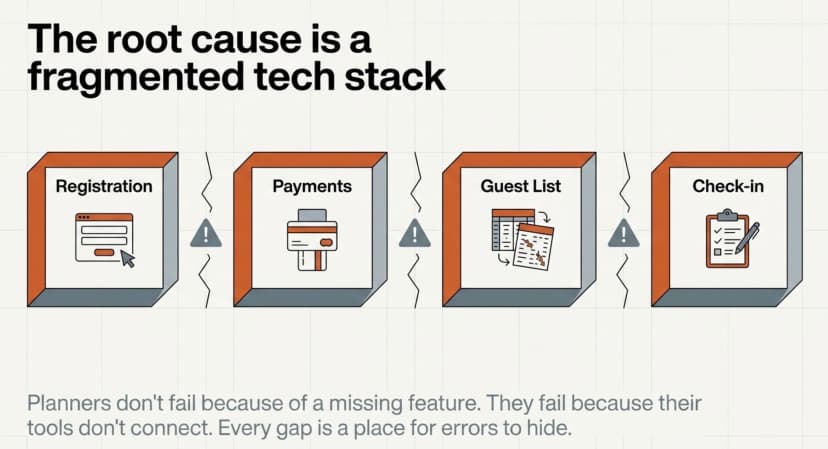
Most planners don't fail because of one missing feature. They fail because their tools don't connect. Registrations live in one system, payments in another, the guest list in a spreadsheet, and check-in on a clipboard. Every gap is a place for errors to hide.
Here's what actually matters when you evaluate a platform:
- End-to-end workflow: one path from event page to QR ticket to check-in to post-event report.
- Secure validation: unique QR codes with duplicate detection, not a generic code anyone can copy.
- Predictable pricing: you should know your cost before tickets go on sale, with no surprise commission.
- Branding control: your event, your logo, your domain; not the platform's marketplace branding.
- Real-time analytics: live attendance, conversion, and entry data you can export.
- Integrations: it has to talk to your CRM, email tool, and accounting software.
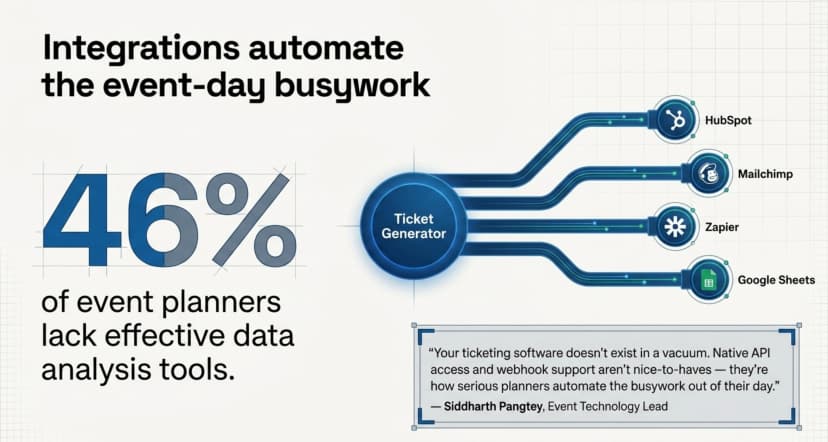
That last point is where many planners get burned. As Siddharth Pangtey, our event technology lead, puts it:
“Your ticketing software doesn't exist in a vacuum. It has to talk to your CRM, your email marketing tool, and your accounting software. In 2026, native API access and webhook support aren't nice-to-haves; they're how serious planners automate the busywork out of their day.”
— Siddharth Pangtey, Event Technology Lead, Ticket Generator
Did You Know? A significant share of event planners report lacking effective tools to analyze and act on event data, making data-driven decision-making a major challenge in the industry. Source: Event Planning Research (Medium) .
Why do event planners struggle with ticketing in the first place?
Most planners struggle because the operational core of an event which is registration and check-in, is exactly where their tools are weakest. These two tasks cause more day-of stress than anything else.
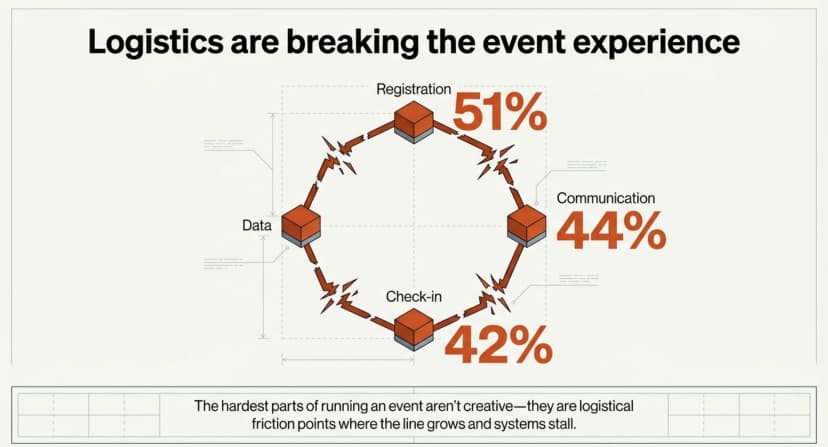
The data backs this up. According to a Meetingsnet survey, 51% of event planners find managing attendee registration challenging. A separate Etouches survey found that 42% of planners report registration and check-in processes cause problems, and 44% struggle with communicating effectively with attendees.
When you read those numbers together and a pattern emerges. The hardest parts of running an event aren't creative, they're logistical. They're the moments where a guest is standing in front of you, your list won't load, and the line is growing.
Did You Know? Around more than half of event planners report challenges with managing attendee registration, making it one of the most commonly cited pain points in event operations. Source: Meetings & Conventions (Etouches Survey) .
This is why “best ticketing software” rarely means “most features.” It means the tool that removes friction from the parts that break. A flashy event-page builder doesn't help if check-in stalls at the door.
Try Ticket Generator to turn registration, ticketing, and check-in into one workflow instead of three separate headaches.
How should event planners compare ticketing platforms?
Compare platforms on five things: pricing model, data ownership, check-in security, branding control, and integrations. Price alone is a trap. A “cheap” tool that loses your data or stalls at the gate costs far more.
Here's how the common options stack up for a working planner:
|
Criteria |
Ticket Generator |
Marketplaces / DIY |
|---|---|---|
|
Pricing |
Credit-based, pay per ticket, zero commission |
Marketplaces: 3–10% commission + fees. DIY: free but manual |
|
Payouts |
Direct to your own gateway (Stripe, PayPal, Razorpay) |
Marketplaces: delayed, platform-controlled. DIY: N/A |
|
Data ownership |
You own all attendee data |
Marketplaces control data. DIY: yours, but scattered |
|
Check-in |
QR validation app with duplicate detection |
Marketplaces: app available. DIY: manual matching |
|
Branding |
Full white-label, custom domain |
Marketplaces: platform branding. DIY: fully manual |
|
Integrations |
REST API, Zapier, CRM & email tools |
Marketplaces: varies, often gated. DIY: none native |
Now there's a few things I want my readers to understand. Marketplaces like Eventbrite earn their place when you need event discovery, which gets you a built-in audience browsing for things to do. If you already have your audience, you're paying a commission for a feature you don't use. If you're weighing those trade-offs, my guides on Eventbrite alternatives and the best Ticketmaster alternative break down the math.
And if your priority is keeping costs low, see my roundup of the best low-fee ticketing sites and which ticketing platforms have the lowest ticket fees.
What about customer support? Does it really matter?
Yes, support is a buying criterion, not an afterthought. When tickets go on sale or check-in breaks on the morning of your event, a 48-hour email reply is useless.
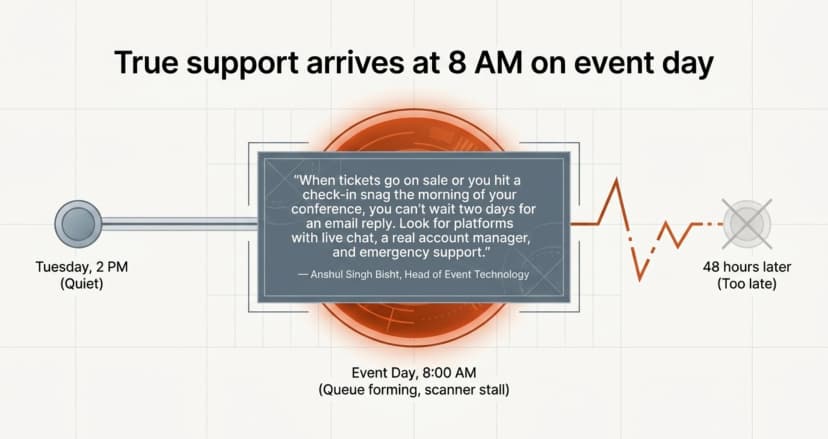
Think about when you actually need help. It's never on a quiet Tuesday. It's at 8 a.m. on event day with a queue forming and a scanner that won't connect. As Anshul Singh Bisht, our Head of Event Technology, notes:
“When tickets go on sale for a popular event, or you hit a check-in snag the morning of your conference, you can't wait two days for an email reply. Look for platforms with live chat, a real account manager, and emergency support you can actually reach.”
— Anshul Singh Bisht, Head of Event Technology, Ticket Generator
When you shortlist tools, test their support before you commit. Send a question pre-sale and time the reply. The answer tells you what event-day will feel like.
How Ticket Generator helps event planners run smoother events?
Ticket Generator is built for planners who want full control over how they sell, deliver, and validate tickets, without paying a commission on every sale. It collapses the registration-to-check-in chaos into one workflow.
Here's what that looks like in practice:
- One workflow, end to end: Users can build a branded event page, collect registrations and payments, auto-issue QR tickets, validate at the door, and export reports. No tool-stitching.
- Commission-free, credit-based pricing: You pay per ticket generated, not a cut of every sale. New accounts get 10 free credits, and credits never expire.
- Payments straight to you: You can connect your own Stripe, PayPal, or Razorpay account for instant settlement, not delayed payouts.
- Secure check-in: Every ticket carries a unique QR code and Ticket ID, with built-in duplicate detection and re-entry support via the Ticket Validator app.
- Real-time analytics: Live attendance, conversion, and entry data, exportable to Excel or PDF, to fix the reporting gap nearly half of planners report.
- Integrations that automate the busywork: A white-label REST API, Zapier, plus Google Sheets, Mailchimp, and HubSpot connections.
The proof is in the events it runs. Ticket Generator has powered 30,000+ events and 1,000,000+ tickets across 100+ countries, used by teams from Deloitte and Verizon to the Emmy Awards. Panama's Felipe Motta ran ticketing for its events with 96% maximum attendance and 95% of tickets generated via the API, exactly the kind of automation a busy planner needs. Design agency KHreative Works hit 98% maximum attendance with 91% of tickets sent via batch delivery.
Pro Tip: If you run recurring events, clone a past event in Ticket Generator to reuse its page, ticket design (you can generate this via the built-in AI tool), and settings; then schedule the entire ticket batch to send at a set date and time. This turns what normally takes hours of setup into a process that takes minutes.
For a deep dive on these topics checkout our guide on event ticket software and ticketing for events. When you're ready to go live, here's how to sell tickets online.
Conclusion
The best ticketing software for event planners isn't the one with the longest feature list. It's the one that removes friction from the parts that break (registration, check-in, and reporting) while keeping your costs predictable and your data yours.
Costs are real, and no single tool fits every event. A massive arena show, a 200-person conference, and a recurring community workshop have different needs. But the criteria stay the same: end-to-end workflow, secure validation, transparent pricing, branding control, and integrations that automate the busywork.
If you want all of that without handing a cut of every sale to a marketplace, Ticket Generator is built for exactly that.
Try Ticket Generator to run registration, ticketing, and check-in from one place and keep 100% of your ticket revenue. Your event. Your revenue. Your rules.
FAQs: Best Ticketing Software for Event Planners
1. What is the best ticketing software for event planners?
The best ticketing software for event planners is the platform that fixes your biggest bottleneck (usually registration and check-in) with predictable pricing and full data ownership. There's no universal winner; it depends on your event size and fee tolerance. Commission-free tools like Ticket Generator suit planners who already have an audience and want to keep their revenue.
2. How much does event ticketing software cost?
It varies widely by model. Marketplaces typically charge 3–10% commission plus processing fees per sale, while platforms like Ticket Generator use credit-based pricing, you pay per ticket generated, with no commission and payments going straight to your own gateway. Always check whether fees fall on you or get passed to your attendees at checkout.
3. Do I need separate software for registration and ticketing?
No, the best platforms handle both in one workflow. Stitching together a registration form, a payment tool, and a manual guest list is where most errors creep in. A single system that takes a guest from registration to QR ticket to check-in removes those gaps.
4. What features matter most for on-site check-in?
Secure QR validation with duplicate detection matters most. Generic QR codes can be copied, so look for unique per-ticket codes, a validation app that flags duplicates and expired tickets, and support for multiple scanning devices at once. Re-entry support helps for events where guests come and go.
5. Can ticketing software integrate with my CRM and email tools?
Yes and it should. The best ticketing software for event planners offers native integrations or an API so registrations flow into your CRM and email platform automatically. Ticket Generator provides a REST API, Zapier, and direct connections to tools like HubSpot and Mailchimp.
About the author
Content Marketer at Ticket Generator
Ashish Chandra has spent 5+ years writing about event technology, covering topics such as ticket design, QR check-ins, attendee management, and event marketing strategy. As the Content Lead at Ticket Generator, Ashish has analyzed hundreds of real-world event workflows and ticketing setups, helping organizers across industries use QR-based tickets, event landing pages, and smarter ticketing systems to run smoother, better-attended events. His writing is shaped by real user needs and the questions organizers ask most often: How do I sell more tickets? How do I avoid chaos at the door? How do I make my next event better than my last? When he steps away from the screen, you'll likely find him hiking a quiet trail or tending his plants- his preferred way to reset.
Latest posts
Check out our latest articles on the blog
 12 min read
Email Marketing for Events and Webinars: What to Send, When to Send It, and How to Automate It
A step-by-step playbook for email marketing for events and webinars. Learn what to send, when to send it, and how to automate every email for in person and virtual events.
Ashish Chandra
18 Oct 2026
 10 min read
Halloween Masquerade Ball: How to Host a Night of Masks and Mystery
From Venetian-inspired masks to QR-coded entry, here is your complete guide to planning a Halloween masquerade ball your guests will talk about for years.
Ashish Chandra
18 Oct 2026
 9 min read
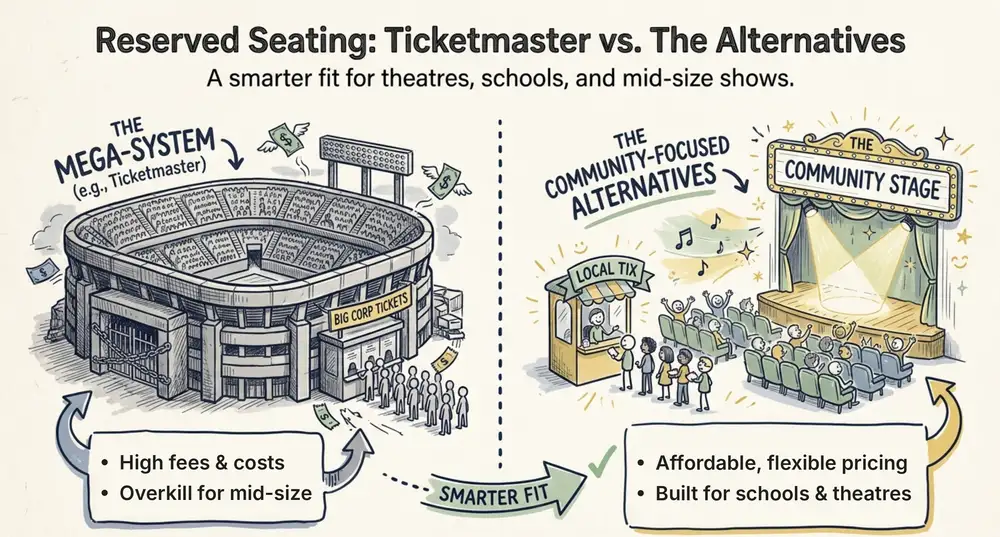
Ticketmaster Reserved Seating: How It Works and a Better Fit for Smaller Events
Ticketmaster reserved seating works well for arenas. If you run a theatre, gala, or mid-size show, see how it works, what it costs, and how to switch.
Ashish Chandra
16 Oct 2026