

Box Office Management: How to Set Up and Run Your Box Office
 Written byAshish ChandraLast updatedOctober 5, 2026
Key Takeaways:
- Box office management is how a venue sells, delivers, and validates tickets. It covers online and counter sales, plus the money behind them.
- Overselling happens when the website and the counter each keep their own ticket count.
- Named counters and named agents turn a short cash drawer into a number you can trace.
- Every ticket needs a unique QR code so the gate can catch duplicates.
- Ticket Generator solves this by running online and counter sales from a single live ticket inventory.
- Plus, you can close every show night with a sales report, a cash count, and a written variance.
The counter just sold the last twelve seats. So did the website, ninety seconds earlier. Now two people hold a ticket for seat J14, and neither of them did anything wrong.
That is a box office management problem.
Box office management is the work of selling, delivering, and validating tickets at a venue across every channel it uses to sell them.
It also covers the money and staff behind those sales. An online ticket sold three weeks before the show and a cash ticket sold four minutes before the curtain; both come from the same pool of seats. That pool is your house: the total number of seats available for sale. When box office management is done properly, every sale, seat, ticket, and payment stays in sync.
Here is what this guide covers: what box office management actually involves, what's most likely to go wrong at the counter, and why. I'll also tell you exactly what you need to decide before you start selling tickets, plus the exact setup sequence. With this guide, you will quickly learn how to manage the box office properly so your event runs smoothly.
Let's get straight to it.
What is box office management?
Box office management is the work of selling, delivering, and validating a venue's tickets via live counter sales. It also covers accounting for the money those sales brought in. It has nothing to do with movie grosses or weekend box office charts. This is venue operations, not film revenue reporting.
There are typically four parts involved.
- Inventory. A live count of the total tickets, and what is left to sell, synced across every channel.
- Sales. Online sales in advance (or live), plus counter sales at the window on the event day.
- Entry. Checking whether each ticket at the door is valid and stopping the duplicates and fakes.
- Money. Making ticket sales from different channels, then proving at the end of the night that the totals agree.
Most venues run all four on an event ticketing platform rather than on paper. The platform holds an event registration page, issues the tickets, syncs the inventory, and produces the report you reconcile against.
The size of the venue does not change the function. What changes is how many counters your staff needs and how fast the queue forms.
What does a box office manager actually do?
A box office manager owns the ticket from the first sale to the final count. Job postings describe the title. This is the shift.
A normal show day has six jobs.
- Inventory and allocation. Decide how many seats go online and how many are held for the door. Adjust that split as the show sells.
- Staffing and counter assignment. Decide how many counters open, who works each one, and who covers the break.
- Payments and the drawer. The drawer is the cash a counter starts and ends the night with. The manager sets the opening float and owns the count at the end.
- Will-call and comps. Will-call is the pile of tickets bought online and collected in person. Comps are free tickets given to press, staff, sponsors, or the cast.
- Entry. Get every ticket scanned, resolve the failed scans, and keep the doors moving.
- The close. Pull the sales report, count the money, and explain any gap before anyone leaves.
Four of these run at once after the doors open. That is the hard part of the job. A manager at the window also watches the online number. Remember, a seat sold on a phone in the lobby is a seat the counter can no longer sell.
What goes wrong at the counter during box office sales, and why?
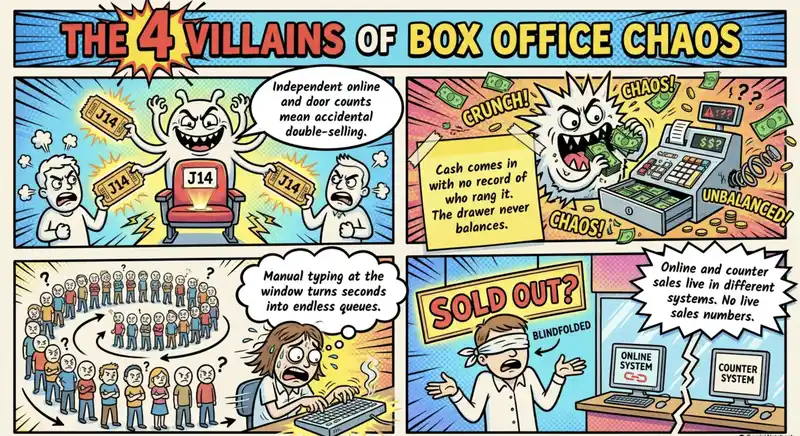
Four things break at a box office, and each has a mechanical cause. These are not usually staff mistakes. They are system design problems.
The first one is Overselling. If the website and the counter each keep their own ticket count, neither knows what the other just sold. The fix is one shared live inventory, not a faster spreadsheet.
Secondly, a cash drawer that does not balance. Cash comes in with no record of which counter took it or which agent rang it. At the end of the night, you have a gap, and it will take a lot of manual calculations and effort to tally it.
Next, Long queues. Your agents have to type in the details the system should already hold. Every manual field adds seconds, and seconds at the window become a line out the door.
No live sales number. Counter sales land in one place, and online ticketing system sales land in another. Nobody can answer "how many have we sold" until the calculations are done manually.
The queue problem is worse than most managers expect. The counter line is made almost entirely of first-time buyers. They have no account, no saved card, and no ticket on their phone. Every one of them is a full transaction.
What to decide before you open the counter?

Five decisions are expensive to change once tickets are live. Make them before the first ticket goes on sale, and you're good to go.
If you are selling reserved seats, build the seat map first. Assigned seating decides how your categories are priced. Set the refund rule in writing and give a copy to every agent.
Staffing is the decision managers change most. Start with one agent per counter and one person for validation at each gate. Add a counter when you see a line is still forming ten minutes after doors.
Did you know? Ticket Generator brings ticket sales, delivery, and entry validation into one workflow. Each ticket gets a unique QR code and ticket ID, so your team can verify tickets at the door and automatically flag invalid, duplicate, or expired tickets. With online sales, multiple ticket types, digital delivery, and ticket validation working together, your box office team spends less time reconciling tickets and more time running the event smoothly.
How do you set up a box office, step by step?
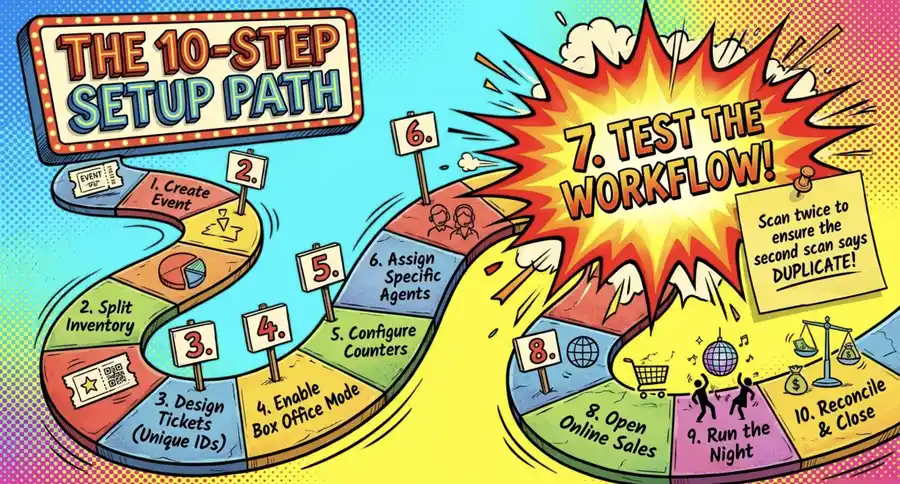
Setting up a box office takes ten steps, and the order matters. I'll use Ticket Generator for the purpose of this guide, because it brings ticket creation, sales, delivery, and validation into one clean workflow.
This makes it easier to see how each box office decision connects to the next, from setting up your event and ticket types to selling and distributing tickets, checking them at the door, and reconciling the day's sales.
Step 1: Create your event
Go to Ticket Generator and sign up. Once you're logged in to the dashboard, you can start by creating your event. To do so, add the basic event details, including:
- Event name
- Date and time
- Venue or location
- Ticket types
- Ticket prices
- Total ticket capacity
The total capacity is your house. It represents the complete inventory available for the event and becomes the shared limit across your online and box office sales.
Step 2: Decide how to split your ticket inventory
Before you start selling, decide how many tickets will be available online and how many you want to keep for on-ground sales.
For example, you could make 80% of your tickets available online and hold 20% for walk-up buyers at the box office.
The important part is to make this decision before either sales channel opens. Both channels should draw from the same overall inventory so you don't accidentally oversell the event.
Step 3: Design your tickets
Create your ticket using Ticket Generator's built-in designer or upload your own artwork.
Your ticket should clearly display important information such as:
- Event name
- Date and time
- Venue
- Ticket type
- Ticket ID
- Unique QR code
Every ticket should have a unique QR code and Ticket ID. This allows the system to identify each ticket individually and detect invalid, duplicate, or expired tickets during entry.
Step 4: Enable box office mode
Once your event and ticket inventory are ready, activate box office mode from your dashboard.
This gives your team the tools they need to sell tickets directly at the venue. You can then configure the on-ground ticketing setup, including the counters and staff who will operate them.
Step 5: Create and configure your counters
Create a counter for each sales point you plan to operate. Give each counter a clear name, such as Main Entrance, Box Office A, or VIP Counter.
For each counter, decide:
- Which payment methods it accepts
- Whether it accepts cash, card, or both
- What refund and exchange rules apply
- Any limits or restrictions on sales
Keeping these rules consistent helps staff handle customers in the same way and makes it easier to reconcile sales later.
Step 6: Add and assign your box office agents
Add the staff members who will operate the counters as box office agents.
Give each agent the appropriate access level based on their responsibilities. For example, a staff member handling ticket sales may need different permissions from someone responsible for managing the entire box office.
Once assigned, agents can use the box office interface to process sales while the central dashboard keeps track of inventory and transactions.
Step 7: Test the complete workflow
Don't wait until the doors open to discover that something isn't working.
Run a test transaction before going live. Sell one ticket through the box office, deliver it, and scan its QR code at the entrance.
The scan should return Valid. Scan the same ticket again and make sure the system identifies it as Duplicate.
This simple test confirms that your ticket creation, sales, delivery, and validation workflows are connected correctly.
Step 8: Open online sales
Once everything has been tested, publish your event page and open online sales.
Tickets purchased online can be delivered to attendees through your configured delivery channels. Because online and box office sales use the same ticket inventory, every sale is reflected in the overall availability.
You can also schedule or manage ticket delivery without requiring your box office staff to handle each ticket manually.
Step 9: Run the box office on event day
On the day of the event, your agents can sell tickets directly from their assigned counters while your entry team validates tickets at the gate.
The workflow is straightforward:
Sell → Deliver → Scan → Validate → Admit
Each ticket has its own QR code, so staff can identify the ticket and check its status when it is scanned. Multiple devices can also scan tickets simultaneously, which is useful when you have several entrances or expect a large arrival rush.
Step 10: Close and reconcile the box office
Once sales and entry are over, close the box office properly.
Deactivate the counters, review the sales report, and compare the recorded transactions with the actual payments received.
Check that:
- Tickets sold match the system records
- Cash in each drawer matches cash sales
- Card transactions match the payment records
- Refunds and exchanges have been recorded
- Remaining ticket inventory is accounted for
The goal is simple: the tickets, inventory, transactions, and money should all tell the same story. If they do, your box office is properly closed.
Step seven is the one venues skip. A test sale and a test scan take four minutes on a quiet afternoon. The show night is the worst time to learn a counter was never switched on.
Pro Tip: Run your test scan twice on purpose. The Ticket Generator Ticket Validator app returns Valid, Invalid, Duplicate, or Expired. Scan the same test ticket twice and the second scan should return Duplicate. If it does not, you will find that out at the door instead.
How do you run the counter on show night?
Show night is when your box office setup gets put to work. From the moment the doors open until the last guest is admitted, your team needs to keep two key operations moving: ticket sales and entry validation.
Keep sales and validation counters separate
The sales counter handles new purchases, payments, and ticket delivery. The validation counter handles attendees who already have tickets and only need to be checked in.
This separation prevents the two workflows from slowing each other down. A new ticket sale can take several minutes, while scanning and validating an existing ticket usually takes only a few seconds. During a busy arrival period, combining both at the same counter can quickly create a queue.
For larger events, you can also have multiple validation counters or entry gates running at the same time. Each device can scan tickets against the same ticketing system, so your team can process attendees in parallel.
Pro Tip: Running multiple entry gates? Ticket Generator supports multi-gate scanning, so your team can validate tickets simultaneously at different entrances. All scanners work in sync within the same dashboard, helping you keep entry moving without creating separate ticket lists for each gate.
Give buyers their tickets immediately
When an agent sells a ticket at the counter, the buyer should receive the ticket before leaving the window.
With Ticket Generator, you can deliver the ticket digitally or provide a printed copy:
- Digital delivery: Send the ticket by SMS, email, or WhatsApp with a digital ticket link that the buyer can open on their phone.
- Printed delivery: Print the ticket and hand it to the buyer at the counter.
Whichever method you use, the ticket contains the same unique QR code and Ticket ID. The delivery format changes, but the ticket's identity stays the same.
Mobile delivery is particularly useful because attendees can keep their tickets on their phones. In 2025, mobile devices accounted for around 58% of online event ticketing transactions, according to Mordor Intelligence.
Treat complimentary tickets like real tickets
Complimentary or comp tickets should go through the same ticketing system as paid tickets.
Instead of putting a guest's name on a clipboard or maintaining a separate list, issue them a proper ticket with a unique QR code and Ticket ID. This means the ticket can be scanned at the entrance and included in your final ticket and attendance records.
It also keeps your process consistent. Whether a ticket was paid for online, purchased at the counter, or issued as a complimentary ticket, your entry team has the same simple process: scan the ticket and check its status.
Scan every ticket at the entrance
At the validation counter or gate, scan every ticket before admitting the attendee.
The QR code check-in system checks the ticket and returns one of four statuses:
- Valid: The ticket is legitimate and has not been used.
- Invalid: The ticket cannot be accepted.
- Duplicate: The same ticket has already been scanned.
- Expired: The ticket is no longer valid for entry.
The Duplicate status is particularly important. If someone forwards a screenshot or shares a copy of their ticket after it has already been used, scanning that same QR code again will flag it as a duplicate.
This gives your entry team a simple process to follow: scan the ticket, check the result, and admit the attendee only when the ticket is valid.
"The most common mistake we see is organizers using a generic QR generator and realizing that this way every attendee will have the same code. Also, those generators can't help you stop duplicates."
Anshul Singh Bisht, Head of Event Technology, Ticket Generator
One honest limitation to plan around: validation needs an active internet connection at the venue. Ticket Generator's Ticket Validator cannot validate offline. If your lobby has a weak signal, run a cable or a dedicated hotspot to the scanning position before the doors. Treat it as part of your event entry management setup.
One last piece: shift handoffs. When an agent leaves, close their session. Do not let the next person sell under the same login. Per-agent tracking only works if each agent sells under their own name.
How do you close the day and reconcile?
Closing the day means proving that the money you hold matches the tickets you sold. Do this while the staff who handled the sales are still on-site. If you discover a discrepancy the next morning, it becomes much harder to determine where or when it happened.
Start by closing and deactivating every counter so no more sales can come in while you are counting. Then pull the sales report and review the totals by counter, agent, and payment method. Count the cash in each drawer, subtract the opening float, and compare the result with the counter's recorded cash sales. Do the same for card payments by matching the card terminal's batch total with the system's card total.
Next, account for everything that affects the final numbers. Confirm that the number of complimentary tickets and refunds matches what was authorized and recorded. Compare tickets sold with tickets scanned to get a clearer picture of actual attendance. If the numbers don't match, record the variance: the difference between what the system says you should have and what you actually count.
Finally, document any variance against the specific counter and agent involved and have the agent acknowledge it. Export and save the final sales report in Excel or PDF, file it with the event paperwork, and follow your venue's cash-drop or banking procedure before the staff leaves.
The key is to close everything while the night's transactions are still fresh. A documented variance tied to a specific counter and agent is far easier to investigate than an unexplained shortfall discovered weeks later.
Pro Tip: Export the sales report the same night, not at the end of the month. Ticket Generator exports box office sales as Excel or PDF. File one report per show. Then you can compare counters across a run instead of rebuilding a season from memory.
Those reports that you build after successful events shape how your future events will go. I walked through how to create an event report separately. For a deeper look, pair it with event attendance tracking so the scan count and the sales count sit side by side.
How Ticket Generator handles box office management
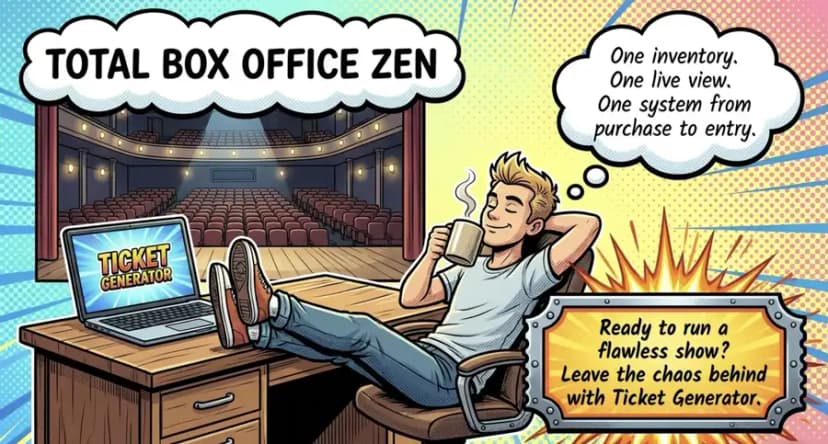
Ticket Generator is designed for venues that want one system behind both online and on-site ticket sales. You can enable box office mode from the dashboard, then set up your counters, payment methods, agents, and sales rules from the same place.
One shared, live inventory. Online sales and box office sales draw from the same ticket inventory. When a ticket is sold at the counter, it is no longer available online. When someone buys online, that ticket is removed from the inventory available to the box office. You are not maintaining two separate counts and trying to match them later. There is one inventory that updates as tickets are sold.
Counters with their own rules. You can create separate counters for your event and define how each one operates. Set whether a counter accepts cash, card, or both, and configure the applicable refund rules. Counters can also be activated, paused, or deactivated individually, giving you control over which sales points are operating at any given time.
Agents with individual access and tracking. Add your staff as box office agents and assign the appropriate access levels. Sales are tracked by agent, giving you a clearer record of who handled each transaction. If something does not balance at the end of the night, you have more information to work with than an event-wide sales total.
A live view of your sales. The dashboard gives your team a central view of ticket sales, capacity, and payment information across your online and box office channels. Instead of waiting until the end of the night to work out how many tickets have been sold, you can monitor your numbers as sales happen.
Unique tickets from sale to entry. Every ticket carries a unique QR code and Ticket ID, including printed tickets. That means a ticket sold at the counter follows the same validation process as one purchased online. When scanned at the entrance, the system can identify valid, invalid, duplicate, or expired tickets.
No commission on ticket sales. Ticket Generator does not charge a commission on tickets sold. Instead, you purchase prepaid credits, with one credit used per ticket. Payments can go directly to your own Stripe or PayPal account, rather than being held by the ticketing platform.
The result is a simpler box office workflow: one ticket inventory, one live view of sales, and one system for tracking tickets from purchase to entry and reconciliation.
Still comparing platforms before setting up your box office? Our theatre box office software buyer's guide walks through the features and decisions to consider.
Closing thoughts
Box office management is not really about the software. It is about maintaining one accurate count of your tickets and being able to trace the money taken at the window back to the transaction, counter, and agent that handled it.
There will always be some friction on show night. Guests arrive late, cards get declined, and someone will occasionally lose a ticket. The goal is to remove the problems you can control: double-selling a seat, losing track of a transaction, or discovering that the drawer does not balance until the next morning.
Get the setup right before the first ticket goes on sale, and the same process can carry you through every show. A shared inventory keeps online and counter sales aligned. Individual counters and agents give you accountability. And a clear end-of-day report gives you something concrete to reconcile against.
If you want to put that workflow into practice, try Ticket Generator to manage online and box office sales from the same live ticket inventory.
FAQs: box office management
1. What does a box office worker do?
A box office worker sells tickets at the counter and hands out will-call orders. They also answer questions about seating, timing, and refunds. They take cash and card payments and issue the ticket on the spot. They handle the small problems too. A lost ticket. A wrong name on an order. A buyer at the wrong show.
2. What does a box office manager do in theater?
In a theater, a box office manager runs ticket sales for the whole run, not just one night. That means holding back house seats for press and production. It means running subscriber and season ticket orders. And it means handling exchanges when a patron moves to another date. On show nights they staff the window and oversee will-call. They reconcile the drawer after the house is in.
3. How do box offices make money?
Box offices make money from ticket sales, and often from fees and extras on top. The core revenue is the face value of each ticket sold. Many venues add a per-ticket service or facility fee. Some also earn on add-ons like parking, programs, or drink vouchers. What the venue keeps depends on the ticketing platform's cut, which is why commission-free platforms like Ticket Generator matter.
4. What is a box office manager?
A box office manager is the person responsible for a venue's ticket sales, counter staff, and ticket revenue. They own the inventory, the pricing setup, the staffing roster, and the end-of-night reconciliation. They usually report to a general manager or director of operations. In practice, they are the single point of accountability for every ticket sold and every dollar taken.
About the author
Content Marketer at Ticket Generator
Ashish Chandra has spent 5+ years writing about event technology, covering topics such as ticket design, QR check-ins, attendee management, and event marketing strategy. As the Content Lead at Ticket Generator, Ashish has analyzed hundreds of real-world event workflows and ticketing setups, helping organizers across industries use QR-based tickets, event landing pages, and smarter ticketing systems to run smoother, better-attended events. His writing is shaped by real user needs and the questions organizers ask most often: How do I sell more tickets? How do I avoid chaos at the door? How do I make my next event better than my last? When he steps away from the screen, you'll likely find him hiking a quiet trail or tending his plants- his preferred way to reset.
Latest posts
Check out our latest articles on the blog
 12 min read
Email Marketing for Events and Webinars: What to Send, When to Send It, and How to Automate It
A step-by-step playbook for email marketing for events and webinars. Learn what to send, when to send it, and how to automate every email for in person and virtual events.
Ashish Chandra
18 Oct 2026
 10 min read
Halloween Masquerade Ball: How to Host a Night of Masks and Mystery
From Venetian-inspired masks to QR-coded entry, here is your complete guide to planning a Halloween masquerade ball your guests will talk about for years.
Ashish Chandra
18 Oct 2026
 9 min read
Ticketmaster Reserved Seating: How It Works and a Better Fit for Smaller Events
Ticketmaster reserved seating works well for arenas. If you run a theatre, gala, or mid-size show, see how it works, what it costs, and how to switch.
Ashish Chandra
16 Oct 2026