

School Event Ticketing System: How to Run Campus Events Without Paper Stubs
 Written byAshish ChandraLast updatedSeptember 23, 2026
Key Takeaways:
- A school event ticketing system creates, delivers and validates campus event tickets, each with its own QR code.
- Paper stubs and a shared form break at the gate, where a screenshot looks exactly like a paid ticket.
- Ticket categories price student, alumni, faculty and guest entry separately inside one event.
- Ticket Generator adds Offers, phone based scanning and prepaid credits with no commission on sales.
- Gate speed depends on internet and scanning devices, not on prettier tickets.
It usually goes the same way. A student committee prints a batch of paper stubs, runs out halfway through the line, and falls back to a shared Google Form with one QR code pasted on the event poster. By 7pm there are two queues, a volunteer matching names against a clipboard, and students walking in on a forwarded screenshot. Nobody, including the administration whose name is on the event, has any record of who actually paid or who is actually inside the venue.
Here is the short answer. A school event ticketing system creates, sells, delivers and validates tickets for campus events, giving administrators a single system of record: every attendee gets a unique QR code that can be scanned once and only once, ticket categories separate students, staff, alumni and guests, and administration gets a live view of who bought a ticket and who is actually on site, without taking a cut of each sale.
In this guide I start with why paper stubs and a shared form break down, then work backwards from the gate: what campus ticketing has to handle, what belongs on student event tickets, how to build categories, how to price and discount them, what check-in day looks like, and what the numbers tell you afterwards.
Why Do Paper Stubs and a Google Form Stop Working?
Paper stubs and a Google Form stop working because neither one can answer the only question that matters at the door: has this exact ticket already been used? A stub is a picture, a form row is a name, and neither is checked against anything in real time.
The failure is predictable. Someone photographs their stub and sends it to three friends. The shared poster code reads as valid on 200 phones, because a static code has no idea how often it has been used. Meanwhile the door has one volunteer scrolling a 640 row spreadsheet on 4% battery.
The cleanup is worse than the night itself: cash in an envelope, a payment app history, a form export and a stack of torn stubs. That is a tooling problem, not a discipline problem. Once each ticket is a record instead of an image, forwarding stops working and reconciliation becomes a download.
What Does a School Event Ticketing System Need to Handle?
It needs to handle four things at once: a tight budget, an unpredictable crowd, several ticket categories inside one event, and a queue that forms the moment classes end. Campus events are not small versions of commercial events. They are a different shape.
The calendar is broad. In one year a committee might run a fest, a concert, a department workshop, a home game, prom and graduation, each with a different audience and price. A general purpose event ticketing platform covers most of that, but the campus version adds constraints.
Money is the first constraint, and it belongs to the school. Student organizations run the event day to day, but administration typically owns the budget and the oversight, since these events happen on school property under the school's name. A platform that takes a percentage of every sale eats into the exact activity fee allocation administration is trying to protect, and it needs central visibility so administration can see every event running under its name instead of trusting each committee's own spreadsheet. Your gate crew are still student volunteers handed a job an hour before doors, so the tool has to be learnable in five minutes on a phone they already own. And students, their guests, alumni, faculty, staff and crew all need different prices and access from one event, which is what rules out most quick fixes.
What Belongs on Student Event Tickets?
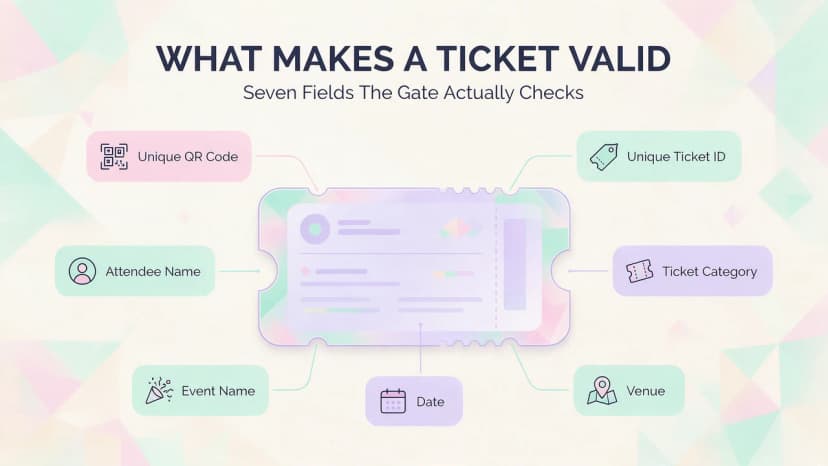
Student event tickets need two things no design template can fake: a unique QR code and a unique ticket ID, one per attendee. Everything else on the ticket is context for the human holding it.
Beyond those two identifiers, a usable campus ticket carries the attendee name, the category, the event name, date, time and venue, and the entry rules in plain language. On a multi day fest, print the valid day on the face of it, because the person checking at 9am on day two was not in the day one briefing.
The unique code is what makes ticket validation with QR codes possible. When each code maps to one record, the scanner returns valid, invalid, duplicate or expired. When every ticket carries the same code, it can only confirm that a QR code exists.
Branding matters more than people expect here, because campus tickets get posted to social feeds for a week beforehand. In Ticket Generator you can use a template, upload your own design, or edit an uploaded design in Canva and import it back. The unique QR code is embedded automatically either way.
How Do You Set Up Ticket Categories and Generate Tickets in Bulk?
Categories and bulk generation solve two different problems. A ticket category controls who pays what and who gets access, so students, staff and guests are not all priced and admitted the same way. Bulk generation is how you produce every one of those tickets in a single batch instead of one at a time. You set up categories by deciding who needs different access or a different price, then creating one ticket category per group inside the same event. Once the categories exist, bulk generation creates every ticket in that category at once. Most campus events need four to six categories, and getting that right on day one saves you from running five separate events and adding them up by hand later.
|
Ticket category |
Who it is for |
How to price it |
What the gate checks |
|---|---|---|---|
|
Student entry |
Enrolled students |
Lowest, often subsidised by activity fees |
Student ID against the ticket name |
|
Guest pass |
A friend brought by a student |
Student price plus a premium, capped |
Ticket only |
|
Alumni |
Returning graduates |
Full price, early bird window |
Ticket only |
|
Faculty and staff |
Departments and staff |
Full price or department billed |
Ticket only |
|
Crew and performers |
Organizers, volunteers, artists |
Free, but still ticketed |
Ticket, to keep headcount honest |
Once the categories exist, generation should be a batch job, not an evening of copy and paste. Ticket Generator has three launch modes: direct ticketing when you already hold the guest list, free registrations when students sign up and get a ticket automatically, and paid registrations when you are collecting money too. Registration pages take custom fields for a roll number or department, plus registration limits and approval rules.
Pro Tip: Build every recurring campus event once, then clone it. Ticket Generator supports event cloning and reusable ticket designs, so next semester's fest starts from last semester's categories, fields and artwork instead of a blank screen.
How Should You Deliver Tickets to Students?
Send tickets to the channel students actually open, which on most campuses is not email. Email is the system of record, but SMS and WhatsApp are where a ticket gets found again at 6.55pm outside the gate.
Ticket Generator delivers on all of them: email in batches of up to 1,000 guests per send, SMS, WhatsApp, and a downloadable PDF or image. Every ticket email includes the digital ticket link, so a student can open their ticket from the inbox. Delivery tracking shows sent, delivered and bounced, and you can resend to the handful who deleted it.
Did you know that mobile devices account for around 58% of online event ticketing transactions? Source: Mordor Intelligence, 2025
One habit is worth copying. Generate the full batch days ahead, then use Schedule Send to deliver it the evening before, so you are not sending 600 tickets by hand while setting up the stage.
How Do You Price and Discount Campus Tickets?
Price by category first, then layer offers on top rather than creating a new category for every discount. That keeps reporting clean, because a discounted student ticket is still a student ticket.
The reliable campus pattern is a three step sell. Open with an early bird registration window priced low for urgency, move to standard pricing once word spreads, then hold a small at the door allocation at the highest price. Alumni and external guests pay full price.
Ticket Generator handles the discount layer through Offers, three tools you assign to specific ticket categories:
- Promo Codes. A code the buyer enters at checkout for a set discount: a staff rate for teachers, a PTA committee rate, or a code for the local business that sponsored your annual day. See our guide to single use coupon codes for the logic behind them.
- Discount Rules. A discount that applies automatically when your conditions are met, so a parent never has to hunt for a code: sibling pricing, or an early bird rate that expires before sports day.
- Bundle Deals. Multi ticket pricing for how families book: a family pack of four for the annual day, grandparent add ons, or a class teacher booking a row of thirty.
Because each offer is assigned to a ticket category, an alumni promo code cannot be used on a subsidised student ticket. That constraint removes the most common campus pricing leak I see.
Did you know that 40% of shoppers abandon a checkout when the extra costs are too high, making it the single biggest reason for drop off? Source: Baymard Institute, 2024
That is the argument against a booking fee on a student priced ticket. A $2 fee on an $8 ticket is a 25% surcharge on the person with the least money in the room. Regulators agree on transparency at least: the FTC's Junk Fees Rule (16 C.F.R. Part 464), effective 12 May 2025, requires live event ticket sellers to show the total price up front. Our roundup of low fee ticketing sites compares the models.
What Actually Happens at the Gate on Check-In Day?
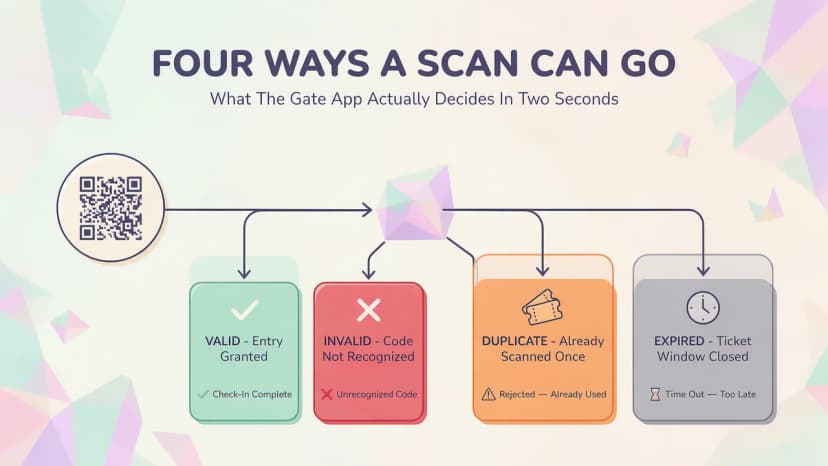
A volunteer opens a scanning app on their own phone, points it at a student's QR code, and gets one of four answers back: valid, invalid, duplicate or expired. That is the whole interaction, and it should take about two seconds per person.
Ticket Generator does this through the Ticket Validator app on iOS and Android, or a web validator at validate.ticket-generator.com. Several devices scan at once, so a 900 person fest runs three lanes instead of one. Re-entry is supported for students who step out for food, and duplicate detection flags the second scan of a forwarded ticket instantly. Our guide to QR code check-in walks through the flow.
One limitation to plan around honestly: the Ticket Validator app needs an internet connection and cannot validate offline. A quad with 800 phones on it is where mobile data gets thin, so treat connectivity as a gate requirement, not an assumption.
Pro Tip: Test the gate before the crowd arrives. Scan two test tickets on every volunteer device and confirm the connection holds. Put a dedicated hotspot at the entry desk, run at least two scanning lanes, and give Ticket Generator coordinator access only to the students working the door.
What Should You Look At After the Event?
After the event, look at attendance rate before revenue. The gap between tickets issued and tickets scanned is the number that tells you what to do differently next time, and it is the one most committees never measure.
A proper system shows tickets generated, registrations, page visits, conversion rate and attendance rate in one view, plus flagged unauthorised entry attempts and a coordinator activity log. Export it as Excel or PDF and you have the report your student council asked for. Event attendance tracking covers how to read those numbers.
Two patterns are worth acting on. Low attendance on free tickets means you over issued, so cap the next one. Many page visits with few registrations means the page works and the price or the form does not.
A Real Campus Example: How Antioch University Made the Switch
Antioch University in Ohio ran this exact setup: 1,700 plus tickets across three events, with sustainability as a stated reason for dropping paper. The scale, the event mix and the volunteer staffing match what most campuses deal with.
"The ability to check in using a QR Code... and the platform to scan tickets on the phone."
Elida Martinez, Antioch University
Notice what she picked out. Not the design tools, not the analytics: the phone. On a campus, the deciding feature is almost always whether a volunteer can do the job on the device in their pocket.
Antioch is not an outlier. The University of Southampton, NYC Public Schools and Kansas City Public Schools all run ticketed events on Ticket Generator, which is the range this covers: one student society at one end, a district at the other. The education industry page shows how that setup works.
How Ticket Generator Fits a Student Organization Budget
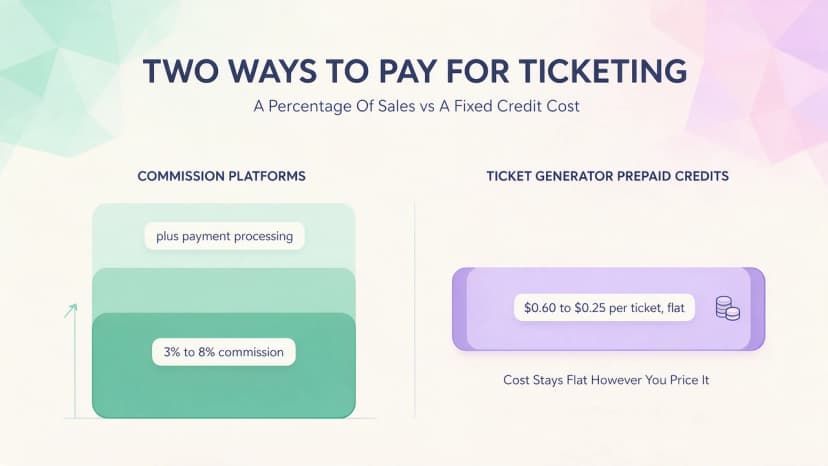
Ticket Generator is built for organizers who want predictable costs, which is exactly what commission pricing takes away from a campus budget. You pay prepaid credits per ticket generated, and nothing as a percentage of what you sell.
Credits come in packs of 10 for $6, 100 for $50, 1,000 for $400 and 10,000 for $2,500, which is $0.60 per ticket at the smallest pack and $0.25 at the largest. Credits do not expire, so a spring allocation carries into autumn. New accounts get 10 free credits, enough to build an event and test the flow before spending. Assigned seat events built on a venue layout use 2 credits per ticket.
Run the math. An 800 person fest at $8 a ticket is $6,400 in sales. You buy the 1,000 credit pack for $400, and that cost does not move if you raise the price to $12. The money lands in your own Stripe, PayPal or Razorpay account, not a platform wallet on a payout cycle.
The rest of the fit is operational: unique QR tickets with duplicate detection, multiple categories, Offers per category, email, SMS and WhatsApp delivery, phone based validation, real time attendance, and branded pages with no platform watermark. Ticket Generator has issued more than 1,000,000 tickets across 30,000 plus events in over 100 countries, and it is ISO 27001:2022 certified and GDPR compliant, which is what your administration will want to hear when they ask where student data lives. The feature list goes deeper, and you can try scanning from the validate tickets page.
Ticket Generator vs Alternatives: Do They Make Sense?
A free spreadsheet is fine for a 40 person departmental talk, and a marketplace platform is fine if you need strangers to discover your event. Neither describes a campus fest, where the audience is already on your mailing list and the budget is fixed.
|
Option |
What it costs the organizer |
Where it fits |
Where it hurts |
|---|---|---|---|
|
Google Form plus a spreadsheet |
Nothing in cash |
Free events under about 50 people |
No unique codes, no duplicate detection |
|
Marketplace platforms (Eventbrite) |
Roughly 3% to 8% commission plus processing |
Public events that need discovery |
Cost rises with success, and branding and attendee data sit with them |
|
Buyer fee box office tools (TicketSource) |
Free to the organizer, buyer pays a booking fee on paid sales |
School and community box office events |
Students absorb the fee at checkout |
|
US district payment vendors (GoFan, Vanco, RevTrak) |
Quote based, agreed at district level |
K-12 athletics and district wide payments |
District procured, so a student society cannot just sign up |
|
Ticket Generator |
Prepaid credits, $0.60 to $0.25 per ticket, no commission |
Campus fests, concerts, games and workshops |
You buy credits up front and estimate volume |
A large multi stage fest follows the same logic as a festival ticketing system, and if your busiest events are home games, read the sports ticketing version of this argument.
Final Thoughts
Campus ticketing is not really a ticketing problem. It is a queue problem, a budget problem and a handover problem, all landing on volunteers with a show to run. A school event ticketing system answers the first by making every ticket scannable once, the second by keeping platform cost off the ticket price, and the third by making next semester's event a clone of this one.
None of it is free. Credits cost money, connectivity needs planning, and somebody still has to stand at the door. The trade is a good one: a fixed, known cost in exchange for never again arguing with a student holding a screenshot.
Try Ticket Generator to give every student a unique, scannable ticket, run student and alumni pricing from one event, and keep every rupee or dollar of your ticket revenue.
FAQs: Campus Event Ticketing
1. What is the cheapest way to ticket a school event?
The cheapest reliable option is a credit based platform where you pay per ticket generated instead of a percentage of each sale. Ticket Generator credits start at $6 for 10 and fall to $0.25 per ticket in the 10,000 pack, with no commission, so your cost stays flat whatever you charge. Free forms cost nothing but give you no unique codes.
2. Is there a free ticketing system for schools?
There are free tiers, but they usually move the cost somewhere else. Marketplace platforms are free to set up and then take a commission on paid sales, and buyer fee tools are free to the organizer because the student pays a booking fee at checkout. Ticket Generator gives new accounts 10 free credits, so you can test a full event before spending anything.
3. How do you stop students from sharing tickets?
Issue every attendee a unique QR code and a unique ticket ID instead of one shared code. The first scan is accepted and every later scan of that code is flagged as a duplicate, so a forwarded screenshot gets caught at the door. Printing the attendee name on the ticket closes the rest of the gap.
4. Do you need special hardware to scan student event tickets?
No. Scanning runs on ordinary smartphones through the Ticket Validator app on iOS and Android, or a browser at validate.ticket-generator.com, and several volunteers can scan at once on separate devices. You do need a working internet connection at the gate, because the app validates against live records and cannot run offline.
5. Can one event have several ticket categories and student discounts?
Yes, and it should. Create a category for each group that needs a different price or different access, then attach Offers such as Promo Codes, Discount Rules or Bundle Deals to specific categories, so a discount meant for alumni cannot be used on a subsidised student ticket. Keeping it in one event also keeps your reporting in one place.
About the author
Content Marketer at Ticket Generator
Ashish Chandra has spent 5+ years writing about event technology, covering topics such as ticket design, QR check-ins, attendee management, and event marketing strategy. As the Content Lead at Ticket Generator, Ashish has analyzed hundreds of real-world event workflows and ticketing setups, helping organizers across industries use QR-based tickets, event landing pages, and smarter ticketing systems to run smoother, better-attended events. His writing is shaped by real user needs and the questions organizers ask most often: How do I sell more tickets? How do I avoid chaos at the door? How do I make my next event better than my last? When he steps away from the screen, you'll likely find him hiking a quiet trail or tending his plants- his preferred way to reset.
Related articles
Keep reading: more guides on the same topic
 29 min read
Event Email Marketing: The Complete Timeline, Sequence, and Deliverability Guide
An event tech expert's guide to event email marketing: the ten send timeline from announcement to post event survey, the triggered emails worth automating, and why event emails land in spam more often than any other kind.
Ashish Chandra
17 Sept 2026
 16 min read
Free Seating Chart Maker: How to Build a Seating Plan Without Paying for Software
Most free seating chart makers give you a diagram, not a working system. Here is how to build a free seating plan that connects to real, scannable tickets.
Ashish Chandra
15 Sept 2026
 11 min read
23+ Free Printable Event Ticket Templates & How to Create Your Own
This article provides 23+ free printable event ticket templates for various occasions, including concerts, raffles, parties, and sports events. It also guides you on how to print tickets, essential ticket elements, security measures, and the limitations of free printable tickets. Additionally, it introduces Ticket Generator, a tool for creating secure and scannable event tickets at scale.
Pooja Jena
08 Sept 2026
Latest posts
Check out our latest articles on the blog
 21 min read
Thanksgiving Event Ideas: 15 Ways to Host a Memorable Event in 2026
Fifteen Thanksgiving event ideas for communities, offices, schools and friends, with a checklist, a three-week plan and a simple way to manage tickets and RSVPs.
Ashish Chandra
03 Nov 2026
 19 min read
Holiday Party Ideas: Themes, Food, Games, Favors and a Planning Checklist for 2026
Themes, menus, games, favors and a plan you can follow, whether you have twelve weeks or four. Includes a budget guide and a simple way to handle RSVPs and check-in.
Ashish Chandra
02 Nov 2026
 13 min read
Fundraising Event Management Software: How Much of Your Donations Do You Keep?
Your gala should raise money for your cause, not lose it to event fees. Compare fundraising software pricing, uncover hidden costs, and find the right fit for your nonprofit.
Ashish Chandra
29 Oct 2026